
- Forums
- Linux Based Receivers
- Dreambox Support Forum
- Dreambox Satellite Receiver | Tutorials | Software
- Dreambox 500
You are using an out of date browser. It may not display this or other websites correctly.
You should upgrade or use an alternative browser.
You should upgrade or use an alternative browser.
dremabox with rs232 port help
- Thread starter ncjv
- Start date
- Status
- Not open for further replies.
ncjv said:hi i got this receiver says dreambox dm500
but inside its a eaglebox says 5105-net-gx1001-m0801with omega sti5105alc chipsetand It dont have the RS232 port
though i can see the 4 pins
GND TX RX 3V
can anyone guide me how to conect to nul cable
LAN is not getting connected
THANKS
Looks like they are cutting down on the price of the connector by using a much cheaper connector instead of the usual 9-Pin D-Type connector.
So the customers get a cheap receiver but pay extra to interface to it.)(-red
Attach some pictures of the back that show the type of connector that it has and also the manual.
You might be able to find an an adapter so that this would give you an RS-232 9-pin to connect to the null modem cable, or you can just make a custom cable so that at the receiver end you can secure it well to this connector.
HB13DISH said:Looks like they are cutting down on the price of the connector by using a much cheaper connector instead of the usual 9-Pin D-Type connector.
So the customers get a cheap receiver but pay extra to interface to it.)(-red
Attach some pictures of the back that show the type of connector that it has and also the manual.
You might be able to find an an adapter so that this would give you an RS-232 9-pin to connect to the null modem cable, or you can just make a custom cable so that at the receiver end you can secure it well to this connector.
Many thanks
here are some pics
Attachments
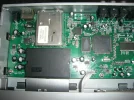
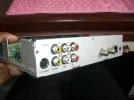
ncjv said:Many thanks
here are some pics
I don't see the connector. Can you please attach another picture that shows it as clearly as possible?
Is it inside the box or at the back/front?
Edit: Do you mean the terminal strip with the 4 pins inside the box?
If it is, and you are absolutely sure that these are the RS-232 interface pins, then you can use an old PC cable which has a terminal strip socket on one end and a 9-pin D-type connector on the other end.
(That takes me back at least 15 years !!!!)
HB13DISH said:I don't see the connector. Can you please attach another picture that shows it as clearly as possible?
Is it inside the box or at the back/front?
Edit: Do you mean the terminal strip with the 4 pins inside the box?
If it is, and you are absolutely sure that these are the RS-232 interface pins, then you can use an old PC cable which has a terminal strip socket on one end and a 9-pin D-type connector on the other end.
(That takes me back at least 15 years !!!!)
Many Thanks yes the 4 pins marked GND TX RX 3Vany idea how to cnnect to PC...which one goes where?
Thanks
Attachments


- My Satellite Setup
- TM 5402HD
Sky+ UK.
- My Location
- Scottish Borders
Looking back at your post history you have already been warned that discussing this cable receiver is forbidden here.
Thread closed - if you continue to try and discuss cable receivers here you WILL be banned.
Thread closed - if you continue to try and discuss cable receivers here you WILL be banned.
- Status
- Not open for further replies.