
Hauppauge Broadway 2T a Slingbox killer?

rolfw

Believe it when I see it Admin.
Staff member
My Satellite Setup
Promax HD Ranger+ spectrum analyser.
My Location
Derbyshire
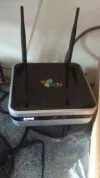
Bought a Hauppauge Broadway 2T a week ago, as the two Slingbox classics I'd had both broke after about 6 months of operation and I wasn't prepared to invest in more dodgy product.

Now obviously I can't comment on the long term reliability of the Broadway, but initial trials are pretty encouraging as is the general historic quality of Hauppauge products.

Ease of setup: Found it easy to setup in the first instance using the browser based wizard after it automatically connected via the ethernet port (it also has wireless connectivity), reasonable online instructions for setting up port forwarding on the router.

Support: Had a problem after initial setup, as it wouldn't show a picture in any browser, even though the channel list etc was showing, so phoned support who advised a software update. This solved the problem and on a standard rate phone number.

How well it performs: Have to say that I've tried it on HTC phone, ipad, Windows with Google Chrome and Firefox and iphone via a friend, works perfectly on all, plus tested it on a large monitor and the stream can be set on high speed for pretty much TV resolution picture.

The Broadway can stream to two devices simultaneously with different channels due to the twin DVBt tuners, plus can relay the picture from your Sky digibox with remote control, although not tested yet. The only disadvantage is that it allocates channel numbers as it finds the channels and to put them in more conventional order, you have to set up a favourites list.

In the instructions it tells you that you have to set up the device you are going to use on the local network first, but I found that once I had it working on 3G via the internet, I was able to play with the URL and substitute part of the URL with my dyndns address, then simply copy and paste into any browser on any device.

Overall Opinion: A cracking device, leaves the slingbox in the cold, can be used in any browser with a direct link and works on all platforms.

Sent from my HTC Sensation Z710e using Tapatalk 2
 

Attachments

  • uploadfromtaptalk1338456539007.webp
    uploadfromtaptalk1338456539007.webp
    29 KB · Views: 118
It sounds like a good product but until they produce a "Sling Catcher" equivalent for the TV side it's not much interest for me.

Incidentally, my 2 year old Slingbox classic broke a while back so I contacted Sling Media and they replaced it free of charge for a refurbished one, no questions asked. I was quite impressed.
 
Probably the only advantage with the sling, although having said that, sling no longer make the catcher, so getting hold of one may be difficult and expensive (seen them for over £300 on amazon).

You can always connect to a TV via a laptop or ipad via HDMI, as the box will stream at up to 2200kbps and the difference between the picture from this and the classic is huge. Some of the latest TVs have browsers built in, not sure whether it would work with those, or perhaps a playstation 3.

As mentioned in the first post, unlike sling media products which require their slingplayer mobile app for portable device viewers at nearly £20 a pop, this works though standard device browsers.
 
Yes, I would be interested in this if something like a Sling Catcher was available. How does channel change work? Can it relay real remote control's codes?
 
Haven't set up the Sky HD box yet, only using the two internal tuners, will try and set it up tomorrow, but apparently works fine. Will post when done.

Been having a look to see which ip streaming boxes with remotes controls have browsers with flash capability, the Boxee certainly looks like it, if someone has one, would be happy to give them the URL to test.
 
rolfw said:
...the Boxee certainly looks like it, if someone has one, would be happy to give them the URL to test.
Me, me, me...
 
I suppose the Catcher was a bit expensive but I'm surprised no one else has tried making one. We (especially my parents) just want to watch IPTV via a TV and remote control with no messing about with computers/laptops/iPads/etc.

The Sony TV's built in web browser won't do streaming video so pretty sure it won't work with the Broadway 2T plus no easy remote for channel surfing.
 
timo_w2s said:
I suppose the Catcher was a bit expensive but I'm surprised no one else has tried making one. ...
Don't forget that the Boxee Box has a Sling app. I've tried it and it works well
 
Have sent you the link Paul, just use my dyndns address, as per second PM.
 
PaulR said:
Don't forget that the Boxee Box has a Sling app. I've tried it and it works well

Thanks, something to consider when the Catcher eventually breaks. How does the remote work on it for watching Sling channels?
 
It's there to left of the picture as just a number keypad. You choose to hide the keypad for a full screen picture and using the arrow keys brings it back again.
 
OK Rolf

Just tried to log in to the Broadway using the Boxee and hit an immediate snag. An error message tells me that I must have cookies enabled to use this site - presumably the dyndns one. Just to check that it wasn't something to do with either my ISP or modem I logged in on my laptop and, after an initial hesitation with the same message, I was presented with the login box. I was then able to select the channels.

Observations.

I think the problem is that Flash is involved and there is a continuing problem with the Boxee and Flash which affects some sites. Is it dyndns or the Broadway that needs Flash I wonder.

Video quality is fair but it seems to be very low resolution with no anti-aliasing. Is this something that is selected in the setup or is it fixed? The Slingbox Pro uses a variable rate of compression but still keeps the same resolution of (I think) 640 x 480. The earlier Slingboxes had a lower resolution (on DVB-T) and a less efficient compression algorithm I believe.
 
I had an idea and cleared the cache, cookies and anything else that could be flushed on the Boxee. I still got an error message but then it suddenly worked. I'm watching a film on BBC1 as I type.

The picture is a bit artifacty but very acceptable. It's sub broadcast but not by a huge amount. The resolution seems to be better than earlier on when I was watching on the laptop.

One huge plus compared to the Slingbox - there's near zero delay between the picture and sound.

What sort of upload speed is it running at?
 
Will be flash on the playback I'd guess, resolution is variable and you can change it in settings.


Sent from my iPad using Tapatalk HD
 
Must have posted simultaneously Paul, my upload speed is up to 5mbps and normally runs pretty close to that speed when needed. In the settings section, did you check what speed was set for broadcast and receive?

Try it on 2200 broadcast, perhaps for a short period on 4000 (just to see what it looks like) and 2200 receive, it will broadcast at a much higher rate for LAN traffic, but obviously that would eat my internet bandwidth.
 
I did look but I don't remember what it was set at as I didn't understand why there would be a broadcast and receive option. I'll look this evening when we get back from Liverpool. Could be late though as we're going to an Olympic Torch Relay Evening Celebration. I know, I know - I rubbished it but my daughter got a handful of tickets for all the family to go over.

In the meantime I'll PM you my login details for my Slingbox Pro and you can tell me what you think. As I said earlier it's supposed to transmit at a higher line rate and uses a better algorithm than the Classic. You can also see what the adaptive rate decides is the maximum rate my line can take on upload - should be just under 1 Mbps if the going is good.

When I try using the Slingbox over my lan it gets up to about 8Mbps and the quality is great.
 
What's Slingbox like with around 750kbps upload and a Slingcatcher? Also, what's the typical delay between real time transmission and the Slingboxed one?
 
I'd guess that quality would be fair at about 750Kbps. Delay seems to be about 4 - 5 seconds but it may vary depending on how much it has to buffer and squeeze. I've used my Slingcatcher only a couple of times and now use the Boxee Box as it's just a bit more versatile with formats when playing files.

I did watch a programme whilst in France on Yesterday through the Slingbox/Boxee Box combo and to be fair the quality was not good and the audio sync was bad. It was scaled up to 47" though so it was a fairly tough test.

But I suppose depends on how desperate you are to watch something!
 
The local profile is set to 1200Kbps and the Internet one is only 650Kbps so that explains the jaggies. I'll set it to 2200 which seems to be the maximum.

Ah, it's not working I'll have to get back to it later as I'm being hassled to get changed to go out.
 
Been doing a bit more playing around this morning. I guess that you have to set the local speed so that it's greater than the Internet one. I notice that settings remain when set on the laptop after I close and later open a ne window but seem to be a bit more temporary using the Boxee Box. On the Boxee according to sttings regardless to what I change it to always comes back to 400/150 Kbps, which is less than when I first tried playing with it.

On the laptop, and simultaneously with the Boxee Box, I can see differences when I change the settings.

It's all very confusing...
 
Back
Top