Help with 500s lan streaming

dazza110772

Member
My Satellite Setup
humax foxsat hd, dreambox 500s
My Location
Newcastle upon Tyne
Hi all, I am new to the dreambox and have searched everywhere for the info on streaming the 500s over a LAN. I have downloaded VLC and have web-x-tv through the Enigma interface but all i can get is a blank screen. I have read loads of posts that state this should work but after weeks of trying the most i can get is sound. I am a total newbie and am not very technically minded. Does anyone know where i am going wrong, looks like this has been done for years looking at the dates on some of the posts. Please Help:confused:
 
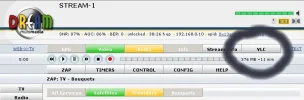
Use the vlc tab. You might have to point the open with dialogue that pops up to where you have installed vlc.
 

Attachments

  • Image1.webp
    Image1.webp
    21.2 KB · Views: 94
tried this, all i get is a black screen with a road cone stuck in the middle?
 
Make sure you try have the box on a fta channel to start with. You get the cone if it cant decode something. Hang on I'll post a screenie
 
Here we go - just to prove it does work heres a screenie of BBC News Channel on 28E streaming across my lan. The Dreambox local ip is 192.168.0.10
 

Attachments

  • Image1.webp
    Image1.webp
    74.7 KB · Views: 87
just tried on itv. my dreambox ip is 192.168.2.4 does this make any difference as still no stream?
 
Shouldnt do.

Have you got your networking set up correctly - check you you can log into the box via internet explorer/ firefox or whatever browser you use?

Once you can do that download the latest version of vlc player & install it

Log into the box again and click on the vlc tab.

If the box asks which programme you want to open point it at the vlc player.

Away you go - it just works for me.
 
i can access all the info from the dreambox by entering the ip address in internet explorer, does that mean the network is okay?
 
just downloaded new vlc and now when i hit vlc in enigma web interface it comes up with a m3u file and asks if i want to save or cancel download? it's got me baffled!!!
 
:confused:managed to get sound stream working by clicking on the apid: but nothing when clicking on the vpid: or vlc
 
Dunno if this will work but save the m3u file to your desktop then open vlc and drag the m3u file onto it. It might just open it.
 
I saved the m3u file, opened with vlc but nothing.... I don't know if the setting in vlc are correct or if i need to change them in any way. If i can't get this to work i will have to look at something like iptv. Thanks for the info.
 
dazza110772 said:
:confused:managed to get sound stream working by clicking on the apid: but nothing when clicking on the vpid: or vlc

Try Dreambox VLC Streamer v1.2. (search online for it). Excellent little application, may find it works better than just calling up your box through your browser.
 
Thanks for that Llew, I now have sound and a very fuzzy boxed picture that sticks. Is there any way to stop the freezing and the boxed picture?
 
Pixel blocking and a freezing picture could mean that your PC's spec isn't up to it, especially if it's an HD channel. That happens on another older spec PC that I have.
 
Hi @dazza110772,

It could be lack of bandwidth in your LAN connection, either between Dreambox and router but most probably between PC and router.

How are the Dreambox and PC connected?

My Dreambox is connected by ethernet cable so is always OK but my laptop is connected by wireless. In some spots in my house the WiFi signal is weak and I get lots of freezing or even no picture at all! This is using the standard system of clicking the VPID. In all cases audio streaming bandwidth is adequate, so clicking the APID always works.

If you are using wireless for the PC/Laptop, try moving it closer to the router to get a better WiFi signal.

Best wishes, John.

BTW: My WiFi connection is always inadequate for HD channels, no matter how close to the router the laptop is situated, and to achieve enough bandwidth an ethernet cable connection is always required.

BTW2: Another thought; Not all standard def. channels require the same bandwidth! It varies from up to 8M bits for the German channels through 5M to 6M bits for the main UK channels, down to 1M to 2M for the 'Girl-on-a-couch' channels or even less than that in some cases! You can use the plug-in Bit Rate Viewer to check.
Try streaming a low bit rate channel to see if that works.

 
what version of vlc are you using , i find version 0.8.6.i to work better , when you get M3u file save it , open properties of that file and associate it to VLC player that way it will auto play the M3u file
 
Back
Top