neumoDVB

Ryle ; Sir, can you please help me?
Which version of fedora kernel-headers should I install?
You should only install the kernel-headers that have the same version that the kernel you're booting.
Once installed, they'll automatically follow the kernel versions during updates (for me at least).
 
This i what I have installed to compile version 6.9.8

kernel-modules-core-6.9.8-200.fc40.x86_64
kernel-core-6.9.8-200.fc40.x86_64
kernel-modules-6.9.8-200.fc40.x86_64
kernel-6.9.8-200.fc40.x86_64
kernel-devel-6.9.8-200.fc40.x86_64

For other versions, just replace the numbers with those of your kernels. With kernel-headers it may work as well,
but the above works.
 
No module named 'wx.svg' can I correct your mistake?

import wx.svg
ModuleNotFoundError: No module named 'wx.svg'
Traceback (most recent call last):


File "/home/star/neumodvb/gui/neumodvb/neumomenu.py", line 320, in <lambda>
self.Bind(wx.EVT_MENU, lambda evt, x=x, accel=accel_key: self.run_menu_command(x, accel, evt), item)
File "/home/star/neumodvb/gui/neumodvb/neumomenu.py", line 282, in run_menu_command
return m(evt)
File "/home/star/neumodvb/gui/neumodvb/satlist.py", line 196, in CmdSpectrum
from neumodvb.spectrum_dialog import show_spectrum_dialog
File "/home/star/neumodvb/gui/neumodvb/spectrum_dialog.py", line 27, in <module>
from neumodvb.spectrum_dialog_gui import SpectrumDialog_, SpectrumButtons_, SpectrumListPanel_
File "/home/star/neumodvb/gui/neumodvb/spectrum_dialog_gui.py", line 14, in <module>
from neumodvb.neumoplot import SpectrumPlot
File "/home/star/neumodvb/gui/neumodvb/neumoplot.py", line 30, in <module>
from matplotlib.backends.backend_wxagg import FigureCanvasWxAgg as FigureCanvas
File "/usr/local/lib/python3.10/dist-packages/matplotlib/backends/backend_wxagg.py", line 4, in <module>
from .backend_wx import _BackendWx, _FigureCanvasWxBase
File "/usr/local/lib/python3.10/dist-packages/matplotlib/backends/backend_wx.py", line 33, in <module>
 
I completely canceled the ubuntu 24.04 kernel. I installed the 6.5.10 kernel and the problem was completely eliminated.
 

Attachments

  • Screenshot_20240826_175544.png
    Screenshot_20240826_175544.png
    102.2 KB · Views: 41
  • Screenshot_20240826_180344.png
    Screenshot_20240826_180344.png
    98.2 KB · Views: 23
ubuntu 22.04

No module named 'wx.svg' can I correct your mistake?

import wx.svg
ModuleNotFoundError: No module named 'wx.svg'
Traceback (most recent call last):
 
By connecting to OSCam, it is decoded and shown in the picture.It would be very nice.
 

Attachments

  • Screenshot_20240831_125939.png
    Screenshot_20240831_125939.png
    422.1 KB · Views: 35
The drivers have now hopefully been fixed fro kernel 6.10. This could potentially solve nighthawk77's issue as well.
I can confirm now everything is working on Ubuntu24.04. What a fantastic software this is! A big salute to everyone included in development!
 

Attachments

  • Screenshot_20240903_134017.png
    Screenshot_20240903_134017.png
    34.9 KB · Views: 22
I can confirm now everything is working on Ubuntu24.04. What a fantastic software this is! A big salute to everyone included in development!
Yes, I had 24.04 LTS working in May. There's 24.04.1 up now since the end of August.


Manjaro 24.0 too. Some work to do here with that for neumodvb since the previous release. Unfortunately as a rolling release, there's no going back.
 
Yes, I always prefer lts version for main os while I have others on kvm virtual machines. What about debian? I've tried same method that worked on ubuntu but keep getting make error :all at 87% of installation. I know ubuntu have more recent version of kernel but would like to know what causes this issue and eventually resolve it. I just don't know what's missing. BTW, debian is on upgraded kernel 6.6.47 version.
 

Attachments

Yes, I always prefer lts version for main os while I have others on kvm virtual machines. What about debian? I've tried same method that worked on ubuntu but keep getting make error :all at 87% of installation. I know ubuntu have more recent version of kernel but would like to know what causes this issue and eventually resolve it. I just don't know what's missing. BTW, debian is on upgraded kernel 6.6.47 version.
Just to add on my previous post. I've made clean installation of debian testing with kernel 6.10.6 and successfully installed Neumo in virtual environment. So obviously issues are with kernel 6.6.47
 
It does not work in the central system.
 

Attachments

  • Screenshot_20240906_134049.png
    Screenshot_20240906_134049.png
    123.5 KB · Views: 13
TVheadend is running on the Central System.
 

Attachments

  • Screenshot_20240906_144907.png
    Screenshot_20240906_144907.png
    144 KB · Views: 11
  • Screenshot_20240906_144924.png
    Screenshot_20240906_144924.png
    114 KB · Views: 12
Just to add on my previous post. I've made clean installation of debian testing with kernel 6.10.6 and successfully installed Neumo in virtual environment. So obviously issues are with kernel 6.6.47
So use a newer kernel....
 
The next version of neumoDVB and the neumo drivers will also support unicable-2 (JESS, scr...) to some degree:
-tuning (including blind)
-only unicable 2 (due to lack of devices for testing)
-no spectrum scan

Here is an example of 6 channels from different muxes running over a single cable from the lnb to a tbs-6909X.
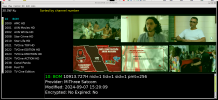
live.png
And here is how it uses tuners and frontends:
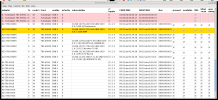
frontends.png

On this card, 8 muxes are possible with this software, but on each mux, it is also possible to
watch or stream multiple services simultaneously. On the tbs6916, up to 16 muxes could be used.

To configure a unicable LNB, the user needs to add a unicable channel list to the lnb definition according to the values
supported by the lnb. My LNB supports 32 user bands, but I configured only 8,
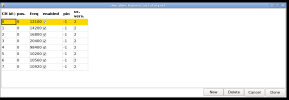
unicable.png


It is also possible to disable unicable on some of the LNB connections. For example, my LNB only has unicable on
3 of its ports. The other port behaves like a standard universal LNB. In the screenshot below, the unversal lnb output
is connected to port 1 of the tbs6916, and the missing check mark in the unicable column informs neumoDVB of this.
One unicable lnb output is connected to the 6909x card, and the two remaining ones to the 6916. Although it is against
the unicable-2 protocol, the unicable lnb is behind a diseqc switch, and that works fine as well.

connections.png

The software will be released soon. Driver updates are needed as well.
 

Attachments

  • lnb.png
    lnb.png
    145.4 KB · Views: 8
Multiswitch Switchboard Central Satellite System DS-1016
 

Attachments

  • dreamstar-10-20-merkezi-uydu-sistemi-multiswitch-santral.png
    dreamstar-10-20-merkezi-uydu-sistemi-multiswitch-santral.png
    194.9 KB · Views: 11
Hotbird satellite is independent, Turksat satellite is a central system but tvheadend scans automatically.
 
It would be great if OSCam could connect and show on the screen who it was downloading from.
 

Attachments

  • Screenshot_20240907_232654.png
    Screenshot_20240907_232654.png
    416 KB · Views: 12
  • Screenshot_20240907_233636.png
    Screenshot_20240907_233636.png
    809.2 KB · Views: 8
Back
Top