neumoDVB

On Ubuntu 23.10, I installed and worked with neumoDVB without problems (see previous pages).
That was last year, and after Ubuntu 24.04 LTS came out, I could install it without problems. I must add that this version works perfectly with Kernel version 6.8.0-39-generic, 6.8.4-060804-generic, now with 6.8.8-060808-060808-generic.
I mention these Kernel versions because both @deeptho's drivers and neumoDVB install without problems on Ubuntu 24.04 LTS.

But with Kernel 6.11.0-24 or 25, last released, you can also install the driver and neumoDVB on Ubuntu 24.02, only there is a problem with the resolution, precisely what happened to me the first time I tried to work with neumoDVB under Ubuntu.
I couldn't fix the resolution.
I would like to know if anyone is working with 6.11.0- 25-generic without having problems with resolution(?).
That's why I reverted to previous Kernel versions, 6.8.0..., which I'm working with now.
Satesco,

That "resolution" problem is unrelated to neumodvb...
 
Satesco,

That "resolution" problem is unrelated to neumodvb...
You're right, because the first time I installed Ubuntu 24.04, I used kernel 6.8.0- 44-generic. The installation of the drivers and neumoDVB went smoothly, without errors, so that I could work with your application immediately.

However, when I upgraded Ubuntu 24.04, kernel 6.11.0-24 was installed, and when I restarted, the resolution was changed, and I couldn't fix it, even though neumoDVB still worked. My attempts to fix it proved futile, as usual.

The same thing happened with kernel 6.11.0- 25-generic, with the resolution changed, so I searched for any version of kernel 6.8. I found kernel 6.8.8, which I used to install the drivers and neumoDVB.

An optimization of the driver for kernel versions 6.11 would be desirable, especially since new versions of the Kernel for U24.04 LTS are released frequently.
Thanks.
 
Last edited:
You're right, because the first time I installed Ubuntu 24.04, I used kernel 6.8.0- 44-generic. The installation of the drivers and neumoDVB went smoothly, without errors, so that I could work with your application immediately.

However, when I upgraded Ubuntu 24.04, kernel 6.11.0-24 was installed, and when I restarted, the resolution was changed, and I couldn't fix it, even though neumoDVB still worked. My attempts to fix it proved futile, as usual.

The same thing happened with kernel 6.11.0- 25-generic, with the resolution changed, so I searched for any version of kernel 6.8. I found kernel 6.8.8, which I used to install the drivers and neumoDVB.

An optimization of the driver for kernel versions 6.11 would be desirable, especially since new versions of the Kernel for U24.04 LTS are released frequently.
Thanks.
Kernels up to 6.12.7 are already supported. Even later ones untul 6.14.4 work but with some possible compilation problems (wait for crazycat to fix it when he updates the tbs drivers)
 
Couple of quick questions if anyone can please help?

1. The spectra window in the bottom right corner of the spectrum screen has a list of previous scans, is it possible to re-load a previous scan into the spectrum?

2. I am getting the "LNB Reservation Failed" error message when try to run a spectrum for a new LNB setting. I had this before and fixed it but cant remember how I did it. Would anyone please be able to advise me how to resolve the error message?
 
Last edited:
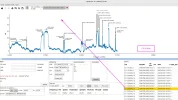
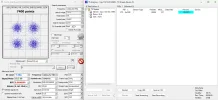
1. You can reload the previous scan. CTR+Enter will display the previous spectrum, and you can scan again (see picture).
2. The LNB is probably disabled.

I happened to find a video tutorial about neumoDVB. Who knows, it might help those having problems configuring and using the application.
I don't know who the user who posted this how-to is.
I hope I will be forgiven for not asking this user's permission.:unsure
 

Attachments

  • 30.0W_2025-05-08_12-15.webp
    30.0W_2025-05-08_12-15.webp
    129.2 KB · Views: 35
Last edited:
1. You can reload the previous scan. CTR+Enter will display the previous spectrum, and you can scan again (see picture).
2. The LNB is probably disabled.

I happened to find a video tutorial about neumoDVB. Who knows, it might help those having problems configuring and using the application.
I don't know who the user who posted this how-to is.
I hope I will be forgiven for not asking this user's permission.:unsure


@satesco

Thank you for your reply.
I resolved the LNB error, closed down neumoDVB, opened it up again and the error message was gone.

The video on youtube is useful, i watched it. He is scanning 166.0E (Intelsat 19), a satellite I am familiar with.
His scan shows an interesting peak at 12526V, SR33000 that is not listed on Lyngsat and does not register with an EBSPro scan or a scan with an Octagon SF8008 (S2X capable).
 
A couple more questions if anyone can please help?

1. Is it safe to proceed with ubuntu updates or is there a risk they could break something in neumoDVB?

2. How does neumoDVB identify S2X frequencies in the DVB-S Mux table? I have scanned 7.0E several times which sometimes has S2X feeds but there seems to be no identifier or description in the blind scan Mux table to indicate if any are S2X?

I am using a TBS 6904SE card with the deeptho custom drivers. The card is S2X capable so will hopefully be scanning and locking S2X feeds.
 
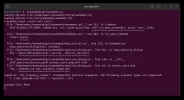
Would anyone please be able to tell me if there is a fix for the "Assertion Error" message in the terminal window?

I deleted historic frequencies from the mux lists and also deleted historic spectra from the spectra list.
Now I cannot get the DX Spectrum window to open up, when I check the terminal window there is a message about assertrown>0

I closed down both neumoDVB and terminal, re-opened and tried again but the same issue is present, with the same message.
Also, I rebooted the PC and tried to get the DX Spectrum window to open up but still the same, it will not open.

If there is a log file that I can upload to help resolve the issue would anyone please be able to provide the location and I will upload it?
I have uploaded a screenshot of the terminal window if that is of assistance?

.
 

Attachments

  • neumoDVB Terminal.webp
    neumoDVB Terminal.webp
    86.2 KB · Views: 17
Last edited:
Another question please:

Does neumoDVB check spectra scans or blind scans against a reference transponder list?

I have muxes for 9.0E recorded in the DVB-S Muxes list but I have never created an LNB setting for 9.0E.
I have an LNB setting for 10.0E and have done spectral scans and blind scans for 10.0E.

Has neumoDVB done a full band scan of 10.700 to 12.750 GHz for 10.0E and registered what it found between 11.70 and 12.50 GHz to 9.0E based on a stored referential transponder list?

Thanks for any feedback.
 
1. Is it safe to proceed with ubuntu updates or is there a risk they could break something in neumoDVB?

2. How does neumoDVB identify S2X frequencies in the DVB-S Mux table? I have scanned 7.0E several times which sometimes has S2X feeds but there seems to be no identifier or description in the blind scan Mux table to indicate if any are S2X?

Updates are OK, although I usually need to reinstall neumo_media_build.

I've yet to find an S2X feed with neumodvb, so I can't help. What about the service list, perhaps there's some indication in there?

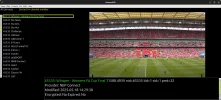
While I'm on 7E, here's a Women's Cup Final feed. SR7200.

WFA Cup final.webp
 
Last edited:
A couple more questions if anyone can please help?

1. Is it safe to proceed with ubuntu updates or is there a risk they could break something in neumoDVB?

2. How does neumoDVB identify S2X frequencies in the DVB-S Mux table? I have scanned 7.0E several times which sometimes has S2X feeds but there seems to be no identifier or description in the blind scan Mux table to indicate if any are S2X?

I am using a TBS 6904SE card with the deeptho custom drivers. The card is S2X capable so will hopefully be scanning and locking S2X feeds.

1. You can upgrade to Ubuntu but must be careful with the installed kernel. If you have Ubuntu 24.04, the 6.11 kernel doesn't work with @deeptho's drivers. With this kernel, you have problems with resolution.

2. There is no express way to indicate transponders with the S2X extension, but if you find a mux with this extension, it shows up as DUMMY in the modulation. There are also cases where S2X is displayed, but they are rarer.
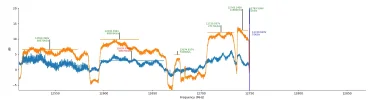
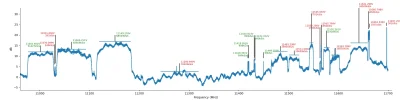
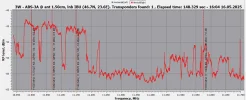
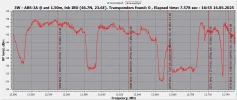
Here's an example at 3.0W where muxes that have the S2x extension but are not displayed as such.
A spectrum with such transponders looks like with neumoDVB and Crazyscan under Windows.

3. Although the 6904 card knows the S2X extension, you must realize it only knows the symbol rate between 1-45; conversely, it doesn't read generic streams.

For enthusiasts, it's good to know that tbs6903x/6909x cards work better with @deeptho's drivers and neumoDVB.
 

Attachments

  • 12630 V,68570_2025-05-18_17-16.webp
    12630 V,68570_2025-05-18_17-16.webp
    39.4 KB · Views: 13
  • 3.0W_12500-12750 HV.webp
    3.0W_12500-12750 HV.webp
    43.9 KB · Views: 11
  • 10940-11700 V_.webp
    10940-11700 V_.webp
    54.3 KB · Views: 12
  • 11002 V,51427,25.36,16apsk,0.15-Data_2025-05-16_16-31-38.webp
    11002 V,51427,25.36,16apsk,0.15-Data_2025-05-16_16-31-38.webp
    95 KB · Views: 10
  • 10950-11700 V_2025-05-16_16-04-28.webp
    10950-11700 V_2025-05-16_16-04-28.webp
    84 KB · Views: 11
  • 12500-12750 V_2025-05-16_16-56-44.webp
    12500-12750 V_2025-05-16_16-56-44.webp
    94.9 KB · Views: 13
@satesco

Thank you for your reply. I will not risk the ubuntu updates.
I have a couple more questions if anyone can please help?

Is it possible to select a range for the spectrum scan, perhaps 12500 to 12750 and get the result to fill the full width of the scale?
I tried to select a range to get the peaks more widely spaced but it kept the same scale width as a full band scan and did not space out the peaks.

Returning to my comment in an earlier post about neumoDVB having a reference satellite/frequency database that it refers to for the spectrum scan and blind scan. I scanned 7.0E for some known Novelsat NS4 frequencies, they displayed in the spectrum OK. However, the SR values were registered as 7200, a common SR used for feeds.

There was no way neumoDVB could have registered an SR of 7200 for these feeds unless it used a reference table to get the value, perhaps it matched up 7.0E and the frequency against a referential and came back with 7200. The true SR was a lot higher that 7200.

Is there a setting somewhere to turn off any referential matching, similar to what can be configured in an E2 receiver?
 
@satesco

There was no way neumoDVB could have registered an SR of 7200 for these feeds unless it used a reference table to get the value, perhaps it matched up 7.0E and the frequency against a referential and came back with 7200. The true SR was a lot higher that 7200.

Is there a setting somewhere to turn off any referential matching, similar to what can be configured in an E2 receiver?
No reference table is used, so it cannot be turned off as it does not exist.
 
Is it possible to select a range for the spectrum scan, perhaps 12500 to 12750 and get the result to fill the full width of the scale?
I tried to select a range to get the peaks more widely spaced but it kept the same scale width as a full band scan and did not space out the peaks.

Click on the maltese cross (under Edit in the spectrum scan), then use left or right mouse buttons to stretch, 'squash' or position the spectrum scan to your choosing. Or turn it inside out (only joking :-wow )
 
Click on the maltese cross (under Edit in the spectrum scan), then use left or right mouse buttons to stretch, 'squash' or position the spectrum scan to your choosing. Or turn it inside out (only joking :-wow )


@Llew

Thank you for your reply.
I could not get the Maltese Cross options to work but I got the magnifying glass option to zoom in on a selected border of the spectrum which is similar to expanding the spectrum.
 
No reference table is used, so it cannot be turned off as it does not exist.


@deeptho

Thank you for your reply.

Would you please be able to tell me how neumoDVB measures the symbol rate in a spectrum scan?
For example, does it try to measure the carrier width and the roll off and extrapolate the SR from there?
 
Hi

Today I upgraded to Fedora 42, my kernel version is 6.14.6-300.fc42.x86_64.

I had to make a bunch of modifications to be able to compile blindscan_kernel:
-some spi_alloc_master had to be changed to spi_alloc_target
-some .remove_new had to be changed to .remove
-some MODULE_IMPORT_NS(DMA_BUF); had to be changed to MODULE_IMPORT_NS("DMA_BUF");
-add EXTRA_CFLAGS += -Wno-int-conversion to blindscan_kernel/neumo_media_build/v4l/Makefile

I hope I didn't forget anything.
 
@deeptho

Thank you for your reply.

Would you please be able to tell me how neumoDVB measures the symbol rate in a spectrum scan?
For example, does it try to measure the carrier width and the roll off and extrapolate the SR from there?
That is indeed what it does to help the chip to find the correct value easier.
 
I could not get the Maltese Cross options to work

By not working, do you mean nothing happened when you selected the Cross, or the options didn't work as expected?
 
Sorry, have not read through all 73 pages here.

Am I right that Ubuntu 24.04 LTS is not supported? I even have no chance to install the deeptho driver. Seems the kernel is too new.

Post in thread 'neumoDVB'

This post says, that even Ubuntu 22.04 is not working.

Any advice, or do I really need to install a different distribution, like Fedora?

But: The TBS driver from GitHub works without problems (audio and video ok).
 
Back
Top