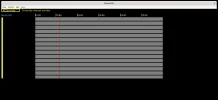
neumoDVB

After choosing new you have to edit the mux. One of the tasks is to select the correct satlleite. This is done by clicking on 0.0
and then selecting 63W from the the popup list or typing 63W
I don't want 63W (! can't receive it ), but that's all I'm offered.

The satellite drop-down list doesn't give me a satellite I choose., just 63W.

The sequence I take: DVB-S Muxes - Edit ticked -New -All Satellites drop-down list - 63.0W appears in the Satellite box.

Any previous satellites in the list show 63.0W.

So the Satellite list isn't functioning for me.
 
Can you check what is actually in the satellite list?
Lists menu - satellites
 
36E - 63W.

The Drop-down list has 75E - 63W.
 
I tried choosing a satellite within the 36E - 68W list. but I still get 63-0W

I have to take a break for a meal, will be back ASAP.
 
It seems there is a bug in one of the wx widgets.
A temporary workaround:
-start the program
-visit the satellite list: lists menu - sarellite
This should show many satellites

Then close the program
start again
 
I can see what I need to do now deeptho.

When I choose New, a new line with question marks appear below the last entry. A down arrow next to the sats column needs to be clicked and the mouse hovered over a pop-up satellite list, where you choose a satellite. Thus you build a list of satellites, hence then you can populate the lists with Frequency, Polarity etc., which will be my next job in hand.Choose satellite.png
 
Llew,
first of all: The problem with not being able to selectt satelliies out to be a bug in wxwidgets.
It is solved in the latest version. You can use "git pull" to update the code. As this bug is
in python, there is no need to rerun cmake, but in general, I will push all kinds of changes, and
some of those may require a recompile (so: cd ~/neumodvb/build; cmake ..; make -j8)

This problem you experienced was that in the satellites selectors, the displayed list was outdated.
When neumodvb starts the first time, it notices that the satellite list is empty and therefore adds some
satellites it self. However, the popuplist showed the empty version which was there at startup.
These problems do not occur on my setup because I have run the code many times. Anyway, it is
fixed.

About the question marks: this is normal. As long as the most essential information is not entered, neumodvb will treat
the entered mux as doubtful.

Instead of adding many muxes at first, it is best to just add one and see how you can get it working.
For instance, when you scan one mux, a lot of other ones will usually be found automatically. Or even
eaier is to use spectrum scan.

The most essential thing is to first define LNBs. At least one to get started.
As long as there are no lnbs, nothing else will work (tuning, blindscan...)
Unfortunately, neumodvb does not always report such problems and sometimes just does nothing
at all. In the log file (/tmp/neumo.log) the problems will be visible.
 
OK, git pull occasionally, unless you report some important code changes, when I'll do a recompile.
 
@deeptho
I'm not finding a mux on 13E 11373H with DVB-S muxes. Correct Adaptor 0 for my TBS 6903.

Is there anything I've failed to add in the lists?

OK with w_scan and blindscan app.

LNB.jpg


13E 11373H.png
 
Moving on to the Spectrum Scan section, if I choose 13E in the LNB section (the only satellte I'm concentrating on ATM), do ctrl- E I get the screen below, which doesn't look like the one shown in the DOC

I'm using Terminal to start neumodvb and I don't know if it's significant, but the last comment says 'no module named scipy' (?)
Code:
Traceback (most recent call last):
  File "/usr/lib64/python3.9/site-packages/neumodvb/neumomenu.py", line 264, in <lambda>
    accel=accel_key: self.run_command(x, accel, evt), id=key_id)
  File "/usr/lib64/python3.9/site-packages/neumodvb/neumomenu.py", line 236, in run_command
    return m(evt)
  File "/usr/lib64/python3.9/site-packages/neumodvb/lnblist.py", line 239, in CmdSpectrum
    from neumodvb.spectrum_dialog import show_spectrum_dialog
  File "/usr/lib64/python3.9/site-packages/neumodvb/spectrum_dialog.py", line 23, in <module>
    from neumodvb.spectrum_dialog_gui import SpectrumDialog_, SpectrumButtons_, SpectrumListPanel_
  File "/usr/lib64/python3.9/site-packages/neumodvb/spectrum_dialog_gui.py", line 14, in <module>
    from neumodvb.neumoplot import SpectrumPlot
  File "/usr/lib64/python3.9/site-packages/neumodvb/neumoplot.py", line 34, in <module>
    from scipy.interpolate import interpn
ModuleNotFoundError: No module named 'scipy'


Spectrum Scan screen.jpeg
 
Yet another not-installed dependency
sudo dnf install -y python3-scipy
 
Yet another not-installed dependency
sudo dnf install -y python3-scipy
Installed that with pip3 install scipy

Still same screen.

Terminal now moves on to ModuleNotFoundError: No module named 'neumodvb.mini
 
@deeptho
I'm not finding a mux on 13E 11373H with DVB-S muxes. Correct Adaptor 0 for my TBS 6903.

Is there anything I've failed to add in the lists?

OK with w_scan and blindscan app.

View attachment 138821


View attachment 138820
This looks ok, except for the delivery system. Acccording to kingofsat this is a dvb-s transponder.

Did you actually start the tune by pressing 'Ctrl-Enter'?
 
Installed that with pip3 install scipy

Still same screen.

Terminal now moves on to ModuleNotFoundError: No module named 'neumodvb.mini
ARe you sure there is no other error?
And are files like
./neumodvb/mini/minispinctrl.py
actually present in ~/neumodvb/mini?
 
Installed that with pip3 install scipy

Still same screen.

Terminal now moves on to ModuleNotFoundError: No module named 'neumodvb.mini
Also: it is better to use the dnf command, although it is unlikely that it makes a difference in this case.
 
This looks ok, except for the delivery system. Acccording to kingofsat this is a dvb-s transponder.

Did you actually start the tune by pressing 'Ctrl-Enter'
I'll check the TP again with dvb-s chosen.

Oh, ctl-Enter instead of ctl-E :-doh (Doc says ctl-E)
 
ARe you sure there is no other error?
And are files like
./neumodvb/mini/minispinctrl.py
actually present in ~/neumodvb/mini?
Might be other errors, I'll check again, and look for those files.
 
ARe you sure there is no other error?
And are files like
./neumodvb/mini/minispinctrl.py
actually present in ~/neumodvb/mini?
I think you must have performed a "sudo make install"
Might be other errors, I'll check again, and look for those files.
I think you probably did a "sudo make install" without telling me.
The make install forgets to install some files.

It is better to NOT install at the moment and just run
~/neunodvb/gui/neumodvb.py

This will minimize the confusion when you report bugs.
For example yu could be running an old version if you foret to run
"sudo make install again". The wrong configfiles could be used...

It is better to keep it simple for now...

So:
remove the installed files (if they exist):
sudo rm -fr /etc/neumodvb /usr/lib64/python3.9/site-packages/neumodvb
Then run as
cd ~/neunodvb/gui/
./neumodvb.py
 
I think you must have performed a "sudo make install"

I think you probably did a "sudo make install" without telling me.
The make install forgets to install some files.

It is better to NOT install at the moment and just run
~/neunodvb/gui/neumodvb.py

This will minimize the confusion when you report bugs.
For example yu could be running an old version if you foret to run
"sudo make install again". The wrong configfiles could be used...

It is better to keep it simple for now...

So:
remove the installed files (if they exist):
sudo rm -fr /etc/neumodvb /usr/lib64/python3.9/site-packages/neumodvb
Then run as
cd ~/neunodvb/gui/
./neumodvb.py
Ok I'm probably getting a little confused Senior moments.
 
Llew,
all of this is very useful. Although most of the problems so far were about installation,
it is exactly those problems that will frustrate users most.
 
Back
Top