neumoDVB

Llew,
all of this is very useful. Although most of the problems so far were about installation,
it is exactly those problems that will frustrate users most.
OK, give me a little time to sort things out my end.

It's a shame nobody else here has considered trying the app (so far). The more I look at the functions provided, the more I'm impatient to have it running.
 
You are almost there, but there is no need to hurry.
After all, it is a hobby
 
You are almost there, but there is no need to hurry.
After all, it is a hobby
Got 13E.

Started with a clean neumodvb

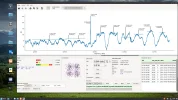
Late, so tomorrow I'll do a spectrum analysis. Wish me luck :-rofl2

13E 11372H.webp
 
I wish you luck. There are a few improvements in spectrum scan, mainly regarding better display
of the frequency at the cursor.

I also made some small changes to drivers, but the ones you have installed are good enough.
Mainly a few bugs solved regarding incorrect display of stream_id and pls_code in some cases.
tas2101 cards also start to work reasonably well.
 
@deeptho

A query or two deeptho that either I can't find in the Document, or I misunderstand,

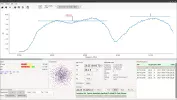
In the spectrum scan section, I find no way of adjusting the scan to show the frequency range that I have set at bottom right. Is that what the little Maltese cross in the top line is supposed to do, adjust the range? What and whereare the Left and Right buttons it refers to?

A couple of other questions please.

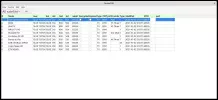
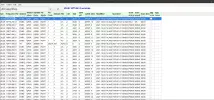
The mux List -- I'm not sure what Pending signifies - what is it pending, as the mxes have been found?

The service list.-- I don't see any video for any channel I choose - is Mplayer in use in the Program?

Screenshot from 2021Spectrum Scan-10-03 18-08-43.pngList Services.png28.2 Muxes.pngService List.png
 
Last edited:
In the spectrum scan section, I find no way of adjusting the scan to show the frequency range that I have set at bottom right. Is that what the little Maltese cross in the top line is supposed to do, adjust the range? What and whereare the Left and Right buttons it refers to?
Oops - ignore deeptho. missed the line under the graph to pan right.
 
The mux List -- I'm not sure what Pending signifies - what is it pending, as the mxes have been found?
Pending means that the mux has not yet been scanned. It was found to exist, but it may not be tuneable, e.g., in case
of too weak signal, or sanning was interrupted before it could finish (spectrum scan does that. It does not attempt
to find all services, only muxes)

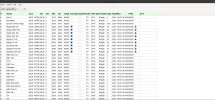
The service list.-- I don't see any video for any channel I choose - is Mplayer in use in the Program?
You have to switch to the live panel and press control-enter on a channel in the list. It must be not encrypted of course.
You do ot need an external viewer.
 
Pending means that the mux has not yet been scanned. It was found to exist, but it may not be tuneable, e.g., in case
of too weak signal, or sanning was interrupted before it could finish (spectrum scan does that. It does not attempt
to find all services, only muxes)


You have to switch to the live panel and press control-enter on a channel in the list. It must be not encrypted of course.
You do ot need an external viewer.
Thanks. There's plenty more of the app for me to get to understand; just needs time.
 
Yes I understand. One day I hope to learn myself how iqmonitor works. I have not been successful sofar.
 
You mean what's under the bonnet? Certainly you need patience to use it.
 
You mean what's under the bonnet? Certainly you need patience to use it.
Maybe it is not compatible with my card. I press start and nothing seems to happen, except a large CPU usgae. The program seems to
freeze or respond very slowly at this stage. I think I once made a constellation plot with it, but couldn't reproduce that afterwards.

I have been reading up on it on another forum. I am maninly interested in Stranik's approach on making spectra, but have not found
many details, other than how to make them visible in IQ monitor. I will probably ask at some point (right now I have other priorities), but it
might be challenging with the language issues.

In any case: it is an program with many possibilities.
 
Maybe it is not compatible with my card. I press start and nothing seems to happen, except a large CPU usgae. The program seems to
freeze or respond very slowly at this stage. I think I once made a constellation plot with it, but couldn't reproduce that afterwards.

I have been reading up on it on another forum. I am maninly interested in Stranik's approach on making spectra, but have not found
many details, other than how to make them visible in IQ monitor. I will probably ask at some point (right now I have other priorities), but it
might be challenging with the language issues.

In any case: it is an program with many possibilities.
Each time I upgraded or reinstalled it, the TSReader or ABC 4T2 buttons greyed out. I never managed to have them available together.

Now I have a working kernel with neumodvb, I'll head over to the Blindcan section today, as I have unfinished business setting it up on Fedora.
 
Spectrum scan makes a decent job of 8W's MENA frequencies, but the SR's are haywire :oops:

8W Spectrum.webp
 
Llew,
those "symbolrates" are NOT symbolrates, but initial values used for blindscan. They can't be correct and need not be correct.
The symbolrate is displayed under "info from tuner" (after blindscanning) and the real frequencies/symbol rates are shown in the muxlist
(Ctrl-Shift-M from the main screen)

The graph does not show them.
 
Llew,
those "symbolrates" are NOT symbolrates, but initial values used for blindscan. They can't be correct and need not be correct.
The symbolrate is displayed under "info from tuner" (after blindscanning) and the real frequencies/symbol rates are shown in the muxlist
(Ctrl-Shift-M from the main screen)

The graph does not show them.
Of course, yes. I'm still assimilating the many technical details in this impressive project.
 
@deeptho

I'm hoping to have neumodvb working on a Ubuntu distro (Mint), and having spent a week getting the prerequisite packages set up for Ubuntu, I have successfully built a Mint-flvoured version using cmake.

Installation is another matter. I have it 20% compiled, but there's an error.

I appreciate your work on the project is on Fedora, but I wondered if you might have time to spare to give me some idea what to look for with that error?
Code:
checking for ANSI C header files... /home/davidl/Downloads/neumodvb-master/src/neumodb/neumodb.cc:90:5: error: expected expression
                                else
                                ^
yes
checking for sys/types.h... yes
checking for sys/stat.h... yes
checking for stdlib.h... yes
checking for string.h... 1 error generated.
make[2]: *** [src/neumodb/CMakeFiles/neumodb.dir/build.make:63: src/neumodb/CMakeFiles/neumodb.dir/neumodb.cc.o] Error 1
make[1]: *** [CMakeFiles/Makefile2:802: src/neumodb/CMakeFiles/neumodb.dir/all] Error 2
make[1]: *** Waiting for unfinished jobs....

TIA
 
I don't think there's enough information there. Tomorrow I'll post the full output minus the reams of verbose listing, to reach the endpoint.
 
Llew,

You can try the latest version (of today). Perhaps it will work. Probably something related to specific compiler versions
 
Llew,

You can try the latest version (of today). Perhaps it will work. Probably something related to specific compiler versions
That's done the trick. Installed successfully, just need to get my TBS tuners recognised now.
 
Hello all , I have to admit that your program is very interesting :D, I just want to tray it with TBS6903X
your discussion here help me a lot , thank you very much @ deeptho and LIew :Y

finally succeed in installing NeumoDVB , But when I tray to start NeumoBlindscan I see this message ;:confused
"""open_frontend failed: No such file or directory!""

and how can I know which card or Lnb is used ?
and thank you in advance .

Screenshot from 2021-10-25 11-04-45.webp

Screenshot from 2021-10-25 10-55-33.webp
I am new in Fedora 34 !
 
Back
Top