neumoDVB

I have just released neumodvb-1.8. Mostly bug fixes, but also some new features, such as the cable list,
which allows easily updating the LNB configuration when changing cards, or attaching cables to different
inputs.

Changes in version neumodvb-1.8​

New features​

  • Support for unicable lnbs.
  • Alow fuzzy filtering by frequency in service list.
  • Added cable list.
  • Improved layout of frontend list.
  • Parse service name in pmt and use it when no sdt name is present.
  • Added t2mi to mux grid combos.
  • Display error when command is run on disabled lnb instead of silently failing.
  • Improve dishlist layout
  • Filtering screens based on frequency and symbol_rate now also shows muxes with small deviations.

Bug fixes​

  • Confusion between chglist_filter_chg and chgmlist_filter_chg.
  • Peak_matching sometimes leads to muxes which cannot be tuned, resulting in unscannable peaks.
  • Add timeout mechanism to ensure blindscanner always ends.
  • Confusion between unique_ptr and shared_ptr.
  • Incorrect assertion due to confusion between 0.8W and 1.0W.
  • Positioner_move_time computed when positioner did not move.
  • Selecting satellite for lnb no longer working correctly.
  • Draw_mux no longer working due to matplotlib change.
  • Bug in deserialisation of vectors.
  • Avoid assertion on corrupt stream due to poor reception.
  • Deadlock when replying positive to add sat dialog.
  • Adding satellite causes python stack dump.
  • Race when stopping live channel.
  • Wait longer when new adapters appear due to module reloading, preventing assertion.
  • Changing rf_path has no effect in positioner dialog.
  • Incorrect snr and such displayed on live screen when more than one service is displayed.
  • Handle races between multiple demods attempting to send unicable commands.
  • Using the same lnb is treated as a conflict when lnb is on positioner.
  • Usals type not updated when selecting different lnb connection in positioner dialog.
  • New usals position sometimes not saved when pressing the "save network" button.
  • Avoid assertion when user configures lnb beyond a possible band.
  • Handle missing satellites when networks already exist.
  • Tuning to different mux leads to forgetting dish parameters in positioner_dialog.
  • Filter service list by DVB type not working properly.
  • Handle Sats with sat_band equal to UNKNOWN more gracefully.
  • Positioner commands not working while mux is tuned.
  • Incorrect assertion when pressing cancel during starting a scan.
  • Incorrect updating of connection names.
  • Incorrect subscription information for DVBC.
  • Incorrect display of 'Ku' in DVB-C and DVB-T status list.
  • Handle cards that have no rf mux.
  • Regression: ref mux is not saved any more.
  • Issue #4: python errors when filtering sat bands.
  • Positioner control (moving dish to usals pos) no longer working.
  • Embedded si_streams not cleared after tuning to t2mi and then to non-t2mi mux on same sat

Internals and compilation​

  • Remove submodule date.
  • Add supports.bbframes.
  • Prevent fmt from being installed system-wide.
  • Updated Ubuntu install instructions.
  • Replace some assertions with error messages.
  • Add dish name in debug output
  • Add rf_path logging.
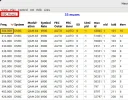
 
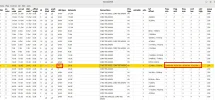
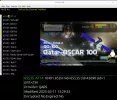
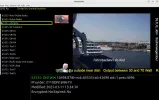
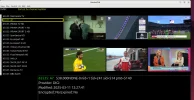
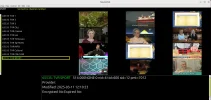
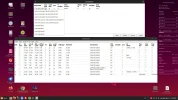
Test with neumoDVB-1.8 version at 25.8E on Radio Amateur TV frequencies with 6983 card.

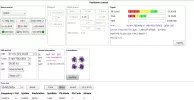
As with Crazyscan, on neumoDVB the LNB must be configured for sub-band frequencies (see pic).

At the time when I tested I found some with low symbol rate, 333, with a stable signal, so I ran those services.

Thanks, @deeptho :Y
 

Attachments

  • config neumodvb for 10490 H_2025-03-11_16-21.webp
    config neumodvb for 10490 H_2025-03-11_16-21.webp
    150.9 KB · Views: 57
  • 10490 H,1500,45,s2-2025-03-11_13-24.webp
    10490 H,1500,45,s2-2025-03-11_13-24.webp
    56.3 KB · Views: 32
  • 10498 H333,-2025-03-11_13-35.webp
    10498 H333,-2025-03-11_13-35.webp
    58.7 KB · Views: 29
  • 11490 h-Qars_2025-03-11_13-31.webp
    11490 h-Qars_2025-03-11_13-31.webp
    80 KB · Views: 27
  • 10499 H-DL1LQJoern_2025-03-11_15-58.webp
    10499 H-DL1LQJoern_2025-03-11_15-58.webp
    81.7 KB · Views: 31
  • 11498 H.333.34-2025-03-11_13-36.webp
    11498 H.333.34-2025-03-11_13-36.webp
    77.5 KB · Views: 38
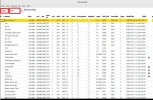
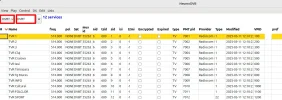
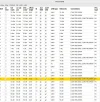
It's a very good idea to have separate lists of services for Satellite, Cable, and Terrestrial. It's easier to access these programs from an individual list, not the whole one, All, as before.

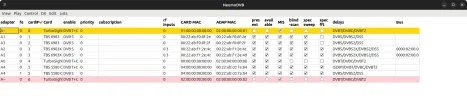
Because the 6590 card has one tuner for Cable/Terrestrial and another for Satellite, the list of adapters in neumoDVB includes four cards and RF inputs.
To scan either cable or terrestrial, I had to choose None so that one frontend doesn't use another, as seen in the picture below.

This way, I could scan muxes and see services on each standard. :Y
 

Attachments

  • 6590_Cable Services_2025-03-12_11-16.webp
    6590_Cable Services_2025-03-12_11-16.webp
    112.5 KB · Views: 35
  • C_Services list_2025-03-12_12-08.webp
    C_Services list_2025-03-12_12-08.webp
    138.3 KB · Views: 33
  • 6590_Config cable_2025-03-12_11-50.webp
    6590_Config cable_2025-03-12_11-50.webp
    33.3 KB · Views: 28
  • neumoDVB-Terrestre_Services_2025-03-12_10-46.webp
    neumoDVB-Terrestre_Services_2025-03-12_10-46.webp
    110.6 KB · Views: 23
  • Terr_Services list_2025-03-12_11-58.webp
    Terr_Services list_2025-03-12_11-58.webp
    77.9 KB · Views: 21
  • 6590_Config Terr_2025-03-12_11-48.webp
    6590_Config Terr_2025-03-12_11-48.webp
    25.4 KB · Views: 34
I have a problem setting up LNB configuration with my recently purchased TBS5580.

The card allocation number is the same for DVB S/S2 and T/T2, and when I choose S/S2, it always gives the T/T2 card standard. More in hope than expectation I also tried the T/T2 card to see if that might give me the S/S2, but it always gives the T/T2 card in the LNB Connections section.

Have I missed something obvious that I can do in the frontend list?

TBS5580 card system choice problem.webpfrontend.webp
 
@Llew,

If I understand correctly, the card has two outputs, one for C/T, and another for S/S2/S2X, although it has the same number for both adapters.
I would choose "None" to the standard I don't use, that is C/T (see above, in my picture, how I did it), I would choose the LNB for the S, if that's what you want to do. This is the only way I managed to use the output desired.

In parentheses, although it has nothing to do with neumoDVB, I want to know if the tbs5580 card uses ChangeModeTool under Windows?
 
Last edited:
If I understand correctly, the card has two outputs, one for C/T, and another for S/S2/S2X, although it has the same number for both adapters.
I would choose "None" to the standard I don't use, that is C/T (see above, in my picture, how I did it), I would choose the LNB for the S, if that's what you want to do. This is the only way I managed to use the output desired.
I should have mentioned that I did try your fix before I changed back again from None satesco, but I still have the DVB-T/T2 card standard tuner in Connections. Moreover, how does it even show in the LNB list (?)
 
@Llew,

I notice that you have several cards on the neumoDVB list, only three are named, 6983,6903x,5580, and there is one not mentioned, but it has a C/T output.

I get the impression that this unnamed card, probably a C/T USB stick, might be causing the problems(?). I'm not sure about this.

But I'd better show how one of the cards(6590) with S/C/T is configured. On the tuner's list for Terrestrial there is no LNB listed. In fact, the three standards are separated on the neumoDVB list (under "Lists"): DVB-S Muxes, DVB-C Muxes, and DVB-T Muxes, as you already know.

So each standard is scanned separately. If you think it helps, here's what the card list looks like and how I choose to scan it.

As you already know, in @deeptho's documentation, there is a special paragraph mentioning how to choose a multi-standard card. I apologize for quoting it in full:

"Which DVB standards you want enabled on the card. Usually you want all enabled, butsuppose that you have a card which supports DVBT and DVBC. Usually such cards have only one connectorshared by DVBT and DVBC. If this connector is connected to a DVBT antenna, then it cannot receive DVBCand you should inform neumoDVB of this by changing the default value "DVB T+C" to "DVB-T".This is essential if you have two such cards in the system, one connected to DVBC and another to DVBTas there is no way for neumoDVB to know which card is connected to which DVB source."
 

Attachments

  • DVBT muxes_2025-04-06_21-54.webp
    DVBT muxes_2025-04-06_21-54.webp
    15.6 KB · Views: 14
  • DVBC Muxes_2025-04-06_21-55.webp
    DVBC Muxes_2025-04-06_21-55.webp
    61.7 KB · Views: 13
  • LNB list_2025-04-06_21-52.webp
    LNB list_2025-04-06_21-52.webp
    126.9 KB · Views: 14
  • tbs6590_Frontend S_C_T_2025-04-06_21-17.webp
    tbs6590_Frontend S_C_T_2025-04-06_21-17.webp
    60.7 KB · Views: 25
LLew,
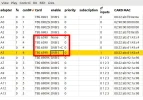
The TBS 5580 card is not officially supported so the name is just the one assigned by TBS,
which is confusing as it is the same for both standards. As a result the DVB/TC and DVB/S
appear both as C5#0. I suspect that one of them will work (ignore DVB-T in the name).

Did you actually try if it works?

The non-named entry is for a card not currently in the system, or some left over from earlier neumo versions.
 
The non-named entry is for a card not currently in the system, or some left over from earlier neumo versions.
deeptho,
That's my TBS6220 T/T2 tuner, working OK as card 4 in frontends list. As you mention, the pinked-out cards are a leftover from when I do a reboot.
Did you actually try if it works?
Not yet, I'll try with some other dvb tool.
The TBS 5580 card is not officially supported so the name is just the one assigned by TBS,
which is confusing as it is the same for both standards. As a result the DVB/TC and DVB/S
appear both as C5#0. I suspect that one of them will work (ignore DVB-T in the name).
Thanks for that. I'll try it again with neumodvb, but it doesn't seem promising now that you have explained the problem.
 
deeptho,
That's my TBS6220 T/T2 tuner, working OK as card 4 in frontends list. As you mention, the pinked-out cards are a leftover from when I do a reboot.

Not yet, I'll try with some other dvb tool.

Thanks for that. I'll try it again with neumodvb, but it doesn't seem promising now that you have explained the problem.
You seem to be confusing card number and adapter number
 
In parentheses, although it has nothing to do with neumoDVB, I want to know if the tbs5580 card uses ChangeModeTool under Windows?
Yes, TBS5580 has that tool. Shame there's not something similar for Linux.

I've now given my laptop the TBS5580 to use in Windows, as I'm not getting far with it in neumodvb. The TBS5927 can come back to the PC.

Crazyscan with the 5580 with the laptop. TBS5580 28.2E.webp
You seem to be confusing card number and adapter number
Sorry, yes meant A0.
 
Last edited:
i have the problem compiling tvheadend you patched, under Arch Linux, some packages when trying to use make seems like links are down such as nasm and so on can you help me with this?
 
where can we buy this neumo DVB?
 
Haven't you read the first post ?
 
I have just released neumodvb-1.8. Mostly bug fixes, but also some new features, such as the cable list,
which allows easily updating the LNB configuration when changing cards, or attaching cables to different
inputs.


Would you please be able to tell me if the ubuntu 23.10 debian installation package is updated with the new version 1.8 and if ubuntu 23.10 O/S is still OK to install for use with nuemoDBV ?


Thank you.
 
Would you please be able to tell me if the ubuntu 23.10 debian installation package is updated with the new version 1.8 and if ubuntu 23.10 O/S is still OK to install for use with nuemoDBV ?


Thank you.

23.10 was/still is OK for me with neumoDVB 1.8. No further OS updates available now with that release.

Presently I'm using neumoDVB on Ubuntu 24.04 with 1.8.
 
23.10 was/still is OK for me with neumoDVB 1.8. No further OS updates available now with that release.

Presently I'm using neumoDVB on Ubuntu 24.04 with 1.8.


Thank you for your reply.

Did you setup nuemoDVB from the *.deb package or did you compile it?
I am just wondering if the *.deb package option might be a simpler approach for me as a complete novice with Linux compared to the compilation route.
 
Thank you for your reply.

Did you setup nuemoDVB from the *.deb package or did you compile it?
I am just wondering if the *.deb package option might be a simpler approach for me as a complete novice with Linux compared to the compilation route.
Got the amd64 .iso desktop releases from Ubuntu, installed them on my PCs. I don't know if there is a .deb package for 24.04. I didn't go down that route.
 
Would you please be able to tell me if the ubuntu 23.10 debian installation package is updated with the new version 1.8 and if ubuntu 23.10 O/S is still OK to install for use with nuemoDBV ?


Thank you.
On Ubuntu 23.10, I installed and worked with neumoDVB without problems (see previous pages).
That was last year, and after Ubuntu 24.04 LTS came out, I could install it without problems. I must add that this version works perfectly with Kernel version 6.8.0-39-generic, 6.8.4-060804-generic, now with 6.8.8-060808-060808-generic.
I mention these Kernel versions because both @deeptho's drivers and neumoDVB install without problems on Ubuntu 24.04 LTS.

But with Kernel 6.11.0-24 or 25, last released, you can also install the driver and neumoDVB on Ubuntu 24.02, only there is a problem with the resolution, precisely what happened to me the first time I tried to work with neumoDVB under Ubuntu.
I couldn't fix the resolution.
I would like to know if anyone is working with 6.11.0- 25-generic without having problems with resolution(?).
That's why I reverted to previous Kernel versions, 6.8.0..., which I'm working with now.
 
Last edited:
Don't know about that 6.11 kernel in Ubuntu, but in Fedora using kernel 6.11.9-100, resolution is no problem.

neumoDVB on Fedora 6-11-9.webp
 
Back
Top