neumoDVB

Would anyone please be able to tell me what is the difference between the TBS6904-X and the TBS6904-SE please?
Also, are both these cards supported with neumoDVB custom blind scan drivers, the list of card with custom drivers is below but the TBS6904-X is not listed by name?

stid135-based cards: tbs6909x, tbs6903x, tbs6916
stv091x based cards: tbs5927
si2183 based cards: tbs6504
tas2101 based cards (incomplete): tbs5990, tbs6904
m88rs6060 based cards: tbs6904se

Thanks for any help.
 
By not working, do you mean nothing happened when you selected the Cross, or the options didn't work as expected?


Nothing worked, I got no alteration to the spectrum appearance. It is not an issue for me as the magnifying glass used with the box border does what I need.
 
That is indeed what it does to help the chip to find the correct value easier.


Thank you for your reply.

Is the carrier width stored anywhere after a spectrum scan or blind scan?
I could not find any details of it in the DVB-S Mux lists.
 
Thank you for your reply.

Is the carrier width stored anywhere after a spectrum scan or blind scan?
I could not find any details of it in the DVB-S Mux lists.
/neumo/spectrum
 
Sorry, have not read through all 73 pages here.

Am I right that Ubuntu 24.04 LTS is not supported? I even have no chance to install the deeptho driver. Seems the kernel is too new.

Post in thread 'neumoDVB'

This post says, that even Ubuntu 22.04 is not working.

Any advice, or do I really need to install a different distribution, like Fedora?

But: The TBS driver from GitHub works without problems (audio and video ok).
You can install deeptho drivers and work on Ubuntu 24.04 without any problems.

I would also like to add that I have worked with deeptho's application on Ubuntu 20.04, 22.04, 23.10, and now with 24.04.

For Ubuntu 24.04, avoid kernel 6.11 because it causes resolution issues, although I had no problems installing the drivers.

With kernel 6.8, you can install and work on Ubuntu 24.04.

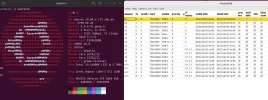
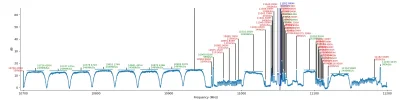
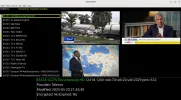
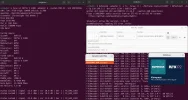
Here are tests with neumoDVB at 1.0W with the 6909x card on Ubuntu 24.04, and NRK DAB+ with @deeptho's drivers.
 

Attachments

  • Ubuntu 24.02_drivers_neumoDVB_2025-05-20_21-08.webp
    Ubuntu 24.02_drivers_neumoDVB_2025-05-20_21-08.webp
    160.3 KB · Views: 31
  • 6909x_10700-11200 H.webp
    6909x_10700-11200 H.webp
    68 KB · Views: 19
  • neumoDVB-Services_2025-05-20_21-28.webp
    neumoDVB-Services_2025-05-20_21-28.webp
    131.1 KB · Views: 15
  • 1.0W_NRK DAB+_2025-05-20_20-51.webp
    1.0W_NRK DAB+_2025-05-20_20-51.webp
    180.5 KB · Views: 28
Hi,

Would anyone please be able to help resolve a problem neumoDVB?

My version of ubuntu 24.04 LTS did some automatic updates even though I had been refusing update notifications and thought I had turned them off. After restarting the PC, neumoDBV now crashes every time I run a blind scan after a spectrum scan. I have tried the blind scan several times and it crashes every time.

The card I am using is a TBS6904SE.

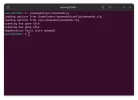
I have attached a screenshot of the terminal window below.
Are there any log files I can locate and upload to the forum that might help to identify the problem?

Thanks for any assistance.

.
Screenshot from 2025-05-22 14-12-49.webp
 
Hi,

Would anyone please be able to help resolve a problem neumoDVB?

My version of ubuntu 24.04 LTS did some automatic updates even though I had been refusing update notifications and thought I had turned them off. After restarting the PC, neumoDBV now crashes every time I run a blind scan after a spectrum scan. I have tried the blind scan several times and it crashes every time.

The card I am using is a TBS6904SE.

I have attached a screenshot of the terminal window below.
Are there any log files I can locate and upload to the forum that might help to identify the problem?

Thanks for any assistance.

.
View attachment 162757
-Find neumo.log in "tmp",

-See if, after the update & upgrade, a different kernel than the initial one is installed(?).
 
-Find neumo.log in "tmp",

-See if, after the update & upgrade, a different kernel than the initial one is installed(?).


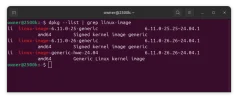
I seem to have two kernels installed,
6.11.0.25 and 6.11.0.26
Perhaps the 6.11.0.25 was installed with the ubuntu installation from usv and the 6.11.0.26 was done via an update?

Neither are the 6.8..... version which is supposed to remove resolution issues. Perhaps I might be better installing the 6.8... kernel and removing these two I have?

.
Screenshot from 2025-05-22 20-00-10.webp
 
I seem to have two kernels installed,
6.11.0.25 and 6.11.0.26
Perhaps the 6.11.0.25 was installed with the ubuntu installation from usv and the 6.11.0.26 was done via an update?

Neither are the 6.8..... version which is supposed to remove resolution issues. Perhaps I might be better installing the 6.8... kernel and removing these two I have?

.
View attachment 162778
That's the two kernels you have in /lib/modules. The kernel you are using is the latest that you have installed - 6.11.0-26, if that's the one you are booted into.

To confirm, do uname -a in terminal.
 
Attached below is the output from the terminal command of uname -a
It might explain why the Spectrum Maltese Cross was not working when I tried to use it the other day?

.
Screenshot from 2025-05-22 20-45-30.webp
 
I seem to have two kernels installed,
6.11.0.25 and 6.11.0.26
Perhaps the 6.11.0.25 was installed with the ubuntu installation from usv and the 6.11.0.26 was done via an update?

Neither are the 6.8..... version which is supposed to remove resolution issues. Perhaps I might be better installing the 6.8... kernel and removing these two I have?

.
View attachment 162778
Your picture shows that the resolution did not change after you installed deeptho's drivers. That's why I would like to know if you have ever scanned with neumoDVB with kernel 6.11.0-25?

As I said in another post, I had problems with this kernel, so I installed the 6.8 kernel.

Probably deeptho's drivers are not installed correctly(?).
 
Update:

I scanned another satellite with neumoDVB and the blind scan proceeded OK.
It looks like it is the specific satellite and frequency that causes the crash?
 
Update:

I scanned another satellite with neumoDVB and the blind scan proceeded OK.
It looks like it is the specific satellite and frequency that causes the crash?
This is why developers invented log files and such.
 
This is why developers invented log files and such.

Yes, I understand that.

However, as a complete novice with Linux I am unsure which log file I need to find and where it is located.
@satesco indicated there is a neumo.log in the /tmp folder. If this is the log file I need to help identify the issue I will upload it to the forum.
 
Yes, I understand that.

However, as a complete novice with Linux I am unsure which log file I need to find and where it is located.
@satesco indicated there is a neumo.log in the /tmp folder. If this is the log file I need to help identify the issue I will upload it to the forum.
Indeed, assuming the problems is related to neumodvb and not to the drivers or something else.
 
Has anyone managed to compile neumodvb on Debian13? I get clang error when start compiling process. Could it be kernel problem (6.12)? Earlier this year I've managed to run neumo on Debian12 with kernel 6.10.
 
OK, it seems I resolved clang error by googling. Looks like it was invalid linker name and I've found that binutils-gold package was missing. Manage to run make -j'nproc' but now hangs on 11% . Now investigating further...
 
Perhaps someone with better linux knowledge could get this. It's Debian13 clean installation from offline dvd image (no update issued, just manually added sources list). Obviously I'm missing something but don't know what. So far I managed to build tbs drivers. I'm just guessing but I have home, var and temp on separate partitions. Does that change the way of compiling it? Here's a brief console output at the end...
 

Attachments

Back
Top