OCTAGON SF8008 E2 4K UHD

I have two separate Dishes connected to the Receivers...both 1.2 m.
The one with the Dreambox is registering a 76% Snr on a fringe freq whilst the other with the Octagon is displaying 69%...But I
know for a fact that the Dish connected to the DBox gives a slightly better overall reception than the other....no matter how much
I tried to align the other perfectly, so in realty I cannot say with certainty if the 21660 is better or not.
 
Last edited:
The only way to measure the sensitivity of a receiver is to go on a satellite or signals are weak, even very weak, and see which receiver can still receive a good image while the other has a bad image.
the% does not mean anything. This is not a unit of measurement (each receiver has its% system, we can not compare)
If you take the dB it will already be a better indication.
 
The only way to measure the sensitivity of a receiver is to go on a satellite or signals are weak, even very weak, and see which receiver can still receive a good image while the other has a bad image.
the% does not mean anything. This is not a unit of measurement (each receiver has its% system, we can not compare)
If you take the dB it will already be a better indication.
So I will give signal strength in db - One is showing 6.25db (Octagon Dish) whilst the other (Dreambox Dish ) 9.25db (both on 70East)
and the Channel is MTA HD. Now the funny thing is this.....On this Sat besides receiving the MTA Channel there is another channel (besides others)
goes by the name of U-News Channel...Now on the octagon I am locking this channel with a 7.25 db and clearing BUT on the dreambox I have
a 9.00db signal but not locking and naturally it's not clearing. The Dreambox is a 900UHD Receiver with a Si2166D Tuner and Newnigma Image.
I cannot explain this and btw both Dishes are tuned for maximum signal.
 
Last edited:
thank you very much, for these tests.:Y
This is much more precise as an answer, and we can deduce that on these frequencies,
the 8008 is more sensitive than the 900 with an SI2166D.

best regard
 
@MCelliotG
in current driver we changed code for SR, support from min. SR 100 - until - max 80000.
1xx SR well tested, works. High SR example 47300 Optus D1 tested, well. 60000 need test too.
The tests will be interesting to see, indeed. For the moment you can ask Silabs why Asturias Mux is so problematic with their tuners...
 
thank you very much, for these tests.:Y
This is much more precise as an answer, and we can deduce that on these frequencies,
the 8008 is more sensitive than the 900 with an SI2166D.

best regard
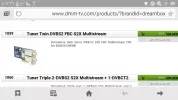
You use dreambox 900 with tuner twin DVB-s2 FBC S2X Multistream ?
 

Attachments

  • image.webp
    image.webp
    51.5 KB · Views: 46
zorbua,
I know that you had si2166b - that was tuner I ask about
stephan94 Is absolutely right about way we compare two tuners sensitivity - the one with less breakups Is better
 
zorbua,
I know that you had si2166b - that was tuner I ask about
stephan94 Is absolutely right about way we compare two tuners sensitivity - the one with less breakups Is better
Hi I just came in now....My Dreambox 900 has a twin Tuner S2x Multistream NOT FBC.... but my other one 920 UHD yes.
 
OCTAGON SF8008 4K UHD E2 Treiber (Driver) Update 21.03.2019

1: Try HDR issue fix (please test)
2: Update Hiplayer for Kodi fix video sync issue
3: Try fix Kodi stutter issue (please test)
4: Add more character for Frontpanel led (Display).
5: Fixed crash when handle some pes packet.
6: Remove CEC 0 NOT VALID! message on HDMI CEC driver.
7: Fixed the screen blank for skip media when refresh rate set to "Auto" mode.
8: Update: hi-dvb.ko, vtnerc.ko, hi_hdmicec.ko, oled.ko, libreader, stb-kodi-sf8008_17


Ab morgen in den Images!
From tomorrow in images!
Yarinki imajlardan itibaren!
 
SES-6 @ 40.5° West

Octagon SF8008

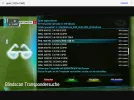
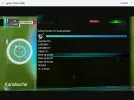
Hat T2MI im Blindscan mit eingelesen und geöffnet. (Danke an saxxx)

Has T2MI read (scan) in Blindscan and opened. (Thanks to saxxx)

Kör taramada T2-MI transponderi bulup aramayi basarili ile acmistir.
 

Attachments

  • Screenshot_20190329-210204.webp
    Screenshot_20190329-210204.webp
    75.7 KB · Views: 24
  • Screenshot_20190329-211030.webp
    Screenshot_20190329-211030.webp
    40.3 KB · Views: 23
  • Screenshot_20190329-211108.webp
    Screenshot_20190329-211108.webp
    100.6 KB · Views: 22
Speaking of the screenshots I have detected a very serious driver issue with png transparency. I will give you details later because it affects all skins but on mine it's very apparent since I use multiple overlayed transparencies which SF8008 cannot display properly!
 
I have my friend send me two screencaps, so you can see the problem in detail.
In general, SF8008's png driver does not blend images well when they are overlayed, and renders unecessary grey when there is a gradient to alpha clear.
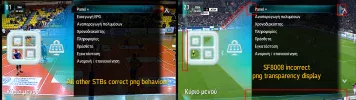
Look at example 1. On the left we have the correct behaviour on all other STBs and on the right the erroreous blending and rendering on SF8008.
example1.webp
As you can see the colors are way too greyish and faded, especially on the blue/turquoise gradient png graphic, also the fade towards the clear background is also grey. Around the white pngs there is also a grey shadow where it should be a light blue shadow that should be barely noticeable.

Also, on the lower right, the transparent black png is below in z position the escalating transparent blue and should not be blended into it (not even flagged to blend in the skin.xml). These are also two different screens that should not blend into each other. Since the blue line is over in z position it should overlap the black one and not blend into it.

Moreover, the blue selector is not fading to clear as it is expected but renders an undesired blue color.
The clock on the top right is even a greater example. It should appear transparent black but it's completely grey.

The same fade error and grey tones are apparent in the second example.
example2.webp

The left transparent blue panel should fade to a clearer transparency, but SF8008 renders a grey color. Also the grey contour shows even more on black background.

Now, when a skin is not using png transparency or not png overlays, the user may never notice the issue, but that does not mean that pngs are rendered correctly. This behaviour reminds me of the rendering of 8bit alpha transparency! On the above examples, all graphics shown (except the white ones) are 32bit transparent. Thus, it seems SF8008 is unable to render 32bit transparency correctly, it downgrades it to 8bit quality. And blends all graphics by setting the alphatest flag to blend overriding all other skin flags.
 
My friend has tested SF8008 with OpenPLI and OpenATV, so if it was an image issue, this problem would appear on all other receivers and would be different per image. This issue is simply SF8008 specific, I have not confirmed if it happens on other Hisilicon boxes as well, but it's not a correct behaviour.
Besides I have tested OpenVIX with my skin and I saw no blending issues there either (on other receivers of course).
 
Back
Top