RTL1090 thread

Vipersan

Emmett Browns Ghost
My Satellite Setup
IP9000HD +
TD110 Dish and TD88 Dish in Tandem
66°East to 60°West.
AZbox PrmHD + OpnbxS9HD + Skybox + DrHD F15
2x VboxII AZ-EL
2 m+ Alcoa PF + BSC421 C-Band lnbf...
+SS2/TwHnS2-3200 pci/TBS6925 pci
1.5 Fortec Star -Gbox - HtoH Ku/Ka/C
My Location
UK
DSCF0003.webp So ..starting a new thread ..Aero related ...but this time for 1090 mhz data/ plane postion data reception..
Made myself a collinear antenna this afternoon specifically for 1090 mhz ..
The antenna is working fine ..and have a small lna on it ..
Tried to install RTL 1090 with SDRplay ..
BUT ...it is NOT compatible atm ..so I had no choice but to install an RTL dongle (R820T chip) which is ..
So once more using Zadig bulk usb drivers ..
Well ..the whole process of installing RTL1090 is fully automated ...which is nice ...and it automatically identifies and install using the RTL dongle ..
Once up and running it autotunes without SDR# to 1090 mhz and starts grabbing plane data ..
To prove this I have taken 2 screen grabs ..
one is pre antenna connected ...the second is a grab less than a minute after the Collinear is connected ..
Call signs are collected and displayed ..
The lates version of RTL 1090 also has a scope on which planes are plotted ..
Sadly it doesn't look as though the screens/windows can be expanded ...so looks 2 b written for low res only..
Nontheless ..I'm impressed with the ease of installation ...the software...and the sensitivity of the antenna.
Surprisingly simples to get up n running.
rgds
VS
Pre antenna.webp post antenna 1.webp scope.webp
 
Have you tried running RTL1090 on the PC that is running JAERO? I found that JAERO stops decoding as soon as RTL1090 or ADSB# (an old version which works with RTL sticks) is enabled. JAERO still shows signals on the spectral display but the constellation is a mess if it does anything at all. Just running the ADSB decoders did not stop JAERO though, clicking "start" stopped it decoding. I had to run ADSB# on another PC.

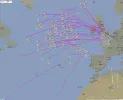
The Merged feed on VirtualRadar works well with the Mode-S tracks joining JAERO ones if the time outs are set long enough. The preview http://www.virtualradarserver.co.uk/Preview.aspx allows the long time outs. In the screen shot, tracks in the gap between the SE UK & N. France and AOR can be seen to have been filled in. I found that setting ~2 hour tracking and 30-45 mins display time outs worked reasonably well. The local area becomes a bit of a mess if all trails are enabled though.
Screen Shot 2016-04-13 at 1.34.40 PM.webp
 
Last edited:
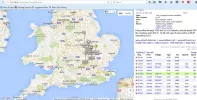
Hadn't too much time this morning ...but RTL1090 was left running overnight and logged a lot of data ..
This morning I managed to install Virtual Radar Server ...and eventually get it to communicate with RTL1090 ..so I guess some progress is being made.
This is the my screen grab so far ..
I need a bigger screen to display so many facets/windows without overlap....
I'm working that ..
;)
rgds
VS
Radar image.webp
 
So I'm guessing this is working ...
Here is another screengrab ...
sadly time to go open the shop..
no more playtime till later.
lolEIDEJ.webp
 
I am tempted to build this antenna myself, because it seems so, ehrm, doable.
What do you use for LNA?

Why is the scope centered around northern Germany?
Did you move recently? :)
The thing is ..I aint set the scope up properly yet as I'm still working on the antenna ..
Thing is ...I did have an lna connected ..but the battery quickly went flat ...so took it out of the loop and just connected the antenna directly to the RTL dongle ..
Still getting excellent results ..
antenna is indoors and under plastic now ..
See the antenna thread update..
rgds
VS
 
Being somewhat at a loose end today, and now in the possession of an RTL2832 USB stick, I thought I'd try it out on the Aero stuff.
I constructed a collinear coaxial antenna - a chain of eight elements in a piece of plastic tubing - and rooted around for some antenna bits and pieces to clamp it to the TV mast.

So far so good, so I fired up the RTL1090 and Virtual Radar Server software, and I seem to be receiving some callsigns.

However, comparing with VS's screenshots, I 'm not getting Radar info in the RTL1080 screen. Do I wait for the info to appear eventually?

I don't have any Google maps showing with the Virtual Radar Server, VS's Local Address points to GoogleMap.htm, but I've no idea where I find that.

Much to learn, obviously :rolleyes:


Antenna_4.webp

Screen_1.webp

Screen_2.webp
 
Being somewhat at a loose end today, and now in the possession of an RTL2832 USB stick, I thought I'd try it out on the Aero stuff.
I constructed a collinear coaxial antenna - a chain of eight elements in a piece of plastic tubing - and rooted around for some antenna bits and pieces to clamp it to the TV mast.
Which design did you use?

There seems to be several variations on the net, they all agree on the coco bit, but the ends vary (some have resistors, some have half-wave-extension, som have ferrite rings...)
I need to chose which one to go for...

(I wish I had a week off to start experimenting with all this stuff, and just build them all!)
 
Try selecting 'Old Desktop Version' in the drop down menu where it says.... http blah blah virtual radar
I couldn't get the 'default' to work either ..
Should open up a web page then Llew ..
rgds
VS


did you also change the receiver setting in Virtual radar > tools> options to AVR or Beast ?
and the port setting to match 1090 (31001) ?
 

Attachments

  • old desktop version.webp
    old desktop version.webp
    104.6 KB · Views: 3
Last edited:
Which design did you use?

There seems to be several variations on the net, they all agree on the coco bit, but the ends vary (some have resistors, some have half-wave-extension, som have ferrite rings...)
I need to chose which one to go for...

(I wish I had a week off to start experimenting with all this stuff, and just build them all!)
From what Ive seen ..they all perform much the same ...
The critical thing being the element length and the spaces between each active element ..
The beauty of these antennas ..whichever you choose is they are cheap and easily constructed ...
The longer they are ...( the more elements ...) the higher the gain..
:D
 
Last edited:
Which design did you use?

There seems to be several variations on the net, they all agree on the coco bit, but the ends vary (some have resistors, some have half-wave-extension, som have ferrite rings...)
I need to chose which one to go for...
Just the basic one, eight bits of cable, screen and centre alternately connected. No terminated end, no stubs, and not amplified to dongle.

Coaxial Collinear Antenna for ADS-B
 
Try selecting 'Old Desktop Version' in the drop down menu where it says.... http blah blah virtual radar
I couldn't get the 'default' to work either ..
Should open up a web page then Llew ..
rgds
VS


did you also change the receiver setting in Virtual radar > tools> options to AVR or Beast ?
and the port setting to match 1090 (31001) ?
OK VS, I'll try that in the morning, I've taken the antenna down now for sealing the cable end.

Yes matched the Port but didn't do that Option setting. Still new to me this one. Thanks anyhow, something to do tomorrow.
 
Thanks, got the map, but nothing seems to track, even though in RTL1090 there's a bunch of aircraft around my locality. Maybe it's because there's no Radar info in the RTL1090 Radar column?


VRS Map.webp
 
Thanks, got the map, but nothing seems to track, even though in RTL1090 there's a bunch of aircraft around my locality. Maybe it's because there's no Radar info in the RTL1090 Radar column?


View attachment 92479
Cant check atm ..but I'll go through the settings with you this evening.
rgds
 
Cheers, I'll do a bit of research, probably something I've missed setting it up.
 
Success ;)

Seems to be tracking OK now -


Virtual Radar Tracking.webp
 
Go on then ...
What was the problem ??
 
No idea VS. I don't recall tweaking anything, other than shutting the progs down and restarting again :confused
 
No idea VS. I don't recall tweaking anything, other than shutting the progs down and restarting again :confused
Your map display does look a bit different to mine ...
are you now using the 'default' version ?
Pretty pics of hairy planes n stuff ..
I dont get those ..
???
 
Your map display does look a bit different to mine ...
are you now using the 'default' version ?
Pretty pics of hairy planes n stuff ..
I dont get those ..
???
No, Old Desktop. But now, I only get what you had - and clicking on a flight, just info of its present manoeuvre.


Flight Tracking.webp
 
Back
Top