RTL1090 thread

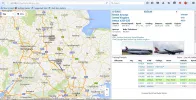
No, Old Desktop. But now, I only get what you had - and clicking on a flight, just info of its present manoeuvre.


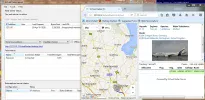
View attachment 92499
Wierd that we cant use a later version of VR ...
most curious..
but your previous screen grab definately showed a different data window ..with pics ?
 
Yes, I can't replicate that one now. Back to the drawing board then.

Also, In RTL1090, I still don't get info in the Radars column as you do.
 
I wonder if you are required to register VR to access these 'features' ....Certainly not found any way to do so as yet ...and was convinced it was free to use ?
As you say Llew ..huge learning curve all this ..

As to the data under Radars ...
I wonder if this is extra data I receive being relatively close to Manchester Airport ???
Someone should explain all this to us ?
 
Last edited:
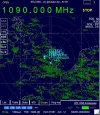
I have pics back now. I had to go to Scope in RTL 1o90.


CaptureVRS Try Again.webp


Capture Scop in RTL1090.webp
 
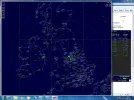
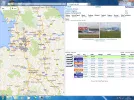
Well ..FWIW I have discovered that you can seperate the 'radar scope image ' from rtl 1090 ..and expand it to fill the screen ..
go to scope and press the three up arrows at the top left ..
big scope.webp
 
Yes, that's what my RTL1090 pic was in my last post. Didn't span it there tho', did in an earlier post.

It seems that VRS needs a lot of input from RTL1090 to function well.
 
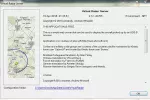
Still not convinced we aren't running different versions of VR Llew ..
I'm running 2.3.1.40765 ...apparently ..


Not once have I seen a web page VRS display such as the one in you screen grab above ..
No pretty plane pics for me so far..
 
That's the same as mine VS. Odd indeed.


VRS Version.webp
 
I'll have to have a go at one of those simple collinear antennas made from coax - Ive got enough junk lying around to make it worthwhile. The only thing Im missing is a dongle - whats the preferred type?
 
I'll have to have a go at one of those simple coinear antennas made from coax - Ive got enough junk lying around to make it worthwhile. The only thing Im missing is a dongle - whats the preferred type?
There are many to choose from but it is fairly important that it uses the right chipset..

"Be sure to get a stick based on the R820T/RTL2832U chips, as the earlier E4000 chip may not tune to the required 1090 MHz frequency"
I'll take a look on fleabay for you ..to see whats out there ..currently
rgds
VS

..so something like this :-
NooElec NESDR Mini RTL-SDR & DVB-T USB Receiver, RTL2832U & R820T Tuner TV28T v2

I would also recommend you buy a suitable connector/adapter in order that you can connect your coax /antenna ..
I'll let you decide on which fitting ..
there are quite a few ...F connector to mcx ....BNC to mcx ...SO239 to mcx etc ..
it just depends what you intend to terminate the coax with ..but crucially the above dongle uses an MCX fitting ..
like this ..
BNC female to MCX male adapter (BNC F to MCX M) - fits RTL-SDR dongle
 
Last edited:
I'll have to have a go at one of those simple collinear antennas made from coax - Ive got enough junk lying around to make it worthwhile. The only thing Im missing is a dongle - whats the preferred type?
Nice video showing coax collinear construction -


A possible hint VS - Make sure your address in the map is 127.0.0.1 VirtualRadar/desktop.html, not /GoogleMaps. See my screenshot in post #24.
 
A possible hint VS - Make sure your address in the map is 127.0.0.1 VirtualRadar/desktop.html, not /GoogleMaps. See my screenshot in post #24.
Fair enough Llew ..but how and where to edit to prevent it adding the words ..'googlemaps' ?

Looking at the map you opened higher up the thread ..it simply says 127.0.0.1/VirtualRadar/desktop.html
In my case it opens as a webpage
http://127.0.0.1/VirtualRadar/googlemap.htm

That much is obviously different ...but why ..?
Perhaps something different during the setup ?
I could uninstall and re-install ..
ignoring the request for a port number (default 80) and the 'configure firewall so other computers on your network can access' option ?
 
Last edited:
I've shut it down now, having bought the antenna in from its temporary site at ground level. I'll check tomorrow.

If I remember, I just changed from Default to Desktop Version, but maybe that doesn't do the business.
 
Stuck the antenna in the kitchen to try .

I'm using Desktop Version, not Old desktop Version - If I use the latter, I get /GoogleMaps then.


Capture_VRS.webp
 
So ..how are you using Desktop version and not 'old desktop version' ..
If I select that from the dropdown and try to use it ..
No page is loaded and errors can be read bottom left corner of blank web page ..
this is mighty confusing and bloody frustrating..
doh!!
Perhaps it's a browser issue ..?
are you using explorer ..and if so which version buddy ?

did you install from the link in the picture ? ...and did you install anything else ?

I'm at a loss to expain the differences now ???
 

Attachments

  • VRS.webp
    VRS.webp
    43.2 KB · Views: 2
Last edited:
Hi VS. Yes, that's the Download I installed. I'm putting the antenna up permanently today, just sorting the cabling out through the wall upstairs.

I'll hang the antenna up temporarily in a mo to run VRS. I don't think I have anything different to you in the software, I simply copied what you have done in your posts.

Could be a browser issue I suppose. I'm using IE11 version 11.0.9600.18204.
 
Hang on, no, I've just realised 127.0.0.1/VirtualRadar/desktop points to Firefox for me. see the Firefox icon at top of page in post #24.
 
Sorry, should have noticed before. Is there an option in VRS to change the browser?
 
IE11 VRS.webp
Hi VS. Yes, that's the Download I installed. I'm putting the antenna up permanently today, just sorting the cabling out through the wall upstairs.

I'll hang the antenna up temporarily in a mo to run VRS. I don't think I have anything different to you in the software, I simply copied what you have done in your posts.

Could be a browser issue I suppose. I'm using IE11 version 11.0.9600.18204.
Sorted Llew ...
You may remember in the Optiplex build thread ...I turned off all updates from MS ...on account this constant background searching was using well over half my CPU capacity ..
Well I had turned it off BEFORE IE had updated ..as at the time I had no use for web browsers on the dedicated SDR receiver ..
So stuck in the stonage at IE8.xx
Done a manual upgrade to IE11 ..and now runs the latest desktop version..
Ya live n learn I guess..
rgds
VS
 
Last edited:
Back
Top