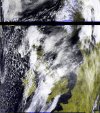
Satdump software & wxsat reception

Will see in about an hour and 20 min.

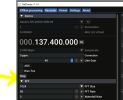
Looking for how to turn the decimation off, and do you use the LRPT 72 K or 80 K on the meteor settings?
 
Stop the radio

1713216523307.png

then change it to 1.

Restart the radio

Meteors are normally 72k, although apparently M2-4 was testing on 80k early this morning - its reverted to 72k now.


Try changing the centre frequency to 137.4 like I have too - see if that helps
 
I have that set to 1, will try the offset to 137.4, find out in about an hour
 
I dont really have any evidence that 137.4 helps but it seems to work for me.
 
I can always change it back.
 
Got zip on that pass, and it was a close one, they must turn it off when it's over me.

I might try the 1.7 GHz freq.
 
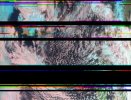
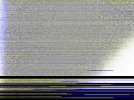
Got zip on any frequency for the Meteor satellites, investigating where my mid scan noise problems are coming from., this is causing the blank areas on some of the Meteor scans, as all I'm getting are the tops and some bottoms of the downlink data.

Meteor M2-3a.jpg
 
Thats pretty typical for Met M2-3. The signals are noisy at the best of times. Ive seen suggestions vdsl2 sinals can be responsible for some of the noise
 
I don't think I have anything like that out here in the boonies where I'm located.

However I'm thinking it may have something to do with Starlink uplink signals, as a few around here have started to use that service, one neighbor close by has a panel antenna on the roof, will check to see what freq's that service is using.
 
OK checking on Starlink freq's, it works the the 14 to 14.5 GHz band, so that's out.

I did a sweep of the 5G band and found my 5G uplink at 1899.7 MHz, but no harmonics for that freq, my 5G downlink is at 2093.3 MHz, with no harmonics.

All sweeps done on SDR console.
 
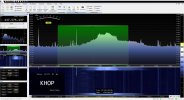
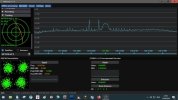
OK, I think I found the problem (I hope) I monitored the 137 MHz band for a bit and this popped up (see photo) this a harmonic or some intermod from one of the local (35 miles away from me) FM radio stations at 95.1 MHz, it comes and goes, but it's very strong.....So I have ordered an LNA with a 137 MHz band-pass filter to see if that helps out.

Interfearance.jpeg
 
I get the same results.Sometimes a broken image .more often than not a file called product.cbor.Twice recently the satellite path was straight through the center of the tracking target I just got a black image.the last one yesterday I did not even get a signal.If I find the problem I will post it.
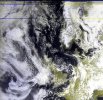
First scan this morning a good image from M2-3,and a couple of earlier duds .
msu_mr_rgb_221_corrected.jpgmsu_mr_rgb_321.jpgmsu_mr_rgb_221.jpg
 
Something is not right.This is the 21.09 Meteor 2-3 pass a good signal poor image.
m2-3.jpgmsu_mr_rgb_221_corrected.jpg
 
Thats exactly what I get in the late evening with M2-3. The bright area lower right seemds to be sunlight out to the northwest as the image will probably be inverted.
 
It is certainly a stroppy satellite this one:)I got a good image from the 11.22 pass this morning #152
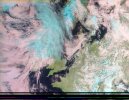
 
The new LNA with the 137 MHz band-pass filter came today, didn't see much of an improvement, but it's still early, the problems with the FM radio station bleeding in is gone, so that's a big help, waiting for the next pass of the Meteors.
 
OK, got zip on M2-3 on the last pass, not a peep, again I'm wondering if they are turning it off when it's over North America.
 
And it looks like the next few passes are not going to work too good as NOAA-18 and 19 will be right in the way, not much can be done till they get out of each others way.
 
Although it is a bit of hassle I have been disabling the NOAA sats in sheduling if they clash with the M2-3 pass.Just unticking Live, the sat still scans.So I delete the offending Satellite.Then I have the hassle of reinstalling it.It Dos'nt seem to be doing me any good though.:)
 
Last edited:
Back
Top