Visiosat bisat - loss of signal during bad weather

OK.
You could let your old ones dry longer (can you easily open them?), and keep them for later trying/checking.
They wouldn't be the first that come out unharmed, in the end....

Greetz,
A33
Looks like that you are right. They seem to have recovered. I got the new ones but I am holding fire for now.
Thank you.
 
Today I had bad signal again on Hotbird, I went to check it up and just checked if the LNB had moved and checked the cables, nothing else as the LNB seemed all solid there. After doing that I seem to be back with good signal. I wonder what may have happened. Any ideas?
 
Today I had bad signal again on Hotbird, I went to check it up and just checked if the LNB had moved and checked the cables, nothing else as the LNB seemed all solid there. After doing that I seem to be back with good signal. I wonder what may have happened. Any ideas?
Local interference? Failing lnb?


You did sort out the skew of the lnbs? In western Europe they should be twisted round so the cable entry is around "7 o'clock" when facing a fixed dish dish - this is VERY important as the cross polarity supression will be weakened if its set incorrectly. A few degrees out either way wont make any difference but grossly out will be bad.
 
Local interference? Failing lnb?


You did sort out the skew of the lnbs? In western Europe they should be twisted round so the cable entry is around "7 o'clock" when facing a fixed dish dish - this is VERY important as the cross polarity supression will be weakened if its set incorrectly. A few degrees out either way wont make any difference but grossly out will be bad.
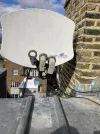
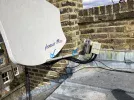
Yes to the skew - I think. See photo. The puzzling thing is that the issue stopped as I went up to check and touched the LNB (just touched it to check that the bracket was tight and it was) and moved the cables.IMG_8927.webp
 
Thinking about it I also pushed down a bit the LNB cable protection. There could be some loose cable somewhere but then it would need to be in two different cable run downs as two receivers exhibited that problem.
 
It is happening this afternoon too. Randomly HB channels go choppy. I wonder if the multi switches are at fault. They seemed to have recovered after getting wet but maybe I should change them. The other option is some kind of fault in the newly bought LNB. Or the interference. No issues on Astra.
 
Are the problems still in two receivers, simultaneously?

After your rain incident, could it be that water did ingress in the cables from the Hotbird LNB to the switches?

It is all hard to assess, from a distance....

Greetz,
A33
 
It is happening this afternoon too. Randomly HB channels go choppy. I wonder if the multi switches are at fault. They seemed to have recovered after getting wet but maybe I should change them. The other option is some kind of fault in the newly bought LNB. Or the interference. No issues on Astra.
Sounds like it's a cable termination problem at the LNB end. How long have those cables been up there?

Cables should come out of the LNB with a loose curve and then be cable tied along the LNB arm in order to take the weight off them and long term wind effect.

Re-terminate with new high quality connectors. I reckon that's your problem.
 
Last edited:
Sounds like it's a cable termination problem at the LNB end. How long have those cables been up there?

Cables should come out of the LNB with a loose curve and then be cable tied along the LNB arm in order to take the weight off them and long term wind effect.

Re-terminate with new high quality connectors. I reckon that's your problem.
Thank you. You mean the bit of cable between the LNB and the multiswitch? It has been there for 12 years. This would also explain why when it stopped completely a while ago it restarted after I went up and touched the cable coming out of the LNB. Sounds like a job for next WE. Thank you.
 
Thank you. You mean the bit of cable between the LNB and the multiswitch? It has been there for 12 years. This would also explain why when it stopped completely a while ago it restarted after I went up and touched the cable coming out of the LNB. Sounds like a job for next WE. Thank you.
Yes the run of cables from the LNB to where ever the switch is located.

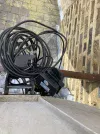
In your pic the run of cable from the LNB's should ideally be cable tied to the LNB arm. It takes the weight off the terminated ends. Movement in the wind and exposure to the elements over 12 years at that height takes it toll.

I reckon new terminated compression plugs will sort it.

I personally prefer the PPC Belden CMX100's
 
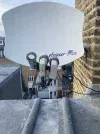
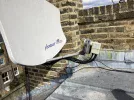
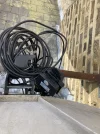
Thank you so much. I did the job this WE and changed the LNB to multi-switch cables for HB and the problem went away. I have not changed Astra yet as it has no issues yet so I leave it for now. Photos of the setup below.
 

Attachments

  • IMG_9125.webp
    IMG_9125.webp
    1.7 MB · Views: 22
  • IMG_9126.webp
    IMG_9126.webp
    1.5 MB · Views: 20
  • IMG_9127.webp
    IMG_9127.webp
    1,013.3 KB · Views: 20
1742166804913.webp

TBH, I don't like the look of that. Very untidy.

At the top of the roof everything is exposed to the elements.

Those Visiosat Bisats are fibreglass and will last for years and years.

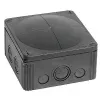
You would be better off getting a WISKA box fixing it to the wall and put the switch inside that.

Feed the cables into and out of the box. Much better and longer lasting solution.

Weatherproof and bombproof. Fit and forget.

1742166973641.webp
 
You mean the bit of cable between the LNB and the multiswitch?

They are, by the way, not multi-switches. They are (ordinary) diseqc switches.


You should use 2 more zip ties as marked.
I would not agree. Imho, a ty-rap nearer to the LNBs would cause a sharper bend of the cables between arm and LNB, and too much bending of the cables should be avoided.
So there should be no ty-rap nearer to the LNBs, in my opinion.

As for your tidiness suggestion: I wouldn't do that extra work. It is a personal preference, I think.
Though I do agree, that rain protection for switches, and UV-protection for cables, are not to be neglected.

Greetz,
A33
 
Thank you to both!
There is actually a disconnected / looped cable going into a separate flat hence it looks untidier than what it is :oops:.
I like the idea of the box - I will put it up when the weather gets better together with replacing the Astra connections.
As for the tie in yes I realized that I had not enough cable so it is probably pulling a bit on the LNB so for now I will only add an extra tie close to the dish.
 
View attachment 161684

TBH, I don't like the look of that. Very untidy.

At the top of the roof everything is exposed to the elements.

Those Visiosat Bisats are fibreglass and will last for years and years.

You would be better off getting a WISKA box fixing it to the wall and put the switch inside that.

Feed the cables into and out of the box. Much better and longer lasting solution.

Weatherproof and bombproof. Fit and forget.

View attachment 161685
Since the DiSEqC switches are in their own protective covers, and they are behind the reflector, there is little chance of damage except by freeze/thaw and perhaps invasive spiders. I have at least 20 systems installed in the same way from the late 90's and the only issue to date has been surface corrosion on the steel plated boxes that house the switch internals.

The box imaged is not waterproof, they are IP66 and are reliant on the installer ensuring all glands used are at the base of the device with the correct sealing protocol. You will not get more than one DiSEqC switch and three cables in each.
 
I a;ways use top quality electrical tape for securing cables on dish booms and masts, lasts way longer than plastic cable ties do and stays in the position I orignslly wrap it. :)

SEKISUI 19mm x 20m PVC Tape 360
 
Back
Top