VU+ Duo Twin Tuner

compufunk said:
In short, its comparable to a DM8000 but costs half the price.

The hardware is very similar to that of the DM8000, so similar that you can run an image designed for the DM8000 on it (Not recommended though). The main difference in hardware is that it has two fixed tuners as opposed to the DM8000's potential 4 interchangeable ones.

The three main teams developing images for it (AFAIK)are Pli, VTI and Dream-Elite.

One of the big benefits as opposed to other Linux receivers on the market is that it uses a processor with the same architecture as the E2 Dreamboxs. This means that you can run anything compiled for Dreambox on the VU+, including the popular CCcam.

''as opposed to the DM8000's potential 4 interchangeable ones.''

2 interchangeable ones....as the two onboard DVB-S2 Tuners (A & B ) are fixed on the Mother Board, not Plugable.
 
still you can always add tuners thru USB..i have TDT and Cable tuners (USB stick) and work great
 
Mickha said:
Depends on the motor, I'm using a 1224 which has dedicated wires connected to the motor, probably in your case you use the coax cable, which should probably be connected to Tuner A, on the VU+ Duo.
One wire goes from the LNB to the motor then to your receiver, tuner A, the second goes from the second LNB output to Tuner B.
What motor do you have?


hi its the same as this one ... http://www.satellites.co.uk/forums/...s/39396-moteck-sg-2100-manual.html#post199734 see where it has 2 screw threads?at this moment i have one from the lnb to one side and the other comes from the back of the box to what am assuming is the drive part of motor, so am i right in saying it would

as i have it now 1 cable from 1st lnb to the first screw part (as i have it now)
1st part of twin coax from tuner 1 to the drive part of motor
2nd part of tuner to another lnb
i cant get duo lnb's here
 
As it shows in the pictures, picture 2, but make sure that the cable from the motor goes to Tuner A, as this is the one that drives the motor, the second just runs as normal from the LNB to Tuner B.
 
Mickha said:
As it shows in the pictures, picture 2, but make sure that the cable from the motor goes to Tuner A, as this is the one that drives the motor, the second just runs as normal from the LNB to Tuner B.

That's not correct as i can run my DiSEqC rotor connected to tuner B.
I have 2 DiSEqC rotor and later i will test if its possible to run 2 rotors to the Vu+ Duo

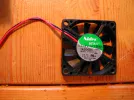
I also like to show all what type of fan theres in the Vu+ Duo, have read in some forums that it's a 7v fan and thats not correct its a standard 12v PC fan. I have not checked the voltage on the MB where the fan connects but i can think theres 7v. This gives a lower speed on the 12v fan.If you Google the fan you will find the data .
 

Attachments

  • DSCN3850.webp
    DSCN3850.webp
    214.4 KB · Views: 48
Just ordered a Vu+ Duo to replace my Dreambox 800HD. Hopefully it'll be here by Friday so I can play with it over the weekend.

Thanks to all who have contributed to this thread! :-beer
 
I'm having real problems transferring/copying files over to an ext hdd or even a usb stick! One hdd it doesn't recognise at all. What is the procedure because the instruction book is a waste of time?


compufunk said:
I havent tested in a while, but I managed to simultaneously record 5 HD channels when I first got the reciever. That was the max only because the tuners were working to capacity. The resulting recordings were glitch free.

You can use a 3.5" SATA HDD internally, or an external drive (USB or eSATA). Transferring recordings to PC is no probelm via FTP or using external USB storage.
 
I think that the hard drives have to be formatted to FAT32. Maybe that's why it won't recognise your HDD.
 
Then there would be a 4GB file size limit?
 
Back
Top