
- Forums
- Satellite TV receivers & systems support forums
- DISH SETUP: Single sat, Multi-Sat & Motorised
- Satellite Meters and Installation Equipment
You are using an out of date browser. It may not display this or other websites correctly.
You should upgrade or use an alternative browser.
You should upgrade or use an alternative browser.
Using the "138MHz-4.4GHz USB SMA Source/Signal Generator/Simple Spectrum Analyzer" for TV/CATV/SAT
- Thread starter vma
- Start date
 . Few minor comments - will PM tomorrow.
vma
Regular Member
- My Satellite Setup
- Main dish: 120cm No-Name, Motek SG-2100A, Bullseye LNB
- My Location
- Portugal
Thank you!
Very kind of you!
To be honest, I didn't realize how much new functionality I have implemented in the last months... And without any documentation.
I know there is still much space for further explanation on how some functions work, but I need more time.
The reflectometer measurement is pretty cool and can be usefull even for satellite enthusiasts. It does work and allows to figure out where a defect is in the cable/cable distribution, as well as, determine th exact length of the cable (give or take a few millimeters).
Also, I eneded up implementing a few almost hidden features, like the display of frequency tags.
Never in my life I would have thought that the software would get as big as it did.
Regards,
Vitor
Very kind of you!
To be honest, I didn't realize how much new functionality I have implemented in the last months... And without any documentation.
I know there is still much space for further explanation on how some functions work, but I need more time.
The reflectometer measurement is pretty cool and can be usefull even for satellite enthusiasts. It does work and allows to figure out where a defect is in the cable/cable distribution, as well as, determine th exact length of the cable (give or take a few millimeters).
Also, I eneded up implementing a few almost hidden features, like the display of frequency tags.
Never in my life I would have thought that the software would get as big as it did.
Regards,
Vitor

jeallen01
Specialist Contributor
- My Satellite Setup
- See Signature
- My Location
- Somewhere in England (possibly?)!
Good afternoon - actually not too good because of what I found as below.
I have just got the latest version of the s/w loaded up AND working on the ASUS netbook - and was very puzzled that I could not get the Sat Pattern Recognition working (which, as you remember you recently encouraged me to use).
But it then took me sometime before I finally realised why => the complete "Measurements - Pattern Recognition" box at the bottom of the screen is missing and it still shows the older "Measurements -MIN/MAX/AVG" version!!!!
I then loaded up the s/w version from 11 Feb this year - and the same thing happened.
PS: and most/all of the images in the latest manual still show the latter as well - didn't realise that until I actually compared what I am getting on-screen to what was shown in this thread around posts 150-170'ish - can't be more specific because, sometime in the recent past, I think that "someone" on the Staff appears to have removed the Post numbers which had been shown as "#123" etc.!
Any idea what could be causing this problem?????????
John
I have just got the latest version of the s/w loaded up AND working on the ASUS netbook - and was very puzzled that I could not get the Sat Pattern Recognition working (which, as you remember you recently encouraged me to use).
But it then took me sometime before I finally realised why => the complete "Measurements - Pattern Recognition" box at the bottom of the screen is missing and it still shows the older "Measurements -MIN/MAX/AVG" version!!!!
I then loaded up the s/w version from 11 Feb this year - and the same thing happened.
PS: and most/all of the images in the latest manual still show the latter as well - didn't realise that until I actually compared what I am getting on-screen to what was shown in this thread around posts 150-170'ish - can't be more specific because, sometime in the recent past, I think that "someone" on the Staff appears to have removed the Post numbers which had been shown as "#123" etc.!
Any idea what could be causing this problem?????????
John
vma
Regular Member
- My Satellite Setup
- Main dish: 120cm No-Name, Motek SG-2100A, Bullseye LNB
- My Location
- Portugal
I am not in front of my PC right now, but have you cycled with the NEXT button through the different measurements screens?
I am pretty sure it is there and working in the current release.
Regards,
Vitor
I am pretty sure it is there and working in the current release.
Regards,
Vitor
vma
Regular Member
- My Satellite Setup
- Main dish: 120cm No-Name, Motek SG-2100A, Bullseye LNB
- My Location
- Portugal

jeallen01
Specialist Contributor
- My Satellite Setup
- See Signature
- My Location
- Somewhere in England (possibly?)!
VitorI am not in front of my PC right now, but have you cycled with the NEXT button through the different measurements screens?
I am pretty sure it is there and working in the current release.
Regards,
Vitor
You are absolutely correct - just didn't realise what is behind that button, and I couldn't see anything in the manual that "hit me in the face" about it. I suggest that this is another area which could use some further explanation in the manual - possibly including a series of screen shots showing what you get each time you hit the "Next" button.
PS: Sorry if I'm saying stuff about things that probably should have been obvious to me, but I'm getting rather stressed by a whole series of things (some trivial, some not!) going "wrong" with my various PCs all at the same time - whilst all I've actually been trying to do is to get ONE of the laptops in a reliable setup to take down the garden to help set up the "new" TD110 dish, and I still haven't yet got one in that condition
 .
.
Last edited:
vma
Regular Member
- My Satellite Setup
- Main dish: 120cm No-Name, Motek SG-2100A, Bullseye LNB
- My Location
- Portugal

DOWNLOAD HERE
This allows to insert the desired frequency of the 2nd, 3rd, 4th or 5th harmonics.
You can use the SMA/NWT device to reach frequencies up to 22GHz/30GHz (depending if your device has ADF4350/ADF4351 or MAX2870).
This is work in progress, which is why it is not on the blog, yet.
Very useful to test LNB's of different kinds (C-band, Ku-Band, Ka-band, etc.)
Thanks to John for the first idea and Mark for really requesting this.
Regards,
Vitor

- My Satellite Setup
- Triple Dragon, Dreambox 8000, Echostar AD3000ip, TBS6522,6925,6983 PCie cards.
Gibertini 1.25m motorised dish driven by the AD3000, with either Inverto BU Quad or Norsat / XMW Ka LNBs . SMW 1.05m + 3 other dishes. Speccy: Promax HD Ranger+
- My Location
- The Flatlands of East Anglia
Excellent Vitor.
That looks to be a really useful extension of the original signal source app, which John and myself have been using to test our Ka LNBs
That looks to be a really useful extension of the original signal source app, which John and myself have been using to test our Ka LNBs

John
Enthusiast.
- My Satellite Setup
- Elite 2.2 PF with Multi lnb changer - CM1.2 - Gibertini 1.25.
Ku - Ka - Ext Ku - C & Ext C. X.
PC cards 6983,6903, main receiver GTX Combo. Ericsson RX8200.
Promax HDRanger+ & HDRanger2 Analysers.
- My Location
- North Nottinghamshire. UK.
View attachment 116898
DOWNLOAD HERE
This allows to insert the desired frequency of the 2nd, 3rd, 4th or 5th harmonics.
You can use the SMA/NWT device to reach frequencies up to 22GHz/30GHz (depending if your device has ADF4350/ADF4351 or MAX2870).
This is work in progress, which is why it is not on the blog, yet.
Very useful to test LNB's of different kinds (C-band, Ku-Band, Ka-band, etc.)
Thanks to John for the first idea and Mark for really requesting this.
Regards,
Vitor
I like that Vitor - very much. Thanks.
vma
Regular Member
- My Satellite Setup
- Main dish: 120cm No-Name, Motek SG-2100A, Bullseye LNB
- My Location
- Portugal
New version available: VMA's Satellite Blog: VMA Simple Spectrum Analyser - Download the latest version here!


vma
Regular Member
- My Satellite Setup
- Main dish: 120cm No-Name, Motek SG-2100A, Bullseye LNB
- My Location
- Portugal
Hi,
I just uploaded a new version with improved Harmonics Signal Generation functionality: VMA's Satellite Blog: VMA Simple Spectrum Analyser - Download the latest version here!
You can now "see" the simulated Harmonics and change the frequencies with a scrollbar. This can be done with active signal generation and allows to follow the signal on a connected spectrum analyser.
Also, some bug fixes.
Regards,
Vitor
I just uploaded a new version with improved Harmonics Signal Generation functionality: VMA's Satellite Blog: VMA Simple Spectrum Analyser - Download the latest version here!
You can now "see" the simulated Harmonics and change the frequencies with a scrollbar. This can be done with active signal generation and allows to follow the signal on a connected spectrum analyser.
Also, some bug fixes.
Regards,
Vitor
vma
Regular Member
- My Satellite Setup
- Main dish: 120cm No-Name, Motek SG-2100A, Bullseye LNB
- My Location
- Portugal
vma
Regular Member
- My Satellite Setup
- Main dish: 120cm No-Name, Motek SG-2100A, Bullseye LNB
- My Location
- Portugal
vma
Regular Member
- My Satellite Setup
- Main dish: 120cm No-Name, Motek SG-2100A, Bullseye LNB
- My Location
- Portugal
Hi,
There is a major update of my software:
Quick preview: Gone are the notches of the SMA/NWT devices!
This new version removes the annoying notches!
Regards,
Vitor
There is a major update of my software:
Quick preview: Gone are the notches of the SMA/NWT devices!
This new version removes the annoying notches!
Regards,
Vitor

frankviana
Member
- My Satellite Setup
- Satellites/tv
- My Location
- Brazil
Hi. How to activate this software? I read some informations, but I don't know how to use with my motorized dish 5m.
Any way to use TBS 5925?
portuguese:
Como ativar esse software? Eu li algumas informações, mas não sei como usar com minha antena motorizada de 5 metros.
Existe alguma forma para a TBS 5925?
Sorry my english.
Thanks
Any way to use TBS 5925?
portuguese:
Como ativar esse software? Eu li algumas informações, mas não sei como usar com minha antena motorizada de 5 metros.
Existe alguma forma para a TBS 5925?
Sorry my english.
Thanks
vma
Regular Member
- My Satellite Setup
- Main dish: 120cm No-Name, Motek SG-2100A, Bullseye LNB
- My Location
- Portugal
Hello,
The software only works with SMA/NWT/D6 devices. These cost between 50-200 Euro and you need to buy them on Ebay or AliExpress. I think you will find them on Amazon, too.
In order to use them for satellite TV, you connect the LOOP THROUGH connector from your satellite receiver (or a "T" connector) to a DC Blocker (very important to not destroy immediatly the M810 IC) to the INPUT connector of the SMA/NWT/D6 device.
Changing Polarity/Low-High and DiSEqC is done on the receiver.
Regards,
Vitor
The software only works with SMA/NWT/D6 devices. These cost between 50-200 Euro and you need to buy them on Ebay or AliExpress. I think you will find them on Amazon, too.
In order to use them for satellite TV, you connect the LOOP THROUGH connector from your satellite receiver (or a "T" connector) to a DC Blocker (very important to not destroy immediatly the M810 IC) to the INPUT connector of the SMA/NWT/D6 device.
Changing Polarity/Low-High and DiSEqC is done on the receiver.
Regards,
Vitor
frankviana
Member
- My Satellite Setup
- Satellites/tv
- My Location
- Brazil
I found this 2:


But I don't know the kind of DC blocker...
I don't know if this site allow post links. If not, please tell me to edit or delete.
Thanks
New 138MHz-4.4GHz 4.4G USB SMA Source/Signal Generator/Simple Spectrum Analyzer | eBay
Find many great new & used options and get the best deals for New 138MHz-4.4GHz 4.4G USB SMA Source/Signal Generator/Simple Spectrum Analyzer at the best online prices at eBay! Free shipping for many products!
www.ebay.com
140MHz~4.4GHz USB RF generator Sweep function | eBay
Find many great new & used options and get the best deals for 140MHz~4.4GHz USB RF generator Sweep function at the best online prices at eBay! Free shipping for many products!
www.ebay.com
But I don't know the kind of DC blocker...
I don't know if this site allow post links. If not, please tell me to edit or delete.
Thanks
vma
Regular Member
- My Satellite Setup
- Main dish: 120cm No-Name, Motek SG-2100A, Bullseye LNB
- My Location
- Portugal
Don't rush any purchase - go to my blog and download the user guide. It explains everything (I think).
There are differences between the SMA, NWT and D6 models.
The SMA is the cheapest option to get reliable results.
The NWT is the most expensive one, because it can do full duplex (TX and RX simultaenously). This is important to measure filters and antennas.
The D6 is similar to the NWT but is the cheapest of the three models. However, it has the worst results in sensitivity and noise floor. There are modifications you can do, but then you get wrong measurements (but better sensitivity).
All of this is documented in many of my posts in my blog.
The second item you list (USB RF generator) is NOT the correct device.
A DC Blocker is a cheap F-connector type thing you can purchase in any Sat-Shop for 1-2 Euros. It basically does not allow DC to pass. Not sure if there is a diode or capacitor inside.
Do a Google search for "dc-block sat" and click on IMAGES. You will see what I mean.
Regards,
Vitor
There are differences between the SMA, NWT and D6 models.
The SMA is the cheapest option to get reliable results.
The NWT is the most expensive one, because it can do full duplex (TX and RX simultaenously). This is important to measure filters and antennas.
The D6 is similar to the NWT but is the cheapest of the three models. However, it has the worst results in sensitivity and noise floor. There are modifications you can do, but then you get wrong measurements (but better sensitivity).
All of this is documented in many of my posts in my blog.
The second item you list (USB RF generator) is NOT the correct device.
A DC Blocker is a cheap F-connector type thing you can purchase in any Sat-Shop for 1-2 Euros. It basically does not allow DC to pass. Not sure if there is a diode or capacitor inside.
Do a Google search for "dc-block sat" and click on IMAGES. You will see what I mean.
Regards,
Vitor
frankviana
Member
- My Satellite Setup
- Satellites/tv
- My Location
- Brazil
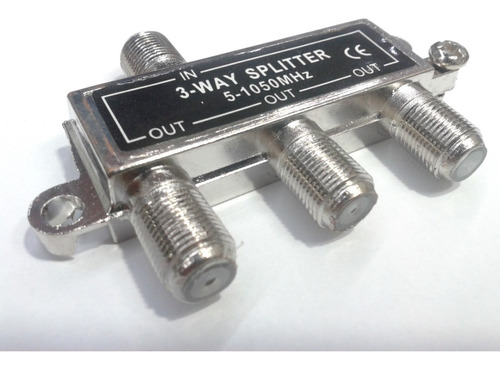
Este é o tipo de dc bloqueador?
 produto.mercadolivre.com.br
produto.mercadolivre.com.br
Divisor Splitter De Antena,tv A Cabo,coletiva 1x3 5-1050mhz - R$ 19,9
Divisor Splitter de sinais de 5 à 1050 Mhz 1 entrada para 3 saídas de sinaisUtilizado para divisão de sinais de tv a cabo,Tv por assinatura, antenascoletiva, Antenas espinha de peixeCom este Splitter, pode-se dividir Um sinal em até tres pontos extras de sinais.Um produto desenvolvido com a mais...
produto.mercadolivre.com.br
Outros | MercadoLivre.com.br
Descobri o produtos mais procurados que você não pode perder em Outros ✓ Com Frete Gratis e Rapidos ❤ E Compra Garantida ©. O melhor tá chegando!
produto.mercadolivre.com.br
Last edited: