Advice Needed Adding a second LNB to a Sky dish

statalite

Member
My Satellite Setup
SF8008
DiSEqC motor with 1m dish
Zone 1 @ 28.2°E
Zone 2 @ 28.2°E
Channel Master 1.0m (to be setup)
Channel Master 1.2m (to be setup)
SMR 1224
My Location
UK Midlands
I am unable to find a forum post about this so forgive me if it has been posted before.
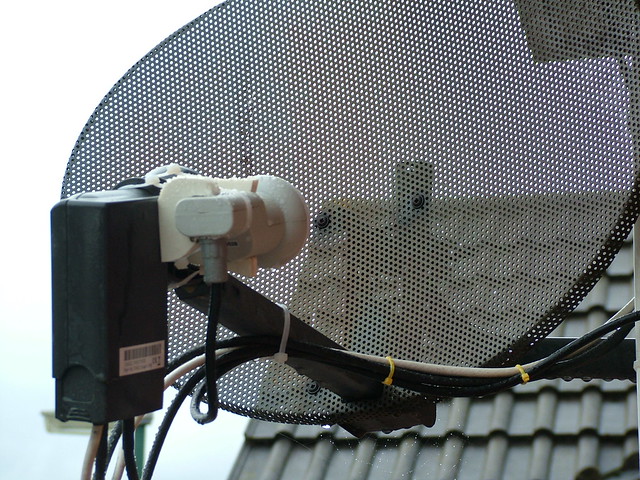
I want to add an LNB to a Sky dish that is already setup and aligned on the wall. I want to be able to receive 19.2e

After some looking around could this be done with the 2 following items?
  • Inverto Multi-LNB Holder (It looks like you tighten to fit the LNB - will the bracket be suitable?
  • Technomate TM-2 Super High Gain 0.1dB Universal Twin LNB
Will the weight of the new LNB be a problem to the existing setup/new bracket?

Thank you for any advice.
 
Your Sky dish will probably not be big enough to get what you want.
I would recommend leaving your Sky dish and adding a second dish, for 19.2E, you could also consider adding a motor, to this second dish, or another LNB, or monoblock, to include 13E.
 
Heres a few on a Zone1 no idea what reception is like :)

DSC01533.jpg
DSC01531.jpg
6214039475_c40b338c1a_z.jpg
 

I do suspect my dish is zone1. I have previously gone up the ladder and moved the dish manually to 19.2, so I know it can recieve something, if this is good enough after adding another lnb with cable ties remains to be seen. The dish is currently fixed back at 28.2.

In terms of adding another dish that is not an option, becasue of permission and how it will look.

digi247 posted some images, these are helpful and are what I had in mind. I'm just wondering if the shape of the Technomate TM-2 Twin LNB will sit well against the existing Zinwell.
Those in the pictures the LNB's look snug against the orignals.
I guess the only way to find out is to try?
 
Do I have to ensure there is a gap between the LNB's?
I have seen some photos that have this and some that don't.
I have the existinfg Zinwell LNB to add too.

I'm just wondering if i should also buy the LNB holder as well as the LNB, or just get away with the LNB, and use some cable ties?
Will the holder greatly improve my chances and provide the right spacing between LNB's?
 
Due to the size of dish and boom arm on the Zone 1 cable ties is all you need
 
See attached 60cm for Astra 1 & Astra 2View attachment 62427

Thank you william-1, is the setup yours?
I cannot tell how the white lnb is spaced, the rear of the lnb is more spaced, these are different to the other photos above in the thread. Is it a case of each setup will vary differently with this?
 
5737594255F9C3927.webp -3669989667D2AEBFD.webp 19238150724AAAB6B4.webp
Thank you william-1, is the setup yours?
I cannot tell how the white lnb is spaced, the rear of the lnb is more spaced, these are different to the other photos above in the thread. Is it a case of each setup will vary differently with this?

Yes this is my set up it has changed slightly I will upload same new pics.
 
Last edited:
I'm here to report back my results.

I attached the LNB to the existing 28.2 one as planned with a cable tie as planned.

I attached it without any signal meter, and going by the images posted in this thread.

I checked my F5s which reported Strength 89% Quality 72% after some moving about this was the best I could get.

I have found that not all TP's are working on the F5s. I have just recieved the F5s but trying to work out if there is a fault if any.

When I do a blind scan with the F5s it says Failed on these TP's

10774H
10892H
11153?
11465H
11553H
12721H

When I attach the lead to my PC card I get these TP's.
Is it a coincidence that they are all 'H', could there be a simple LNB adjustment?

Is the F5s faulty maybe? - This seems odd as only these 6 say failed?

Thank you again.
 
Last edited:
I may be wrong but there is a known issue with the F5S. It's something to do with too much voltage to the lnb on, I think Horizontal polarisation. I believe you can test by disconnecting everything but the F5S from the lnb then see if you have the tp's you are missing if not try turning off lnb power on the F5S menu if that gives you the tps then search e bay for 'f5s no signal fix'. Basically you need a small diode (1n4001 is fine) in line with the centre conductor of the coax.
Hope that gives you a clue.
 
Too much voltage to the lnb on sounds plausable.
I turned the lnb to off in the menus but the signal reported by the box was worse than before.

On 19.2e there are a good amount of TP's that I forgot to mention in my previous post that are signal strength 88% but the quality is jumping from 10-35% however these channels still display.
28.2e does not have this when i go through the TP list.
Would a "signal fix lead" with the diode go some way to resolving this?
 
would a software update from the makers resolve this or would this be hardware that controls the amount of voltage output.

if this is a known problem i would imagine the makers know about it but cannot fix it with software?
 
The only reason I know a little about F5S is that I have been thinking of getting one so doing as much research as I can.
With the lnb power off I think the only channels you might get are the ones you are missing but I am not sure on that.
The 'signal fix', I think cuts the voltage down by 0.7v (silicon diode voltage drop) which doesn't overload the lnb.
I would guess lnb voltage is a hardware issue and probably too expensive to redesign circuit and production facility.
I believe that it only effects some lnbs. So an easy (depending on where the lnb is) fix maybe to try a different lnb.

Have a google search on f5s no signal and signal fix. It may give you more info.

As I said the above is just stuff I have read while doing my own research. There are a few forums that have lots of info on the F5S. This forum seems the best regarding technical info on satellites and dishes etc. F5S box is popular amongst users who want to watch tv on 28.2 and are not so into seeking other satellites :-).
 
Thank you for highlighting the skybox section sonnetpete, I will check this out.

ched999uk:
With the lnb power off I dont get anything, and after a tp rescan.

I'm not familiar with the curcuitary or how these things work power wise so thank you for informing me that this is likely a hardware related problem.
It seems like the only option is to get a signal fix lead and try that, so thank you for bringing that to my atttention. :)
 
ched999uk:
With the lnb power off I dont get anything, and after a tp rescan.

I'm not familiar with the curcuitary or how these things work power wise so thank you for informing me that this is likely a hardware related problem.
It seems like the only option is to get a signal fix lead and try that, so thank you for bringing that to my atttention. :)
As I said make sure you have a Google about F5S signal levels and Horizontal vs Vertical etc. The search 'f5s no signal fix' has some good results (the one from kaos is good). I wouldn't want to assure you the ebay 'signal fix' would be the cure your signal problems. It's just I have read that it can cure some F5S signal problems.
As I said I am no expert just an enthusiastic reader.
 
Just had a bit of a search and it may be that the diode fix is for when you have problems with vertical signals!

Have you tried installing a channel list? (remember to backup first!!!!!!!!!!!!!)
Have you checked that there is something on the tps you can get?

Good Luck. Let us know how you get on.
 
Back
Top