ADSL - how does it route?

pgh13

Specialist Contributor
My Satellite Setup
XTrend ET8000, Dr HD 15, PC/twinhan combination. 80cm dish. GBPVR with 2 DTTV cards +hauppauge Media MVP +Raspberry Pi running XBMC
My Location
Midlands UK
Sorry if that's confusing but wasn't sure how to describe in a few words.

Basically, I'm wondering; if a house has ADSL is it dedicated to a specific ISP or is the user name recognised by the phone network? A friend has asked me to test his router so, obviously, I can put my details in and test at my house but could I test using his settings with a different ISP?

Thanks
 
Sorry if that's confusing but wasn't sure how to describe in a few words.

Basically, I'm wondering; if a house has ADSL is it dedicated to a specific ISP or is the user name recognised by the phone network? A friend has asked me to test his router so, obviously, I can put my details in and test at my house but could I test using his settings with a different ISP?

Thanks

From my limited understanding I believe not, the card at the exchange is telephone number specific and it's ADSL functionality and behaviour is governed by the requirements of the ISP it is configured to be used with. In the same way a mobile has a PAK number when you transfer your number a similar number is passed from one ISP to another when changing which often takes a few days, but I suspect it is just the unique MAC address of the card that is being swapped from one system to another
 
Thanks; that's what I suspected but have never tested it
 
Its the line as far as I know (i.e. if your line is active, his router/modem will work and vise versa) so you should be able to test his modem and him yours, max speed depends on the line so you dont have to worry about speed difference, if it works at your house but not at his then its a line fault likely to be blamed, if it works at your house at your full/normal speed but is really slow at his then again its likely to be a line fault

BT/Openreach will be morethan likely trying to fob him off, what is the use in you testing it (what is the fault on his end)?
 
The connecting terminals in the exchanges are called pots. There are two, one for the analogue phone and one for the adsl.
When your line is upgraded to dsl the line is re routed from the phone pot, into the adsl pot and then back out the adsl pot to your house.
Each pot contains 100 telephone pairs and each pair has an index so they are easy to find.
When you get your line changed to adsl for the first time the engineer get a job sent to his laptop which tells him what to connect where.

Yes, each connection in both pots are normally assigned to your telephone number. Sometimes with bt broadband you can log on using junk details but the system still knows it's your dsl account. It's also normally an automated process when you migrate isps as you're already connected to the dsl pots.

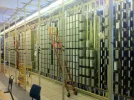
Picture of Alcatel ADSL pots, behind those on the other side is the telephone pots:
 

Attachments

  • ADSL Pots.webp
    ADSL Pots.webp
    184.2 KB · Views: 97
Picture of Alcatel ADSL pots, behind those on the other side is the telephone pots:

Doesn't look as fun as a "Click & Bang" Strowger exchange system... :lol:
 
Haha, the good old Strowger. Even more noisy when they got bad contacts and started jamming.
 
Its the line as far as I know (i.e. if your line is active, his router/modem will work and vise versa) so you should be able to test his modem and him yours, max speed depends on the line so you dont have to worry about speed difference, if it works at your house but not at his then its a line fault likely to be blamed, if it works at your house at your full/normal speed but is really slow at his then again its likely to be a line fault

BT/Openreach will be morethan likely trying to fob him off, what is the use in you testing it (what is the fault on his end)?

Thanks Smoggy

Well, it worked for a while at his but isn't now. If he replaces with his Xyxzel modem that works but has only 1 port hence he wants to use his wireless router.

Tried it on mine and didn't work; put my settings in and it works fine, so maybe his settings had become corrupted somehow?

He's switched to the Post Office (albeit through BT lines) and PO have been very good helping him get set up and assisting when trying to set up 3rd party router
 
LOL, in my time at the local exchange, we were still maintaining these beasts -


I worked on a chemical plant that still had a Strowger exchange. Used to amuse me in the middle of the night when you picked up a phone you'd hear the mechanically generated dial tone start and slowly come up to speed
 
Somewhere in parts of the world there's still Strowger systems doing daily work, invented over a century ago, and still working well, aside from the crackly connections... :D

As for the dial tones (and other tones on the system), they were usually mechanically derived with a rather clever geared motor system, with wheels attached which had bumps on them which operated switches to generate the tones you used to hear on the lines aswell as the good ol' british ringing cadence... :D


And you can match up the tones being played with the switches being operated on the armatures there... :)
 
Back
Top