[Astro Malaysia] Skystar HD 2 + Diablo Cam 2.3 Light

franky1835

Member
My Satellite Setup
Skystar HD 2 + Diablo cam 2.3
My Location
Malaysia
Hye Guyz,

First of all, I'm New bie to this forum. I have a problem with my device and the guy who sold it to me is not giving proper guides to watch the channels. Hope you people will help me out :-worship

Currently i'm living at Malaysia. I want to Watch & Record my Favourites programs on PC. So i bought this 2 Devices a Skystar HD 2 and a Diablo Cam 2.3 Light with Horizon 1.01 Multicam. I'm viewing ASTRO Malaysia, Measat 3 at 91.5°E Ku-Band. On Lyngsat, they said the encryption system is Mediaguard 2, Videoguard, MPEG-4/HD . With Skystar HD 2 Connected to my pc via PCI and installed DVBViewer TE2 .

I'm able to listen to the FTA radio's without insert the CI & CAM. Below is the FTA radios list;

There is also i can see the details of the Encrypted channels which with the KEY logo. Below is only few channels of Encrypted.

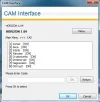
I Plugged the CI module with Skystar HD2 and Inserted the Valid Subscription Smart Card of ASTRO inside DIABLO CAM. Then Inserted the Diablo cam inside CI MODULE. This is the screen where i can see all the details of CAM and Smart Card;


When i Try to Play the Encrypet channels which have the KEY LOGO in the channel lists after inserted the CAM, It's BLANK and No Audio. But i still can listen to FTA Radio's. :confused:

I spent alot of money for get this device's :-bash . Please help me Guyz :-worship .
 

Attachments

  • caminterfacecas.webp
    caminterfacecas.webp
    15.4 KB · Views: 321
  • caminterfaceconfigurati.webp
    caminterfaceconfigurati.webp
    15 KB · Views: 290
  • caminterfacemainmenu.webp
    caminterfacemainmenu.webp
    12.4 KB · Views: 250
  • encryptedchannelswithke.webp
    encryptedchannelswithke.webp
    33.1 KB · Views: 232
  • ftaradio.webp
    ftaradio.webp
    51.9 KB · Views: 221
Does the Smart Card Info give you any details about your card?
 
Here is my SmartCard Scanned Image ..... Editted the number's for my safety and blurred the barcode.
 

Attachments

  • back.webp
    back.webp
    36.6 KB · Views: 210
  • front.webp
    front.webp
    17.8 KB · Views: 195
No, I mean in the Cam Interface Menu - Smart Card Info.
 
It's only showing this details.... Check Attachments

Admin note - Ive edited the pic to block out some sort of keys that were showing. A/S
 

Attachments

  • Image1.webp
    Image1.webp
    13.6 KB · Views: 245
Seems to be finding your card. Maybe the CAIDS file hasn't got Astro's ident in the list. If not, I've no idea where you can find it, as I'm not conversant with the providers where you are :confused:
 
I don't believe Astro uses Mediaguard 2 anymore, as the channels were encrypted in VideoGuard last year. You may have an old card, if not, it mght be a new version card that requires 'pairing' with an official receiver.

_http://www.astro.com.my/portal/indices/index_104.html

If you can borrow/buy a Samsung receiver from any local shop this will let you know what encryption system is used on each channel via the on screen display, a card is not required for this information.
 
@Llew..... That's what the seller said.... CAIDS is not there. However i found out that the CA ID is 09AC from another forum. The guy said i need to edit this CA ID in the CAMs CAID.XML file and then need a tool like CAS2PLUS or CAS3PLUS to enable it to send the modified file from a PC to the CAM. Now he say's i gotta buy that also....:mad:

Isn't there anyother way to edit the CAIDS ? i heard there is a program called FAUSTO can edit this.... Is't true ?

@Channel Hopper.... Here _http://www.lyngsat.com/packages/astro.html]Astro on Measat 3 at 91.5°E - LyngSat they said it uses... Mediaguard 2, Videoguard, MPEG-4/HD. My subscription package is called beyond. Which have few HD channels also. i just bought this package 1 month ago. it comes with SmartCard, STB and Dish.

Can you tell me what details you want me see on the STB/Receiver :) Idk where to see the encryption on screen... Please assist me
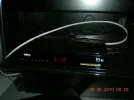
Note: I will attach the image of my STB in next reply.

[nolink]rolfw[/nolink]
 
franky1835 said:
Can you tell me what details you want me see on the STB/Receiver :) Idk where to see the encryption on screen... Please assist me

I cant make it any clearer than the last post, (why u no rissen ?). Plug in a receiver that identifies the encryption system used on a per channel basis.
 
Yes you'll need a CAS2+ or CAS3+ to upload files to your Diablo Light. Fausto involves using a Phoenix programmer and Season interface. If you have neither, better to get a CAS programmer as it will be more convenient in the long run.
 
@Channel Hopper...... It's NDS videoguard

@Llew..... I have ordered CAS3PLUS........ everything on CAS2PLUS can be done in CAS3PLUS rite ?

Guys..... i found out that... The card and STB are linked together and will not work on other B.yond decoders. ( it was stated on their offical site FAQ )

So, can i still use the CARD in my [Skystar HD 2 + Diablo Cam 2.3] ?
If YES, what things i have to do ?

Kindly,
Franky
 
Yes, CAS+ is fine. I don't think the card will work in your Diablo, NDS cards here in the UK don't. You'll have to try it in your Horizon, but I don't know anything about that CAM I'm afraid.
 
STB Pictures Attached :)
 

Attachments

  • STB.webp
    STB.webp
    22.7 KB · Views: 219
  • STB-BACK.webp
    STB-BACK.webp
    21.1 KB · Views: 234
  • SYSTEM SETTINGS-STB.webp
    SYSTEM SETTINGS-STB.webp
    44 KB · Views: 277
Llew said:
Yes, CAS+ is fine. I don't think the card will work in your Diablo, NDS cards here in the UK don't. You'll have to try it in your Horizon, but I don't know anything about that CAM I'm afraid.

Do you mean Horizon 1.01 Multicam ? That's the software in this Diablo CAM 2.3 light
 
Oh, I see. That's what the CAM is loaded with. If you don't have any luck with the Diablo, you may be able to use the CAS3+ in Phoenix mode and use your NDS card in the CAS3+ smartcard slot.

TO do this, you connect the CAS3 to your PC and use a software emulator called NDScam in a DVB viewing application (I use DVBViewer). I use this for my NDS card for my paid subscription channels.
 
i ordered CAS3PLUS. Should be arrived in next 10days. Once i have it on my hand, i will inform you guys :)
 
Hye Guys,

Finally i got the CAS3+. As per you said, I downloaded the NDS (0.0.0.7). Inside the Readme the it says....


DVBViewer:
1. SoftCSA is required. Place SoftCSA.dll and SoftCSA.ini files into the Plugins folder and NDSCam files into the MDPlugins folder.
2. Place FFDecsa.dll, CSA.dll, MakroCSA.dll into the DVBViewer folder.
3. I suggest you to set packet size to 184 for petter performance.

I'm not able to find the "SoftCSA.ini", " MakroCSA.dll" and i don't know where to set the Packet size.

Kindly,
Franky
 
You have to download the SoftCSA files separately. You can find it at Skystar.org.

Click on DVB Players - Other DVB Players
 
Oh, and regarding packet size, you find it in the NDSCam section of Plugins at the top of the DVBViewer screen. I just tick the 184 option, don't think it makes the app run smoother myself, something to do with the incoming PID packet timing?
 
Astro uses NDS version 09ac...there are people who have gotten it working on some softcams like OSCam but mainly for linux. Havent come across anything suitable for windows yet. I myself would love to use astro b.yond with my HTPC running 7MC.

any luck with using CAS3+ NDSCam has not been updated in ages, but they claim it works with astro. did you get it working?
 
Back
Top