Advice Needed Best for streaming over lan

WHATAGOAL1

Member
My Satellite Setup
2.4, 1.8channelmaster, tm5402, tech1500, db920
My Location
Leic
Anyone recommend the best model dreambox, I want to stream from the dbox to various computers around the house. I say dreambox, because I had experience with the old d500, and remember it took some getting used to.
Is there a particular model best suited to streaming, or should I just get the one with the fastest processer?

Do most on here use the dreambox, or the vu?, if there are many users of the latter maybe I could try the vu instead.
 
If your going to do a lot of HP program streaming then I would recommend a good gigabit router and some NIC's that will run in the 10/100/1000 range, if your thinking of doing it via WIFI then you may run into problems with overload if the computers are looking at different HD stuff at the same time.

I had some problems with this when all the computers (12 of them) were looking at HD information at the same time, fixed it with a gigabit router and replacing the NIC's int he computers that didn't have the 10/100/1000 capability's. Things have run very smooth ever since.

And sorry I can't help you with the choice of streaming device(s) as there are so many.
 
For example, my GB Quad Plus receiver with 3 SAT and 1 DVB-T tuners can simultaneously stream up to 7 channels to different PCs (or single PC). This is OK for N-router.
 
i am talking only 3 computers from the dreambox, thought you just used a normal router. Have no intention other than plugging the dbox into the lan I have currently.
Use progdvb at the moment at that seems ok, just fancy a new box as a awinter treat to myself.
 
Normal recommendations.
The tuner that has 1Gb (1000) network.
Hub of 1000GB, are very cheap, segment the network between tuner and PC, not blocking other computers.
Remember, an SD channel is 5Mbs, an HD channel is 10Mbs (minimum).
Receiver with 2 tuners (minimum), better 4 tuner (3 PC's and where it is installed and watch on TV), if it has transcoding, ideal to be able to see in less powerful equipment, if you have fiber optic ADSL to view from outside the Network, without much data spending on the mobile phone.

VU + with 1Gb network, Solo2 (2), DUO2(4), UNO4K(8), Solo4K(8+2SAT/TDT, Ultimo4K(8+8+8SAT/2TDT).
You have more brands with similar equipment.

Antenna theme, if all the channels are in the same band / polarity, with an antenna and splitter to all the tuner (+ voltage isolator).

If they are in different band / polarity ...
With normal LNB's, as many outputs as the receiver has.
With LNB Unicable, LNB and spliter of 4, configure the receiver to use the 4 channels (SCR) and ready.


Currently all receivers support LNB unicable, with FCB tuner outputs all performance, but with normal, it works.
----------------
Las recomendaciones normales.
El sintonizador que tenga red 1Gb (1000).
Hub de 1000GB, son muy baratos, segmentas la red entre sintonizador y PC, no bloqueando al resto de equipos.
Recuerda, un canal SD son 5Mbs, un canal HD son 10Mbs (como minimo).
Receptor con 2 sintonizadores (minimo), mejor 4 tuner (3 PC's y donde esta instalado y ver en la TV), si tiene transcoding, ideal para poder ver en equipos menos potentes, si tienes ADSL de fibra optica para ver desde fuera de la red, sin mucho gasto de datos en el telefono movil.

VU+ con red 1Gb, Solo2(2), DUO2(4), UNO4K(8), Solo4K(8+2SAT/TDT), Ultimo4K(8+8+8SAT/2TDT).
Tienes mas marcas con equipos similares.

Tema de antenas, si todos los canales estan en la misma banda/polaridad, con una antena y splitter a todos los tuner (+aislador de tension).

Si estan en distinta banda/polaridad...
Con LNB's normales, de tantas salidas como tuner tenga el receptor.
Con LNB Unicable, LNB y spliter de 4, configurar el receptor para usar los 4 canales (SCR) y listo.


Actualmente todos los receptores soportan LNB unicable, con tuner FCB sacas todo el rendimiento, pero con los normales, funciona.
 
TBH, I've never read manual :oops:
Streaming from Enigma2 receiver is possible in several ways. Simplest one is to stream directly from web-interface.
Another way is to use "Tuner Server" plugin, when it is activated it creates folder of shortcuts to all your favorite channels. Then via FTP you put this folder to your PC and there you go- just click any channel and stream is started.
 
A good solution for streaming across multiple devices is DVBLink application.In the example below I chose to do streaming from a Dreambox500 HD and my pc cards to a PC with DVBLink player and mobile phone.Everything works well regardless of the signal source and the device chosen.
 

Attachments

  • 1.DVBLink-Devices_07-Jan-17 4-45-11 PM.webp
    1.DVBLink-Devices_07-Jan-17 4-45-11 PM.webp
    40.1 KB · Views: 12
  • 2.DVBLink-Source_07-Jan-17 4-44-02 PM.webp
    2.DVBLink-Source_07-Jan-17 4-44-02 PM.webp
    47.6 KB · Views: 10
  • 4.DVBLink player on PC_07-Jan-17 2-53-55 PM.webp
    4.DVBLink player on PC_07-Jan-17 2-53-55 PM.webp
    57.6 KB · Views: 11
  • 5.Record with DVBLink Player_07-Jan-17 2-55-01 PM.webp
    5.Record with DVBLink Player_07-Jan-17 2-55-01 PM.webp
    27.4 KB · Views: 8
  • 6.DVBLink mobile-channels saved_08-Jan-17 5-26-15 PM.webp
    6.DVBLink mobile-channels saved_08-Jan-17 5-26-15 PM.webp
    41.1 KB · Views: 11
  • 7.Arte on mobile__08-Jan-17 5-24-39 PM.webp
    7.Arte on mobile__08-Jan-17 5-24-39 PM.webp
    28.6 KB · Views: 9
  • 8.View on mobile_08-Jan-17 5-22-01 PM.webp
    8.View on mobile_08-Jan-17 5-22-01 PM.webp
    41.9 KB · Views: 10
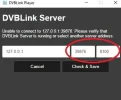
@satesco Interesting. What should I fill in red circle to connect my PC to Dreambox?
 

Attachments

  • ScreenHunter_121 Jan. 08 18.20.webp
    ScreenHunter_121 Jan. 08 18.20.webp
    13 KB · Views: 11
You should not change anything there.That setting is the default in the player.Check if Dreambox WebControl working on browser?This is how my setting in DVBLink player,which seems like it's the same as yours.:
 

Attachments

  • DVBLink settings_08-Jan-17 8-09-59 PM.webp
    DVBLink settings_08-Jan-17 8-09-59 PM.webp
    34.9 KB · Views: 10
I have 2 Enigma2 boxes in the net, they both reachable via web-interface, but DVBLink gives errors in both cases. Maybe I should change something in the boxes?
 

Attachments

  • ScreenHunter_122 Jan. 08 21.42.webp
    ScreenHunter_122 Jan. 08 21.42.webp
    13 KB · Views: 7
1.Check dreambox ip in settings.Look like this-192.168.1.100(/102/103,etc.)
2.Check your server ip,i.e. of your computer-192.168.1.102(103/104,etc)
Find them(ip) into your router
 

Attachments

  • Address-ip dreambox_08-Jan-17 10-02-49 PM.webp
    Address-ip dreambox_08-Jan-17 10-02-49 PM.webp
    21.7 KB · Views: 8
No, all my IPs in the net start with 192.168.8 And, as I've said earlier, I can reach both boxes via network by typing their IPs in Web-interface 192.168.8.100 and 192.168.8.101 ScreenHunter_123 Jan. 08 22.31.webp
I also have shortcuts on the desktop to go directly to hard-drives of the boxes and it all works. ScreenHunter_124 Jan. 08 22.34.webp
 
Got it working. Not only client software should be included but also server. And it was a process for trial activation, so after some time trial will end.
 
Perhaps Dreambox does not communicate with the DVBLink Server.Have you tried to view TV and Media Library on your browser?This is how to configure dvblink on browser.If you see these things on your browser then dvblink player must work.
In the event that the dvblink player/browser does not work when,write here:_https://dvblogic.freshdesk.com/support/home. You will be helped by someone from there.

Edit:After i posted I saw your intervention..I thought all the time that you have a license purchased and enabled!Now you know what to do next...
 

Attachments

  • localhost_39876_08-Jan-17 11-51-39 PM.webp
    localhost_39876_08-Jan-17 11-51-39 PM.webp
    24.1 KB · Views: 8
  • localhost_8100_08-Jan-17 11-58-04 PM.webp
    localhost_8100_08-Jan-17 11-58-04 PM.webp
    26.3 KB · Views: 8
Last edited:
About an hour ago I got it working, but...... when I try to stream HD content then there are lots of frequent breaks. And I do not like that. But when I stream by using web-interface or direct link to channels there are no problems. Besides, DVBLink seems very complicated, maybe it is just first glance. And it is still trial period, after which I pay or quit. So, I better quit now. :(
 
Back
Top