Can't get any channels

madbilly

Member
My Satellite Setup
Humax Foxsat HDR
My Location
Cheltenham
Hi all,

We just moved into a new place which has a dish with two LNBs. I connected up our trusty Humax Foxsat HD HDR and it couldn't find any channels. I'm sure the previous occupants were watching satellite TV and the Foxsat box was working ~6 months ago. However, it's like the box can't find any signal at all in Freesat mode, and it doesn't recognise postcodes or get the time either. In non-freesat mode it can scan and find channels, most don't have signal but there's a bunch in the 53xx range from Euronews to Sky News which work.

Any suggestions for what I can do try and get this working? Does it sounds like a duff box, duff LNB, or dish misalignment? Unfortunately I don't have another box to test with right now.

Cheers :)
 
Sounds like the dish is pointing towards Astra 1 at 19 degrees. Do you have one or two cables coming in the house ?
 
Interesting, I had wondered if the dish might be pointing in the wrong direction but mainly because all the other dishes on our row are up above gutter level and ours is below gutter level.

Two cables joined together, two connectors which I plugged into the two LNB In ports on the Foxsat box. I tried swapping them, but it made no difference.
 
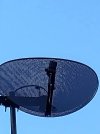
Post a photo of the dish and LNB. Most likely it is from a previous Sky Q installation, if it is the LNB will need to be swapped for a mk4 Sky quad LNB. Alternatively you could buy a Freesat 4K box which will work with the Sky Q LNB. Some more channel names would also help identify if it is pointed at the wrong satellite.

Does the working Sky News have an on-screen clock?
 
Attached are a couple of photos, this is the closest I can get but I can could get another angle if needed.
IMG_20221219_132820.jpg
IMG_20221219_132829.jpg
Other channels that are working are Al Jazeera HD, British Muslim, Pick, Deen TV, Sky Arts, Sky News Arabia, Ideal Extra, Eman Channel, That's TV, TalkingPictures, Classic Hits, CHSTV... does that help? The working channels are at the end of the list, from Euronews through to Sky News; Sky News is the last channel before going back to the first channel, Channel 4 (which doesn't work).

Yes Sky News shows a clock that is UK local time.
 
If you can receive channels, and you are actually getting Talking Pictures, then your dish is working, and you might just need to re-scan.
Can you please post the signal quality readings, from talking pictures, and the channels you can get, along with the polarity, H or V, and channel frequencies.
It looks like you have 3 cables, from the dish, do you know where the third is going?
 
In the menus if you go to manual tune, then where it says Transponder choose 11426 H 27500 2/3 (or auto), what do the signal strength and quality bars show?

The LNB looks like a Sky Quad and you are pointing at the correct satellite. It appears the channels you are receiving are all on horizontal transponders. If you press opt+ on the remote it should display the transponder details of the selected channel, please give a couple of examples from working channels.
 
Good spot on the third cable, I'd not noticed that. It goes into the roof and from memory there's some sort of box up there it connects to and then cables come out and I presume go to the coax outlets in the rest of the house. Right now I've got no way to check that though.

Some additional info which I don't think will change anything - the TV is only 720-HD, not full HD.

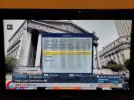
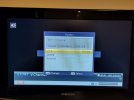
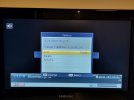
Here are photos of channels which can be found and what the signal is etc. Including some channels that appear twice, one with a signal and one without. Some have a signal and are scrambled, I presume Sky pay-to-view channels.

Do you think a Freesat 4k box will work with the current setup, without having to change anything? I could try and borrow a Sky box from someone to check it.
 
Last edited by a moderator:
mod note. Link removed, please upload photos to the forum.

Borrowing a Sky box or any known working satellite receiver would help narrow down the issue. A Freesat 4K receiver should work but it may not be the receiver that's the cause of the problem.
 
The television will not stop your receiver scanning in the channels, providing the receiver is fully HD.
Your receiver should be able to scan in all the channels, providing you have the correct frequencies, and the LNB is working.
You can check the frequencies, and other details, on sites like lyngsat:
Code:
https://www.lyngsat.com/Astra-2E-2F-2G.html
 
Thanks for removing the link to the photos. I've reattached them here.
 

Attachments

  • IMG_20221219_202836.jpg
    IMG_20221219_202836.jpg
    1.5 MB · Views: 30
  • IMG_20221219_202915.jpg
    IMG_20221219_202915.jpg
    2.6 MB · Views: 23
  • IMG_20221219_202932.jpg
    IMG_20221219_202932.jpg
    1.1 MB · Views: 22
  • IMG_20221219_202949.jpg
    IMG_20221219_202949.jpg
    2.3 MB · Views: 21
  • IMG_20221219_203010.jpg
    IMG_20221219_203010.jpg
    1.8 MB · Views: 20
  • IMG_20221219_203028.jpg
    IMG_20221219_203028.jpg
    1.4 MB · Views: 17
  • IMG_20221219_203105.jpg
    IMG_20221219_203105.jpg
    1.2 MB · Views: 18
  • IMG_20221219_203123.jpg
    IMG_20221219_203123.jpg
    682.7 KB · Views: 13
  • IMG_20221219_203219.jpg
    IMG_20221219_203219.jpg
    706.6 KB · Views: 14
  • IMG_20221219_203140.jpg
    IMG_20221219_203140.jpg
    466.4 KB · Views: 12
And some more
 

Attachments

  • IMG_20221219_203246.jpg
    IMG_20221219_203246.jpg
    525.7 KB · Views: 14
  • IMG_20221219_203303.jpg
    IMG_20221219_203303.jpg
    612.5 KB · Views: 13
  • IMG_20221219_203351.jpg
    IMG_20221219_203351.jpg
    693.3 KB · Views: 13
  • IMG_20221219_203418.jpg
    IMG_20221219_203418.jpg
    1.1 MB · Views: 13
  • IMG_20221219_203618.jpg
    IMG_20221219_203618.jpg
    643.3 KB · Views: 13
  • IMG_20221219_203452.jpg
    IMG_20221219_203452.jpg
    677.3 KB · Views: 13
I don't think your LNB settings are correct, as the channels you have posted, aren't on those frequencies.
 
Yep, Local Oscilator is 660mhz out, it should be Universal 9750/10600
 
I think the LNB must be a Sky Q wideband.

Euronews is on 11464MHz, minus Sky Q wideband LO 10410MHz = 1054MHz, + 9750MHz LO setting on Humax = 10804MHz.

The Humax is displaying 10802MHz but a couple of MHz out makes no difference. It would also explain why many channels are missing as the Q wideband LNB outputs those on frequencies the Humax can't tune.

Assuming the current LNB is a hybrid (2x wideband + 2x legacy outputs) you could move the cables to the other two outputs. If you can find where the third cable goes you could test the box on it first.
 
If you press Menu, go down to Setup, then across to to highlight any of the options, then press red green yellow blue green yellow blue, enter Antenna Settings, then enter Satellite Settings. What is LNB Frequency set to? It should be Universal. If it is Universal then it is almost certain the LNB is a Sky Q wideband.
 
It's on universal. Looks like I should go and get a 4K Freesat box as a quick fix? Can I use a secondhand Sky Q box for Freesat or is it a hassle?
 

Attachments

  • IMG_20221220_202458.jpg
    IMG_20221220_202458.jpg
    641.4 KB · Views: 22
A Freesat 4K box will work. I don't know if a used Sky Q box will work, technically they are all owned by Sky and should be returned at the end of the subscription.

As a test you could change the LNB Frequency setting to User Define and enter 10410. Transponders above 11360MHz should then scan in with the correct frequency, though only one polarity (horizontal or vertical) at a time depending on which cable is connected to the primary tuner.
 
I wonder if you have a quattro LNB, for full distribution, or a quad LNB? A Quattro LNB has 4 outputs, Horizontal High, Horizontal Low, Vertical High and Vertical Low. I have never used these LNB's, as generally they are used for distribution in big buildings, hotels, flats, etc.. So I personally doubt it.
I know you said one of the cables is going into the roof attic, are the other 2 going straight to your receiver, or are you connecting to wall plates?
 
With the LNB frequency set to 10410 I was able to do a Freesat tune and it found lots of channels but would only show a signal and display some of them, unfortunately not the main ones (BBC, ITV, etc).

When I went to check the cables to answer the wall plate question, I realised I was looking at the wrong dish! It turns out that there is a second dish mounted on the other side of the house, above gutter level, please see photos attached. The cables just go through the wall, no plate, not even a cover on the inside wall, it's a very unrefined job (and they just cut off the old cables outside and left the old dish up, pretty bad form as whilst I'd like to use that dish as well, if possible, I'm not even sure if the cables could be spliced or reterminated, could they? Why didn't they just leave them coming into the house!?).

Anyway, I presume this means that the new dish is definitely a Sky Q one and means I need a Freesat 4K box. Are the UHD-X, and 4X boxes I see the same as the 4K ones? They look the same.
 

Attachments

  • IMG_20221221_143502.jpg
    IMG_20221221_143502.jpg
    586.1 KB · Views: 17
  • IMG_20221221_143552.jpg
    IMG_20221221_143552.jpg
    892.6 KB · Views: 15
Back
Top