Dynamic IP question

Chuck_Db

Member
My Satellite Setup
Dreambox 500s connected to WinXP computer via router.
My Location
Norway
I've been playing around with the Dreambox and mounting different folders on my network and it works great. Being able to play mp3s from the computer is a lot of fun. My question is about dynamic IPs and DHCP. If I have DHCP turned on on my Dreambox, the IP becomes dynamic for the box and its hard connecting to it from a PC via ftp. The same applies for my computer. This makes communication between the computer and dreambox difficult because I need to check the IPs everytime I want to mount.

I was wondering if there is a way for the Dreambox to scan the LAN for computers and see the IPs avalible. If this is not possible, is there a way to get a static IP for the computer?

I have a Dreambox 500s with a Gemini 4.40 image.

PS: Congratulations on a great forum :)
 
Check your router's DHCP table and see what IP address DHCP has assigned to your Dreambox, and use this IP for your static address.

Llew
 
Set the router up as the dhcp, make sure its disabled on other devices and allocated static ip's to all devices on the network. Its a bit time consuming, but far easier if you know the dreambox is in 192.168.0.10 for example.

My network looks something like this:

192.168.0.1 - router
192.168.0.2 - my desktop Dell
192.168.0.3 - other half's laptop
192.168.0.4 - my laptop
192.168.0.5 - network laser printer
192.168.0.10 - dreambox
192.168.0.250 - slingbox
 
Why are you using DHCP? It just makes life harder with a Dreambox...
 
Chuck_Db said:
I've been playing around with the Dreambox and mounting different folders on my network and it works great. Being able to play mp3s from the computer is a lot of fun. My question is about dynamic IPs and DHCP. If I have DHCP turned on on my Dreambox, the IP becomes dynamic for the box and its hard connecting to it from a PC via ftp. The same applies for my computer. This makes communication between the computer and dreambox difficult because I need to check the IPs everytime I want to mount.

I was wondering if there is a way for the Dreambox to scan the LAN for computers and see the IPs avalible. If this is not possible, is there a way to get a static IP for the computer?

I have a Dreambox 500s with a Gemini 4.40 image.


PS: Congratulations on a great forum :)

Hi
The typical set up is that your Router is the dhcp server, (This gives clients on your LAN their IP Addresses).
Connect to the router via its IP Address in a web browser (Probably addressed as 192.168.0.1) and look through the menus. There will be one for connected clients, displaying each connected client IP Address and MAC Address. Copy the MAC Address of your dreambox and then navigate to the DHCP section of the routers web page where you will be able to add a reservation. (Most home market routers have excellent help notes)
Paste your dreambox's MAC address here and reserve it the same IP Address every time it requires one.
(Clients IP Address leases are usually 8 days, the client will attempt to renew it after 4 days or half of whatever the lease time is)

MUST DO TIP
You must change the Admin Username and password on your router. Every hacker etc knows it will be admin admin or similar.

Cheers
Wedgy2k
 
Thanks for the helpful replies :)

I tried disabling DHCP (administrative tools - services - DHCP) and could still connect to the PC from the DB. But when the PC was restarted, it couldnt connect to the internet. I enabled the DHCP, rebooted, got a new IP and could connect to the internet once more.

As for the router, I will try to find out the internal LAN adresses tomorrow and login with those. I know that the PCs on my network connect to each other through them so the DB should be fine as well :)
 
It sounds like you have misunderstood.

You should be unticking the DHCP option on the dreambox communications page and assigning it a static IP address.

Not changing dhcp settings on your PC router/modem or anywhere else :)

Chuck_Db said:
As for the router, I will try to find out the internal LAN addresses tomorrow and login with those. I know that the PCs on my network connect to each other through them so the DB should be fine as well

All you have to do is ....
With your remote go to Setup-> Expert Setup - Communications Setup.

Leave DHCP enabled on the dreambox and allow it to acquire the correct settings, IP, Gateway IP etc. (Press green to save)

Go back into Comms setup. Then disable DHCP.

Then the dreambox will always keep the same IP address it was assigned ;)
 
@Compufunk - Thanks for the advice, though my problem isn't with the dreambox. The IP on it is static, but the IP on the PCs changes with every reboot. This makes mounting a folder difficult because you have to run to the room every time and check the IP if the computer has been restarted.

The router I have has been given to me from my ISP and it only gives out dynamic IPs. If I want to sort this out it looks like I'll have to get a new router.
 
Hi Chuck

Are you sure about your router? Even with some old routers I had you could give a static IP address to computers in the network. Also, usually there are settings where you can decide how many times a day or week the adresses change, you might be able to set it to a longer period.
 
In that case, I misunderstood. :)

There should be no problem setting your PCs up with static addresses either.

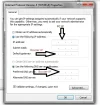
Go to control panel, Network Connections, Right click on either LAN or Wireless depending on what you are using, and select properties.

Choose 'Internet Protocol Version 4' then click properties. Click the 'Use the following IP Address' radio button and fill in the addressess as shown.
 

Attachments

  • NetConf.webp
    NetConf.webp
    31.5 KB · Views: 42
  • NetConf2.webp
    NetConf2.webp
    25.3 KB · Views: 41
Back
Top