Echostar SR-7700 Set Up Question

Redvers Kyle

Member
My Satellite Setup
Echostar SR-7700
1.5 Channel Master Dish
My Location
UK
Hello!. I have an Echostar SR-7700 Motorized Analogue Reciever connected to a 1.5m Dish. I had to move to Canada for 8 years so I put it in to storage. I just got back to the UK and Im interested in setting it all back up again (Even though I know there arnt many PAL Analogue Channels left and no D2mac anymore) Anyway, I cant find the users manual, and I have no idea how to wire up the motor and stuff at the back of the reciever. Could anyone help me?
Thanks!
 
Wow, talk about vintage STB's :eek: Can you upload a picture of the rear of the Echostar?

I have a picture in an old Wotsat magazine, but it's not very clear.

I can make out the actuator terminal and polariser blocks, but not the one on the other side of the LNB i/p's.

Llew
 
Don't forget, Analoguesat has a website with all the availble analogue channels... :)

www.analoguesat.co.uk

:D
 
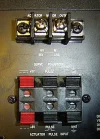
Here are some pictures - Thanks for any help you can give!
 

Attachments

  • SR-7700-BackPanel1.webp
    SR-7700-BackPanel1.webp
    45.5 KB · Views: 98
  • SR-7700-BackPanel2.webp
    SR-7700-BackPanel2.webp
    40.2 KB · Views: 76
  • SR-7700-BackPanel3.webp
    SR-7700-BackPanel3.webp
    37.5 KB · Views: 74
  • SR-7700-Wires.webp
    SR-7700-Wires.webp
    32.5 KB · Views: 64
You really need to check how the cables are terminated at the dish motor, as you are using non-standard wiring for the motor pulse connections.

The 2-wire cable will at a guess go to the motor terminal (top of pic 3)

Two wires of the 4-wire cable from the reed switch of your motor will go to the pulse and ground terminal of the bottom block of pic 2. If the motor has an optical switch, the third wire will go to the +6V terminal. The remaining wire (normally black) goes to the ground terminal.

You don't appear to have any screening round the 4- wire cable (looks like mains cable), but if it worked OK previously, I don't suppose it matters much.

A word about uploading images - I've edited yours as thumbnail attachments (go to 'manage attachments'); do it that way rather than putting them directly in a post.

Llew
 
Back
Top