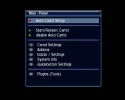
Hacksat Keyupdater on DM800

tlj999

Regular Member
My Satellite Setup
Dreambox DM500s, DM800HD, Sky+, minidish, Fortek star 90cm dish, Fortek Star Motor.
My Location
Newcastle England
Hi All,

I'm trying to get Hacksat working on my 800.
I have downloaded hacksatv9a-en.tar.
When I unpack it I get a folder as follows:
VAR/TUXBOX/PLUGINS
in the plugins folder I get 2 files

hacksatkeys.cfg and hacksatkeys.so

would I be right in assuming that I FTP the last 2 files to VAR/ETC


Started a new thread as it was going off topic as it related to the DM800 not the DM500 which the original topic was about. Nano
 
You FTP the .tar file to /tmp and do a manual install:

blue panel > addons > manual install
 
Thanks Mhku,

I've installed it and got message addon installed successfully.
How do I start it and what does ' chmod it to 755 ' mean?
 
You start it from the blue panel:

blue panel > plugins > Hacksat

To chmod it you can use a number of methods; I use an FTP client or telnet.

If you have FileZilla, for exampe, browse to the files on your Dreambox. Next to the files you'll see some letters like r w x (these mean read write execute). The unix (octal) version of this is shown using numbers.

To chmod to 755, right click the file and select file attributes. Tick:

owner: read write execute

group: read execute

public: read write execute

This will chmod the files to 755

You can also do it directly using telnet - there should be telnet basics in the Idiot's Guide; if they're not let me know and I'll add some when I have time. search should also find some info.

DCC probably does it as well but I don't use it.
 
Hi,
I've received the message installed successfully.
In Blue panel I don't have > plugins > Hacksat. I have Addons or Extras or Services.
None of these have Hacksat in them.
I have browsed to the 2 files which have been created in var/tuxbox/plugins.
Do I need to CHMOD both to 755.
Hacksatkeys.cfg is 644 and Hacksatkeys.so is 755.
Tried restarting but still nothing.
Am I missing something?

Thanks for your help so far.

Tom.
 
Your file permissions are correct. What image are you using?
 

Attachments

  • screenshot.webp
    screenshot.webp
    19.4 KB · Views: 176
Hi,
I'm using Gemini.
 
My attached screenshot in post #11 is the Blue Panel. The 800 will differ from my 7020 but I'd have thought it would still be there?
 
I can get blue panel ok but can't find hacksat anywhere
 
I've found plugins.
It's in the main menu on DM800.
Still no Hacksat there though.
 
I've never used any plugins on 800 yet.
I'm still relatively new to all this and still learning.
Do I need to restart DM or something?
 
You shouldn't need to but it won't hurt to try.
 
Restarted and still nothing in plugins.
I can download new plugins.
I just downloaded CCcam info plugin and got that working straight away.
But no Hacksat.
Could it be somewhere else?
 
Hi,

Yes, I did a manual install and got a message saying plugin installed successfully.
 
The plugin files are in the same folder as your other plugins?
 
I don't know where the other files for CCcam info have gone.
The hacksat files are in var/tuxbox/plugins and these are the only 2 files in there.
I've just noticed that when I browse the files using FlashFXP, if I click var the var folder opens but when i click on tuxbox it opens etc > tuxbox.
So my files are actually stored in etc/tuxbox/plugins.
Is this where they're supposed to be?
 
The Dreambox uses a lot of softlinks/ symlinks (if you use FTP look for the infinity symbol or shortcut arrow by the folder name), which is a link to a different folder.

As a test can you install a different plugin (via the blue button) and see where it is installed? I don't have an 800 so can't look.
 

Attachments

  • shortcut.gif
    shortcut.gif
    13.1 KB · Views: 97
I installed CCcaminfo from the blue panel but can't find the files
I'll have another look.
Thanks for your patience and help.
I might just delete the 2 files for hacksat and start again.
Can you see any problem with this.
 
Back
Top