Motor rotates wrong.. driving me crazy!!

I would check all your cables, especially the connections, again, just to make sure you haven't got a loose connection, or a short:
View attachment 97052

I have experienced problems, with my connections, when the F connector was too tight, for the cable, so I forced it on, and in doing so cut through most of the copper braid, giving me an intermittent connection.

There is no loose connection since I have checked it with a multimeter. And no short because if there was a short the motor wouldn't get any power then.
 
Yes, you're right about the SR. I will correct that. However, it shouldn't be the main cause of this problem, right?

- LNB setup
I think I haven't seen any specific options for the LNB. If you mean tuner configuration, i just entered my latitude/longititude and choose the 'simple' method. I think if one chooses the 'advanced' method then u have other options.

On the other side of the motor I have the latitude set to 51. I will upload its picture too.


Wrong SR will cause a problem as the signal parameters are essentially invalid, so you are looking for something that isn't there - ergo you won't find it.

There most definitely will be an LNB setup page and the fact you haven't come across it reinforces my feeling that that is the main root of the problems you are having. The receiver needs to be told what LNB you are using - It does not know, otherwise.

The settings page will have things like: A list of LNB types and their associated Local Oscillator frequencies, Tone On/Off, Power On/Off etc.

You must select something that looks like "Universal 9750/10600" and ensure Power is on.

As for the Motor Latitude reading, that sounds ok.
 
I'd like to say I've also had a quick look through, but it was a right-royal pain scrolling through on my Tablet!

Anyhow, my guess is it's embodied in the Setup Wizard around Page 18-20. Hard to say as the pictures are wholly indistinct.

I wonder if it might not be an idea to perform a Factory Reset and start afresh?
 
Just been looking on t'Web and there are many hits for Vu Solo 4k LNB ...... and I still can't figure it out!

Unless the box is only capable of using a common or garden Universal LNB and, therefore, is effectively setup from the get go?

I think we need advice from somebody who has one of these boxes, working.
 
There is no loose connection since I have checked it with a multimeter. And no short because if there was a short the motor wouldn't get any power then.

But everything points to the LNB not being powered, so, as you do have power to the motor, please check the cable from the motor to the LNB, which may well be open-circuit. That can happen as the result of the cable not being securely and properly attached to the F connectors, cable damage, or simply no being firmly screwed onto the socket.

Failing that, do you have another LNB you can try?
 
Following on from the above, can you confirm that you are using a standard LNB or a Unicable? Also, are you using the image that came with the box or have you flashed the Solo with another image?
 
Following on from the above, can you confirm that you are using a standard LNB or a Unicable? Also, are you using the image that came with the box or have you flashed the Solo with another image?

Universal LNB and I haven't flashed the solo yet but I am planning to do it after this step (setup of the hardware and making sure I have strong signals from satellites) is taken.
 
Finally I have some good news! :)

Thanks to the support I get here from you all I didn't give up, even after a lot of frustration with this tedious thing.

Yesterday I rechecked all cables and reconnected some firmly to the f-connectors. There were no shorts and no damages to the cables. Then I corrected the SR which I had mistakenly entered 27000 in the receiver. Then using USALS I moved the dish to 4.8E. Nothing appeared on the signal meter (SNR). I was like then let's check Astra 19.2east (that's you guys see 19.2 in the pictures of the positioner setup menu, actually the frequency is from a channel in Astra 4.8e) cuz some days ago I got some signal on that. As the dish was moving towards 19.2e, like half way there I saw movements on the SNR bar. It gave me hope and smile right away!! Haha
Using 'fine Movement' in the positioner setup menu, I moved the dish to the spot where I got that signal. Initially it was like 40%, with some more fine-movement east/west it went up to 50-55%. Then I went to the balcony and tiled the dish slowly up/down, it made the signal rise to 70%. This means I had to change the elevation of the dish from 22.5 (calculated based on the manual of the motor=> 30 minus declination angle which is 7.5) to 23 degrees. That was the time when I noticed that the tube attached to the motor wasn't firmly bolted, it was a little loose and tilting, very probably that had been causing issues too. With an alan key I fixed it.
Then with rotating the LNB very slowly, the signal got around 92%. I couldn't help it more. Probably enough!?
I could then find good SNR for hotbird too.

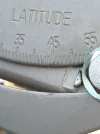
HOWEVER, I still have the deviation issue, now even larger deviation. For instance, as it can be seen in one of the pictures, the degree on the motor where I get signal for hotbird 13.0E is around 22.5 degrees. More or less same kind of deviation for 4.8 east and probably other satellites too.
- Do you guys think resetting motor and the receiver, then aiming the motor and dish at true south, then Goto 0, then entering satellite (4.8e) data of a tv channel, then with Goto x moving to that satellite might be fruitful?
- In the 'Tune and focus' submenu in positioner setup of this receiver, what do exactly 'auto focus', 'caliberate' and 'calculate' do? The manual say nothing about it.
- after getting a good lock on a satellite using the positioner setup, do I have to save it? If yes how, is the USALS index for that purpose?

Here are the pictures. Some are mistakenly uploaded twice. Satellite 4sep. - Click to see more
photos
 

Attachments

  • 1.webp
    1.webp
    41 KB · Views: 21
  • 2.webp
    2.webp
    83.3 KB · Views: 19
  • 3.webp
    3.webp
    97.5 KB · Views: 18
  • 4.webp
    4.webp
    37.4 KB · Views: 20
  • 5.webp
    5.webp
    31 KB · Views: 17
  • 6.webp
    6.webp
    35.6 KB · Views: 19
  • 7.webp
    7.webp
    36.8 KB · Views: 18
  • 8.webp
    8.webp
    108.7 KB · Views: 20
  • 9.webp
    9.webp
    75.2 KB · Views: 18
Last edited by a moderator:
You are having far more problems, than you should have, it shouldn't be this complicated, providing you have followed the basics, unless your motor is faulty, or the receiver, or there is a compatibility issue.
Seeing as your Longitude, your True South, is very close to 4.8E, try ignoring USALS, and switch to Diseqc 1.2.
With Diseqc 1.2 you move the motor/dish, using the East/West options, and store each satellite, e.g. 4.9E as 1, 7E as 2, 9E as 3, 10E as 4, etc.....
Start with 4.9E, select a strong, active, transponder, for your region, set your dish/motor/LNB at 0, then physically move the dish, and adjust the bracket, until you get the strongest signal, from 4.9E.
You then tighten everyhting up, go to your receiver, enter a strong transponder for the next Easterly satellite, and use the Diseqc 1.2 options to move the dish, to that satellite, peak the signal, and store it, before moving to the next.
You can find a list of satellites, and transponders, on various sites, including Lyngsat:
Code:
http://www.lyngsat.com/europe.html
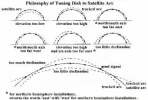
Below is an image explaining how the dish might not be aligned correctly, and missing the satellite arc, for various reasons:
satellite arc.webp
 
Well done, you are getting somewhere!! When you say you got up to 70% SNR on 19.2E did you scan for channels to check that was the sat you were locked on to? (Transponder frequencies are shared by some satellites across the arc)

The motor stub being loose would have definitely have had an effect on your attempts to align everything. I'd also check that the motor body is completely tightened up there appears to be a gap from the photos. I also noticed you have an Open Pli image on the box, did this come already installed with the Solo 4K?
 
Well done from me also.

Your tenacity is admirable - and if you stick at it to the bitter end you'll have learnt a heck of a lot more than had you given up and got someone in to complete the Installation.

Next time you have occasion to extend or alter your dish farm it'll all be so much easier :)
 
Well done, you are getting somewhere!! When you say you got up to 70% SNR on 19.2E did you scan for channels to check that was the sat you were locked on to? (Transponder frequencies are shared by some satellites across the arc)

The motor stub being loose would have definitely have had an effect on your attempts to align everything. I'd also check that the motor body is completely tightened up there appears to be a gap from the photos. I also noticed you have an Open Pli image on the box, did this come already installed with the Solo 4K?

No I didn't and couldn't scan for any channel. In the positioner setup menu you can only lock on to a satellite but can't scan for channels.
In the manual and automatic scan menus, you choose one of the satellites in the list then the motor moves the dish to it. Because of the deviation issue, it doesn't lock on to the selected unless you manually move the satellite which I haven't done yet.

The open Pli come already installed with the solo. Is it a good one? I was thinking to flash blackhole.
 
The receiver would have originally been flashed with the official vuplus image:
Code:
http://code.vuplus.com/

The company must have flashed it with the OpenPli image, with your consent, unless the receiver isn't new, and has been returned, or unless they prefer the openpli image.

It doesn't matter which image you use, they are all similar, it's generally a personal preference.
I would download a motorized channel list, from the menu, then try using Diseqc 1.2, to drive, and store, the satellites. then test the channels.
 
Then with rotating the LNB very slowly, the signal got around 92%.

Hmm...do you mean you actually turned the LNB clockwise or anticlockwise in it's holder or moved the LNB towards or away from the dish face? No skew adjustment (i.e. the slant of the LNB ) should be necessary as the design of the motor and stub will apply the correct skew as it turns. The LNB should be set to vertical and not moved afterwards. If you've had to rotate the skew of the LNB to get better results, it indicates that either your mount isn't true vertically or there is a misalignment of the dish and motor stub.
 
Hmm...do you mean you actually turned the LNB clockwise or anticlockwise in it's holder or moved the LNB towards or away from the dish face? No skew adjustment (i.e. the slant of the LNB ) should be necessary as the design of the motor and stub will apply the correct skew as it turns.

This, of course, is true for any 'normal' satellite, but in Europe the satellites AT 19E, 23E and 28E are pre-skewed, alas! (As is one around New sealand, I believe?)
So if he really was on the 19E, change of skew really would give an improvement.

@meyouall:
Did you check that if your motor is at zero (due south), your dish is aligned to due south too? So that motor and dish are exactly in one line, in that position?

Furthermore: When you get a signal in your motor menu, can you do a satellite scan at that motor position? So that you can check if the satellite you are receiving is really the one you think?

Greetz,
A33
 
This, of course, is true for any 'normal' satellite, but in Europe the satellites AT 19E, 23E and 28E are pre-skewed, alas! (As is one around New sealand, I believe?)
So if he really was on the 19E, change of skew really would give an improvement.

True those satellites may have a 'pre skew' but I'm not sure that adjusting the LNB would cause a leap from 70% to 92%. In practice the 'zero skew' on a motorized system should give good results on those sats. However, until there is a scan carried out we can't be certain which satellite he's locked on to.
 
On the VIX image I use on my Extrend the positioner set up does not allow you to change txp settings or do a scan.
Using the signal finder option does allow you to change parameters and do a scan, this will at least allow you to scan the txp to confirm what is on it and therefor which sat you are looking at.
 
Back
Top