Newbie in need of help with unscientific setup test

cable_guy

Regular Member
My Satellite Setup
Nothing but dodgy Freeview yet!
My Location
England
Hi all,

I am trying a proof of concept in my back garden to see if I can pick up 28.2E to a reasonable level, it's as "heath robinson" as you may imagine, but the thing I'm struggling with is finding the satellite.

I am testing the signal using a "Sly HD" box on the "signal" screen in settings, and my wife shouting to me if the level goes up. Now unless she's playing a very cruel joke on me, she says the signal has not yet gone up once as I'm trying to position the dish to point at 28.2E according to my little "Dishpointer" app on my phone.

It's so unscientific it's laughable, so I would like some tips please!? I feel the sly interface is probably a bad way of detecting signal, would a cheap satellite meter be a good alternative?
 

Attachments

  • Heathrobsat.webp
    Heathrobsat.webp
    203.5 KB · Views: 189
  • Skysigbal.webp
    Skysigbal.webp
    107.7 KB · Views: 177
Easy: You've got the dish pointing 25 deg or so too high!

It's an Offset Dish - the Offset being that of the LNB arm relative to the dish face.

So for a Dish with an Offset of around 25 deg (most are close to this) and a target Elevation of around 25 deg, the dish face needs to be very close to vertical.

Get that right and you should be able to use the S k y Box as long as you remember the Signal indication is incremental, not continuous, so wait a couple of seconds between each small alteration to Azimuth or Elevation to allow the Box time to react.

No point in actually spending any money ................
 

Attachments

  • Offset Dish.webp
    Offset Dish.webp
    2 KB · Views: 73
PS: The diagonal wooden strut on your "mount" isn't helping much, either - looks like it is occluding a fair bit of the incoming signal, so try to clear your line of sight totally.
 
OK great thanks. Good point about the strut, I have now rested the dish up a little higher and pointed it more towards the horizon. I tried to check the signal again and still noe dice. not even 1% strength on the sly hd box :-( I think I'l check the cable I attached an F connector on the end of, failing that try another cable, and failing that look at re positioning later or tomorrow. It just seems down-heartening I'm not even getting one bar of signal!
 

Attachments

  • Dishlatest8pm.webp
    Dishlatest8pm.webp
    164.3 KB · Views: 132
Yes, you should get a reading of sorts if the cable is correctly connected at both ends ................. and if LNB Power is "On" (ISTR that there was a toggle for it in a hidden menu way back when - no idea if the newer fangled boxes have the same).

The bad news is those trees .......... you must have an unoccluded view of the S k y or the incoming signal will be incoherent and irresolvable.
 
Tivù said:
Yes, you should get a reading of sorts if the cable is correctly connected at both ends ................. and if LNB Power is "On" (ISTR that there was a toggle for it in a hidden menu way back when - no idea if the newer fangled boxes have the same).

The bad news is those trees .......... you must have an unoccluded view of the S k y or the incoming signal will be incoherent and irresolvable.
Yes indeed, the trees are why I'm calling it a "proof of concept" because Sl y told me it couldn't be done at my property, unless I used an "unsupported" dish (like i'm doing now, one remote from my house) and 2 independent installers have told me they think it can be done similar to how I'm trying it now, although they wanted to mount it on the other side of my fence post (as you can see in the middle of the pic on the left middle)

Attached is the view of the s ky from the fence post.

Interested in how I can check if LNB power is on on the new fangled boxes if you know?

I just tried another cable stripped it and added a new F connector, still the same :(
 

Attachments

  • sat.webp
    sat.webp
    39.3 KB · Views: 518
Hmm. Trees don't seem to be as much of an issue as first surmised, looking at your latest pic. Interesting.

As for LNB power, dunno (I have an ancient S k y box somewhere, but it's a museum piece)! You could perhaps bung it on a neighbours dish to prove the Box works ok. Should be On by Default, though.

Fortunately, there are Members here who are as clever as a sack of ferrets, so you'll have your answer soon.

Either that or I shall find myself poo-poo'd.
 
a quick google has brought this up

Old method:
Installer setup - Not listed on the Sky Guide Menu
To access the Installer setup, do the following:
1 Press Services on your Sky remote.
2 Press 4 (System Setup).
3 Press 0
4 Press 1
5 Press Select

New Method:
1 Press Services on your Sky remote.
2 Press 0
3 Press 0
4 Press 1
5 Press Select

hope it helps
 
thanks martin and tivu, I will check this power to the LNB using that method tomorrow morning :-)

From the look of the satellites augmented on that picture,do you think you could pick up a signal from that then?

What was weird about the professional installers was that they came around, took a quick look at the horizon and decided without any app or anything that they think they can get me reception!
 
martin-f said:
a quick google has brought this up

Old method:
Installer setup - Not listed on the Sky Guide Menu
To access the Installer setup, do the following:
1 Press Services on your Sky remote.
2 Press 4 (System Setup).
3 Press 0
4 Press 1
5 Press Select

New Method:
1 Press Services on your Sky remote.
2 Press 0
3 Press 0
4 Press 1
5 Press Select

hope it helps
Wrong - Old method used to be a tongue on the end of the cable. If you got a belt, you knew there is enough to drive what's on the end of it.
I wouldn't do it with modern boxes though.
 
he wanted to get into the installers menu ? to make sure lnb was turned on not put his tongue on anything lol, i did say a quick google, i am sure he will google his model and how to get into installers menu if the 2 options do not work,

you will get a signal from where you are i think your on the right track you should have at least 1 signal bar if your nowhere near the sat your aiming for.
 
I should read before I post. CH beat me to it :D
 
here is the lnb settings in my box option 2 worked for me New Method: and my box is a sky + hd.


I feel the sly interface is probably a bad way of detecting signal, would one of <a class="bbc_url" href="http://www.maplin.co.uk/satellite-beeper-48328" title="External link">these </a> be a good alternative do you think?
ive never used one ive only used a reciever, and ive just set a polar mount up it took some getting my head round it and help but i got there in the end :-).
 

Attachments

  • DSCN3091.webp
    DSCN3091.webp
    29.7 KB · Views: 74
cable_guy said:
Interested in how I can check if LNB power is on on the new fangled boxes if you know?
 
Channel Hopper said:
Interested in how I can check if LNB power is on on the new fangled boxes if you know?
yes you need to go into installers menu to check that the power is turned on, the lnb will not work without power,

if the power is on then maybe do what you say to see if its faulty, but the op asked how to check it was turned on
on the new fangled boxes, and thats in the installers menu.
 

Attachments

  • DSCN3091.webp
    DSCN3091.webp
    3.4 KB · Views: 60
Confirmed.
New method - can be quickly verified by placing tongue on end of cable.
 
ok your admin you win :-) but dont listen to him c/g ive got a felling hes old hat :-hide only kidding c/h :-admin
 
LOL. Someone's little bit of whimsy (albeit with truth behind it) has gone over heads! :cool:
 
Getting back to your first post, yes a cheap satllite meter is the easiest option.
First it tells you if you have any power, as it lights up and beeps.
Second it helps in finding a satellite signal, and improving the signal quality, in order to get a picture, but it will not tell you which satellite you're pointing at, scanning in channels, on your receiver, is needed to confirm that.
 
Hi all, thanks so much for the help!

I havn't stuck my tongue in anything haha!!

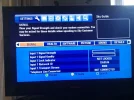
I did however change the receiver to a Sly + HD one and managed to get into the engineers menu on both my receivers and to my horror the LNB power was ON on both. I agree with martin-f, I should be getting at least SOME signal, even if it's extremely weak.

So I think I will go to my local toolstation and see if they have any already made up cables with F connectors on each end, to rule out the cable as a problem.

I have attached the screenshots fromthe sly + HD box, is there anything I can configure on here which could help?

thanks again for all the kind advice to this newbie!!!! I'm learning a lot and enjoying it at least.
 

Attachments

  • Lnb.webp
    Lnb.webp
    89.4 KB · Views: 79
  • trp.webp
    trp.webp
    47.6 KB · Views: 82
Back
Top