Advice Needed OCTAGON SF4008

Are you on Skype? The data in my file is gathered automatically. We need to sort a manual override for when the source doesn't contain contain the multistream info.
I'll send you a PM.
 
That's me added an internal hard disk to the Octagon now. Screws and connection cables were supplied with the receiver as well as an external data cable for the 2 back usb ports. Recording is working. Still to try is to record a 4.2.2 channel and play with Nvidia Shield TV box. Got to find the feed first with the Dr HD blind search, then input the details into the Octagon and hope it has not disappeared before I hit the record button!

The satellite search screen really needs a signal indicator. I miss that badly. It also needs a transponder delete button. Is all very well downloading a ready made transponder list but when it covers the different footprints a satellite covers it means the satellite search has to check a lot of transponders with no signal slowing down the search process.

Using a couple of external satellite editors and sending the amended details back the receiver was unsuccessful and ended up with a non working channel list. Backing up your settings is soooo important! Editing Satellites.xml and then rebooting the receiver worked.

I'm learning, but patience, I am finding, is absolutely essential with this kind of receiver.
 
That's me added an internal hard disk to the Octagon now. Screws and connection cables were supplied with the receiver as well as an external data cable for the 2 back usb ports. Recording is working. Still to try is to record a 4.2.2 channel and play with Nvidia Shield TV box. Got to find the feed first with the Dr HD blind search, then input the details into the Octagon and hope it has not disappeared before I hit the record button!

The satellite search screen really needs a signal indicator. I miss that badly. It also needs a transponder delete button. Is all very well downloading a ready made transponder list but when it covers the different footprints a satellite covers it means the satellite search has to check a lot of transponders with no signal slowing down the search process.

Using a couple of external satellite editors and sending the amended details back the receiver was unsuccessful and ended up with a non working channel list. Backing up your settings is soooo important! Editing Satellites.xml and then rebooting the receiver worked.

I'm learning, but patience, I am finding, is absolutely essential with this kind of receiver.
This is the trouble with Enigma based boxes, they are not very user friendly when it comes to the feedhunting. The software is really geared for other activities..
 
This is the trouble with Enigma based boxes, they are not very user friendly when it comes to the feedhunting. The software is really geared for other activities..
Yet the potential is there for enthusiasts to write software for these boxes which adapts them for enthusiasts.
 
@AndyX, Blindscan plugin work well but a lot of enigma2 boxes have crap hardware.

If you want a signal indicator use satfinder (scans too).
 
@AndyX, Blindscan plugin work well but a lot of enigma2 boxes have crap hardware.

If you want a signal indicator use satfinder (scans too).
Thanks HuevosI did notice the sat finder, but it is on a different page to the transponder editor which means going back and forward via the menu. Not ideal when transponder checking 120 transponders!
 
What comments Eggs is perfect to look for a TP manually, indicates signal level and quality, you press OK and you search it.
You can use the data included in satellites.xml or put the search data you want.
The relation of TP / frequencies that you have in satellites.xml you have to take with patience your search.
In general, in other boxes Enigma2, if you modify the file satellites.xml adding data, satellites and tp / frequencies, only reads the file when the equipment is rebooted.
A photo of satellite finder with the 2 options.
---------
Lo que comenta Huevos es perfecto para buscar un TP manualmente, indica nivel de señal y calidad, pulsas OK y lo busca.
Puedes usar los datos incluidos en satellites.xml o poner los datos de busqueda que quieras.
La relacion de TP/frecuencias que tengas en satellites.xml se tiene que tomar con paciencia su busqueda.
En general, en otras cajas Enigma2, si modificas el fichero satellites.xml añadiendo datos, satelites y tp/frecuencias, solo lee el fichero al reinicar el equipo.
Una foto de buscador de satelites con las 2 opciones.


Likely similar/Similar seguramente.
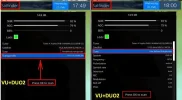
Manual_TP_ok.webp
 
Last edited:
Thanks HuevosI did notice the sat finder, but it is on a different page to the transponder editor which means going back and forward via the menu. Not ideal when transponder checking 120 transponders!
What image are you using? And what receiver? In Satfinder just tune a transponder and press ok to scan it.
 
What image are you using? And what receiver? In Satfinder just tune a transponder and press ok to scan it.
I have the Octagon SF4008 using OpenATV. I will give your method a try tomorrow, thanks
 
What made you choose that image?
 
It came with the receiver. Do you suggest a better one?
The first batch of receivers came with OATV 5.3, which does not support multistreams. For multstreams you need OATV 6.0.
 
The first batch of receivers came with OATV 5.3, which does not support multistreams. For multstreams you need OATV 6.0.

Thank you huve, I have updated to OATV 6.0 and have managed successfully to get Multistream working. 6.0 I must point out, is still in beta at present.
 
Well you are probably better off with any image that has its main support forum language as English. I'm running OpenViX on mine. The official release imminent.
 
Well you are probably better off with any image that has its main support forum language as English. I'm running OpenViX on mine. The official release imminent.
I will certainly have a look at it once it is released. Does the blind scan plugin work in this image?
 
I will certainly have a look at it once it is released. Does the blind scan plugin work in this image?
Blindscan plugin can only work once the manufacturer releases a DVB-S blindscan binary for this receiver. All OE-Alliance images uses the same blindscan plugin... so once the manufacturer provides the closed source file require it will work in all OE-Alliance images that support this receiver.
 
For blindscan linux satellite receivers simply are not an option.
I've got a Solo2, LX3, and OS Mini+. All blindscan reasonably well. Also got a PnP tuner in my Solo4k. That blindscans too but not so thorough. And Sundtek and TBS DVB-S2 USB tuners also work fine. There are other E2 boxes with blindscan, but I don't have first hand experience with them so not going to comment.

Brian had the ET9500 and was happy with it.
 
Back
Top
