
Problem uploading image to /var/tmp

easysat

Regular Member
My Satellite Setup
Dreambox 7000S + motorised 80cm dish, Amstrad DRX550 Digibox + fixed dish
My Location
pj::
I want to use the root.cramfs method to update the image. This worked before but this time I've run into a strange problem trying to upload the new image to /var/tmp. The Dreambox 7000S only seems to accept the first 400kBytes or so before generating errors. I can upload the same file to the directory /tmp without any problem. I tried using telnet to copy the file from /tmp to /var/tmp but the Dreambox refuses and indicates that there is not enough space. Any ideas before I tear the last hair off my scalp? The current installed image is Hydra Zeus if that makes a difference.
 
easysat said:
I want to use the root.cramfs method to update the image. This worked before but this time I've run into a strange problem trying to upload the new image to /var/tmp. The Dreambox 7000S only seems to accept the first 400kBytes or so before generating errors. I can upload the same file to the directory /tmp without any problem. I tried using telnet to copy the file from /tmp to /var/tmp but the Dreambox refuses and indicates that there is not enough space. Any ideas before I tear the last hair off my scalp? The current installed image is Hydra Zeus if that makes a difference.
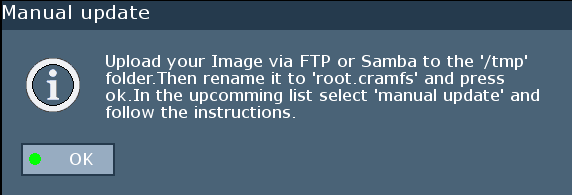
Manual_update.gif


It SHOULD go in the /tmp folder, and be called root.cramfs. :D

Then select "manual update' from the Dreambox update menu.

Pop round later, and I'll superglue your hair back on for you.:P

root.cramfs method rulez.
 
BGonaSTICK said:
It SHOULD go in the /tmp folder, and be called root.cramfs. :D

Then select "manual update' from the Dreambox update menu.
[/QUOTE]

Well I tried that Sunday afternoon and nothing came up in the on screen box showing the choice of images to install. Is Zeus different to previous images in where the root.cramfs file need to be placed? I might try Rolf's idea of Flashwizard Pro assuming it works with a WLAN connection.
 
FWP works fine over wireless, but regardless is sometimes flakey.

You could always flash it back to the stock 1.08 and then go again from /tmp.
 
Sorry removed my post, as half of it was gollocks, the FWPro works well on wired or wireless.
 
Back
Top