B16MCC
Dreambox Gimp & Coder
- My Satellite Setup
- 2 Dreamboxes..........
---------------------------------------------
--- DM 8000 HD PVR & DM 800 HD ---
Motek SG2100 & Triax 80cm Dual LNB
------ Fixed Dish 28e Quad LNB -------
---- Sly HD Full & 24" Apple iMAC ----
- My Location
- /var/tuxbox/config
Hi guys, here's another util from me. I hope you find it useful.
What does it do:-
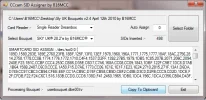
It interegates the files within a Dreambox Edit bouquet set. It takes the SIDs from each channel and creates the SMARTCARD SID ASSIGN line for you to enter in your CCcam.cfg.
How does it do it :-
1. Using Dreambox Edit create a bouquet containing all the channels that you have on your card. Then using this software,
2. Select the card reader you're using.
3. Select your bouquet folder that you created in Dreambox Edit.
4. Select the bouquet from the drop down box.
5. Your line is created for you containing all the SID's you have access to.
6. You can copy it and paste it into your CCcam.cfg file.
3 Points of interest.
1. To implement the SID ASSIGN line in your CCcam.cfg you must restart CCcam.
2. After implementing it, if you get a black screen on a channel that normally works then you have that SID missing from the line. Just bare it in mind.
3. You might want to grab my Sly UK Bouquets to test it out.
Have a look at a previous post I made regarding the CCcam SMARTCARD SID ASSIGN function.
http://www.satellites.co.uk/forums/...antages-cccam-using-smartcard-sid-assign.html
What does it do:-
It interegates the files within a Dreambox Edit bouquet set. It takes the SIDs from each channel and creates the SMARTCARD SID ASSIGN line for you to enter in your CCcam.cfg.
How does it do it :-
1. Using Dreambox Edit create a bouquet containing all the channels that you have on your card. Then using this software,
2. Select the card reader you're using.
3. Select your bouquet folder that you created in Dreambox Edit.
4. Select the bouquet from the drop down box.
5. Your line is created for you containing all the SID's you have access to.
6. You can copy it and paste it into your CCcam.cfg file.
3 Points of interest.
1. To implement the SID ASSIGN line in your CCcam.cfg you must restart CCcam.
2. After implementing it, if you get a black screen on a channel that normally works then you have that SID missing from the line. Just bare it in mind.
3. You might want to grab my Sly UK Bouquets to test it out.
Have a look at a previous post I made regarding the CCcam SMARTCARD SID ASSIGN function.
http://www.satellites.co.uk/forums/...antages-cccam-using-smartcard-sid-assign.html