Technisat Technibox UHD S problem

My Satellite Setup
FreesatfromSky
Freesat [Humax HDR 1000S]
Fta(9E/13E/19E/28E) [Fixed Triax TD88]
1.1M motorised satellite dish [unbranded]
My Location
UK
Hi everyone,hope everyone is well
I have the Tehnisat Technibox UHD S,which is a twin tuner pvr,since last year.
Tuner 1 is connected to a 80cm Triax with multi lnb bracket:13E/19E/28E/9E via a 8 output diseqc switch, however the 9E lnb is currently disconnected and 7E (on a zone 1 Sky minidish),is connected to the same 8 diseqc switch.
Tuner 2 is connected to a 13E/19E monoblock on a zone 2 minidish
However,in recent months,the second tuner has been showing no signal.
I assumed the dish had moved,so realigned,yet the second tuner continued to show no signal,checked with another cable,connected to tv with satellite connection (Ferguson F2220S),and the signal was fine.
Yesterday,I replaced the original twin shotgun cable,which was connected to the second tuner,in case it had become damaged,though it was not visible or in case of water ingress,there was slight discolouration on,one of the connections,though both connections have rubber boots fitted
Again the second tuner is showing no signal,yet when i connect it to the Ferguson tv,it is working fine.
Should I reset the receiver,to factory settings and start again?
The online manual to the Technisat can be found here:
https://www.technisat.com/assets/medias/docus/123/BDA_KURZ_TECHNIBOX_UHD_S_DE_EN.pdf
English instructions page 81 onwards
Thanks for any input.
 
What happens if you swap the cables around - 13E/19E monoblock on tuner 1 & 8-way DiSEqC to tuner 2? Remember to switch the receiver off when doing anything with the cables.
 
What happens if you swap the cables around - 13E/19E monoblock on tuner 1 & 8-way DiSEqC to tuner 2? Remember to switch the receiver off when doing anything with the cables.
No signal,on all channels,from all satellites
 
Did you change the Antenna Configuration to match the swapped cables?
 
Is the second tuner enabled to provide voltage to the lnb by default ?
 
Did you change the Antenna Configuration to match the swapped cables?
Oops :oops:
I changed the antenna configuration after reading your post,but instead tuner 2 showed signal and tuner 1 showed no signal
I was able to view some channels on 13E and 19E,no channels whatsoever on 28E or 7E
The thought then occurred to me to connect both feeds from the monoblock lnb (it is a twin monoblock),to both tuners and both tuners showed signal and I was able to view both 13E and 19E,however I forgot to check whether the Picture in Picture was working as it should
I then went back to my original connection ie
Tuner 1 13E/19E/28E/7E
Tuner 2 13E/19E and did a factory reset and reconfigured the antenna configuration again,and the signal levels were shown for both tuners
I’m in the process of channel searching atm
Will update once it’s completed
Thanks ozumo and Channel Hopper
 
Is the second tuner enabled to provide voltage to the lnb by default ?
I assume so,it’s not possible to configure the tuners separately,which is really annoying,as I am used to be able to do that with all the Topfield twin tuner pvrs,that I previously have had.
You can only select 1 or 2 antenna signals in the menu
If you familiar with the Freesat receiver,it is very similar to that with its menus and auto updating of channels and default epg numbers with the German channels on 19E listed first,which you can change thankfully
 
Last edited:
There's a client of mine in North Surrey that has been using a similar set of receivers. If only Topfield had been around long enough to launch a high definition box.
 
There's a client of mine in North Surrey that has been using a similar set of receivers. If only Topfield had been around long enough to launch a high definition box.
True,it’s such a shame,Topfield are no more
The ease of use,interface and the ability to add TAPS,did put them above the rest.
 
Back to square one.
Tuner 2 shows no signal again.
I can only assume that a recent software update has disabled the ability to use non identical signals,and that’s why I am getting no signal on tuner 2 and the loss of Picture in Picture as previously.
Will have to contact Technisat support
Thanks Guy’s
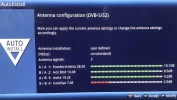
photo 1 : showing the signal levels when tuner 1 was connected to 13E/19E monoblock lnb and tuner 2 to 13E/19E/28E/7E multi lnb
photos 2 & 3 : showing the signal levels when both tuner 1 and tuner 2 are connected to both connections of the twin monoblock (13E/19E)
photos 4 & 5 : showing the configuration and signal levels both tuners,after factory reset and connections back to original configuration as posted in post 1
photo 6 : showing the Picture in Picture and no signal on tuner 2
 

Attachments

  • BCD5535A-7B2A-4A7A-91B9-E04E84F14D94.webp
    BCD5535A-7B2A-4A7A-91B9-E04E84F14D94.webp
    285.5 KB · Views: 9
  • 62CF8863-DD01-4420-A0E4-FAE84C1B869E.webp
    62CF8863-DD01-4420-A0E4-FAE84C1B869E.webp
    324.9 KB · Views: 10
  • 79BB46EA-3E68-4FAA-8D26-914EBC7BE95B.webp
    79BB46EA-3E68-4FAA-8D26-914EBC7BE95B.webp
    308.3 KB · Views: 9
  • 162122CA-B0C3-4CB3-891B-9D087A2B320B.webp
    162122CA-B0C3-4CB3-891B-9D087A2B320B.webp
    320.3 KB · Views: 10
  • F59FB693-5D9A-430D-A9D9-4D274C8CA543.webp
    F59FB693-5D9A-430D-A9D9-4D274C8CA543.webp
    280.3 KB · Views: 9
  • 3CE39F4C-5192-4626-A47C-F9F1A32846C0.webp
    3CE39F4C-5192-4626-A47C-F9F1A32846C0.webp
    295.2 KB · Views: 10
It looks, as you say, like the receiver is expecting identical dish setups on both tuners. If you change connections on the DiSEqC switch to match the monoblock output (13E to input 1, 19.2E to input 4) it might work for 13E & 19.2E.

Off topic - I notice on 7E in picture 5 it is showing 2.5dB and a red bar, is this below lock?

With the picture and picture function, can it show two signals that are squashed to half width with full height, or does it only crop to show the middle portion of the video? I can make an example image to explain it better.
 
It looks, as you say, like the receiver is expecting identical dish setups on both tuners. If you change connections on the DiSEqC switch to match the monoblock output (13E to input 1, 19.2E to input 4) it might work for 13E & 19.2E.

Off topic - I notice on 7E in picture 5 it is showing 2.5dB and a red bar, is this below lock?

With the picture and picture function, can it show two signals that are squashed to half width with full height, or does it only crop to show the middle portion of the video? I can make an example image to explain it better.
7E is on a zone 1 minidish ,so I can only receive a few transponders,but it’s not below lock for those transponders I do receive.
Very little rain margin though,but the old minidish was lying around,and a forum member mentioned they were managing to receive 7E on a minidish,so I thought I would give it a try.
It brings in all the TRT channels and others so I can’t complain.
As for the Picture in Picture,you have two options,either both pictures side by side,both equal size in width and height,as you say or the usual Picture in Picture,with one picture full screen,and the other picture as a miniscree,in the corner
I now wish I had taken some screenshots when it was originally working.
The photo shows what the manual states,but as I say it was working with the different feeds originally.
 

Attachments

  • FE255CC9-A439-4F8F-93B4-9AB166B6EB0C.webp
    FE255CC9-A439-4F8F-93B4-9AB166B6EB0C.webp
    67 KB · Views: 8
Last edited:
...Off topic - I notice on 7E in picture 5 it is showing 2.5dB and a red bar, is this below lock?


The one receiver I do know that gives a signal indicator for frequencies below a lock is the Dr HD F15.
Other than that, something like CrazyScan or IQMonitor used with a DVB card can also show signals below a lock.

Having never owned a Topfield receiver I cannot comment on it's ability to show a signal level below a lock.
If there are any Topfield receivers on the online marketplaces for reet cheap wad it might be worth the chance of getting one for a sniff?
 
Hmm the manual says both inputs have to be identical. If you swap the cables around on the DiSEqC switch like I suggested in my previous post, both inputs will appear identical, only with 28E & 7E having no signal on the second input.

@moonbase The screenshot is from the OP's Technisat, it would be interesting to know which transponder the signal level is from :)
 
Last edited:
Regarding the picture-in-picture modes, these are the options I was thinking of:

original:
92B8D20A-6BAD-4A56-A221-EE8889767C8F.jpeg

2x 8:9 squashed:
35065B60-DDE8-40E8-AB30-06705FC51DBA.jpeg

2x cropped:
E4ED2FAA-3A37-4652-9E07-68A68198D25C.jpeg

I could find a use for a 2x 8:9 squashed mode on an active 3D television. Can one side be a recording?
 
The one receiver I do know that gives a signal indicator for frequencies below a lock is the Dr HD F15.
Other than that, something like CrazyScan or IQMonitor used with a DVB card can also show signals below a lock.
A quick look at Flysat and I can't see any TV transponders with symbol rates above 2000 on the 7E Europe beam which would lock with 2.5dB, assuming these figures are correct for lock:

B74AE518-9051-4D2B-BAD8-2E7DC949157D.jpeg
677429FB-FB46-4946-90DC-72F6217FA99D.jpeg
 
Last edited:
Hmm the manual says both inputs have to be identical. If you swap the cables around on the DiSEqC switch like I suggested in my previous post, both inputs will appear identical, only with 28E & 7E having no signal on the second input.

@moonbase The screenshot is from the OP's Technisat, it would be interesting to know which transponder the signal level is from :)
Thanks,will give it a try
 
@moonbase The screenshot is from the OP's Technisat, it would be interesting to know which transponder the signal level is from :)
The signal level for 7E was for 10804 V 30000 (TRT 3/Spor).
 
Back
Top