Advice Needed Tracking

Spiff

Regular Member
My Satellite Setup
Technomate TM-5402HD M3 C1+ Super+
Primesat VBox
2 x Actuators
Precision 1.3m Prime Focus Dish & mount.
InvertoTwin Black Pro C120

Amiko Viper4K
Primesat VBox
2 Actuators
Precision 1.5m Prime Focus Dish & mount
Titanium C1W-PLL C Band

Seven Computers : )
Two Davis Vantage Pro Weather stations
One Waldbeck Weather Station
My Location
Mullion Cove Cornwall
Good evening from Mullion Cove.

I have to raze the motor up for sats to the East and Down for west.

Which way should I turn the motor assembly on the pole : )

To the East ?

Increasing the height of the pole to give clearance between the KU & C band dishes, has upset the alignment.

God Bless Spiff
 
You will need to recalibrate everything, start with the motor on it's ""Zero" position, then find due South from your location and aime the motor and dish in that direction, then you must go to your due South satellite and reset, you may need to recalibrate a tiny bit but you should be set.
 
If you have a bog standard polar mount with additional elevation motor then the north/south needs to be moved in the direction of the drop.

Edit, still half asleep, have you changed the mounting pole and if so is it still vertical ?
 
Last edited:
If you have to put the DISH up at east side of the arc to get more signal and down at the west side , the mount / motor must be turned to the east on the pole
 
Good evening from Mullion Cove.
I have to raze the motor up for sats to the East and Down for west.
Which way should I turn the motor assembly on the pole : )
To the East ?
Increasing the height of the pole to give clearance between the KU & C band dishes, has upset the alignment.
God Bless Spiff


Spiff,

At your location of Mullion Cove your due South satellite is 5.0W. If you use your Az/El motor to get the polar mount to its dead centre position you can then manually rotate the entire assembly on the pole on the Az/El exis to peak the signals coming from 5.0W. Additionaly, you should also peak the elevation angle (not the declination offset angle) to maximise the signal from 5W.

If your declination offset angle was previously correctly set for your location (6.62 degrees) the above process should have realigned your arc. If you are using an actuator for the declination offset adjustment you will need to set it to 6.62 degrees at your polar mount dead centre.

As an alternative to using 5W as your due South satellite you could use "solar noon". If by any chance you have some sunshine today at 12:28 the sun will cast a shadow from the vertical feed support arm of the dish directly across the dish centre. By adjusting the entire assembly to get the vertical feed support am shadow centred on the dish you will be at dead due South for your location. Knowing UK weather, I think the signals from 5W are more reliable for adjustment.
 
Last edited:
No...If you center the dish and motor to the due south satellite at 5W the whole thing will be out of wack.

You must find due geographical South from your location first, then rotate the motor with the receiver to find the due South satellite, this satellite is a starting point for finding the other birds.

dishpointer.com can help you with finding due South at your location, and for finding the due South satellite

Finding due South is a very imprtant step in aligning or re-aligning a motorized setup, as all the satellites use geographical co-ordinates to position them selves in the arc of the Clark belt in space, they are all aligned stating at the prime meridian (East and West of) and all are on the Equator.

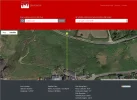
To use dishpointer first find your location using google Earth (or what ever mapping software you have) and find your longitude and latitude, copy and paste this in the address section, or you can enter your address in the address section of the program, then use the ""True South/True North"" selection, this will give you a line on a map showing the correct direction you need to first align the motor and dish.

I use this method when first installing or re-installing a motorized system, it should only take 10 to 15 min to setup and recalibrate the system, here is an example of the dishpointer web site using generic co-ordinates for your location.
Dishpointer.webp

You can zoom into your exact location and using the map with the line will help you find due South, it can also help you find the other satellites if needed.
 
The lines drawn by dishpointer for Mullion Cove re "True South" and the satellite at 5.0W are to all intents and purposes identical.

MC - DP - 5W.webpMC - DP - TS.webp
 
Last edited:
Increasing the height of the pole to give clearance between the KU & C band dishes, has upset the alignment.

Spiff : If you've had to increase the mount height, have you checked if the extra pole length is causing a left to right or front to back lack of plumb? I use a digital level to try and achieve alignment to within 0.1 of a degree.
 
Good evening after a very sunny day in Mullion Cove.

Thank you all for the advice, moving the pole up meant it was no longer pointing in the same direction, jacking it rotated the pole.

We could have just rotated the motor bracket till a satellite from the poles original position came in, but it had never tracked properly at far East or West.

Buy the time we were ready to start it was 12 midday, so I decided to go for the 12.28 sun it being a lovely sunny day.

As the shadow approached I could see it was going to be out, so loosened the bolts ready.

We set it when the shadow of the centre LNB support crossed the centre of the dish, as instructed.

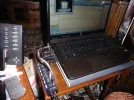
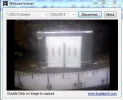
I then found 5 West easily, I have a scale on the motor mount with a webcam providing the image to a laptop near the TV.

I peaked it up East and West as well as with a jack that moves the motor mount up and down.

Tested it at far East and West and it is perfect.

I then proceeded to peak all the satellites from East to West, I got as far as about 7 East when it refused to peak to the East, the Primesat Box came up with ER2.

Driving to a satellite further West was fine but it refused to go back East.

I rebooted the receiver, unplugged the Primesat Box, all to no avail.

I then fed the jack direct from a power supply, it moved fine in both directions.

The reed switch also showed it was switching on and off in both directions.

Next would have been a reset using the Primesat Box remote, before I tried that I decided to check the cables, though how that could affect one direction is unlikely.

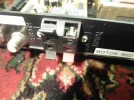
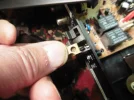
The top right spring device for connecting one of the motor feeds flew apart, it had broken being only thin plastic.

The box came apart easily, so I used a block connecter as per the image.

After reconnecting it all up it works fine ?

A poor connection unless it was acting like a diode, would have effected both East & West movement ?

Anyway it is all now working, that is so far : )

If you look carefully at the first image you can just see Alanna using the jack to lift the pole.

Thank you all again God Bless Spiff
 

Attachments

  • Jacking.webp
    Jacking.webp
    210.8 KB · Views: 38
  • Balcony.webp
    Balcony.webp
    222.4 KB · Views: 39
  • Sat Dish.webp
    Sat Dish.webp
    333.1 KB · Views: 37
  • Suns shadow.webp
    Suns shadow.webp
    110.2 KB · Views: 43
  • Broken Connecter.webp
    Broken Connecter.webp
    108.9 KB · Views: 44
  • Repair 1.webp
    Repair 1.webp
    75.3 KB · Views: 42
  • Repair 2.webp
    Repair 2.webp
    127.2 KB · Views: 39
  • CCTV Switch Box.webp
    CCTV Switch Box.webp
    211.6 KB · Views: 35
  • Webcam Image.webp
    Webcam Image.webp
    13.7 KB · Views: 49
Spiff,

Well done, the "solar noon" is as reliable as it gets, you have taken advantage of a cosmic event today.
They look a very nice pair of dishes at the end of your balcony.
 
Good morning another sunny day : )

An update.

I have now replaced all the connecters on the Primesat box just in case.

The first one I replaced was definitely faulty and not my ham fistedness.

I tried to break the others off by pushing them hard the wrong way, but they would not break.

I had to twist the plastic part that holds the cable with long nose pliers to get it out.

From this it looks as if the problem was the connecter, and that it was already broken.

Perhaps the poor connection stopped the jack driving in one direction only if it required more current one way ?

I have also made a scale for the motor pole so that it can be reset should it move.

Also a picture of the scale that shows via a webcam to reset the sat positions, it is laminated and Araldited on : )

God Bless Spiff
 

Attachments

  • Internal.webp
    Internal.webp
    126.1 KB · Views: 34
  • External.webp
    External.webp
    86.2 KB · Views: 34
  • Indicator.webp
    Indicator.webp
    150.6 KB · Views: 34
  • Scale.webp
    Scale.webp
    111.2 KB · Views: 31
Good morning another sunny day : )

An update.

I have now replaced all the connecters on the Primesat box just in case.

The first one I replaced was definitely faulty and not my ham fistedness.

I tried to break the others off by pushing them hard the wrong way, but they would not break.

I had to twist the plastic part that holds the cable with long nose pliers to get it out.

From this it looks as if the problem was the connecter, and that it was already broken.

Perhaps the poor connection stopped the jack driving in one direction only if it required more current one way ?

I have also made a scale for the motor pole so that it can be reset should it move.

Also a picture of the scale that shows via a webcam to reset the sat positions, it is laminated and Araldited on : )

God Bless Spiff


.. Good repair & Remote 'eyes' Spiff , so very useful :Y
 
Back
Top