Ok, had a night session here, installing fresh w7 pro 64 on a Lenovo i3\ssd. Long time since last w7 install, good to test skills and revive practice. Must say its become a
tedious affair. Like half dried glue... regarding install, winspy 10 is a F1 car compared to a w7 tortoise!
- Got the iso from ms download, made the bootable usb (using MS "w7 usb download tool").
Disconnected all network (to avoid auto search for updates, will be done later under full control) and installed, no key entered. Lenovo booted fine from usb for the install, and w7 booted fine after install done.
- Next, installed basic drivers, which were ready on a usb stick, prev downloaded from lenovo: chipset, network, usb3, display.
- Installed Macrium Reflect, and did an image to external drive, so would never need to repeat the above steps if anything went wrong later on.
- Then, the glue dept., the updates... Set WU to "never check for updates" and did manual check. Early on got a notice for an update to WU, which was installed.
Then installed KB3102810 (download from MS and install directly), which is recommended to speed up the search for updates.
- Then patience dept., waiting for WU to search. All found after a (long) while. Did all security updates, in a few batches, all well, rebooted and made a new reflect image.
- From then on, new update checks, and wading through the other available updates, and hiding all the
known w10 related tricks & spyware.
Encountered zero problems (apart from the slow and lenghty update process). Saved a few reflect images along the way. Last step will be activation (retail pro key), and running the disk cleanup tool.
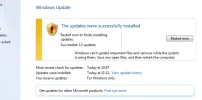
Hoping any of this may be helpful. Some screenshots attached.