Want to resurrect your D/D2 MAC kit?

Newbie here! I contributed to the old Analoguesat website back in the day but I've long been a lurker on here. hacktv was finally what got me to register and post! I don't have any MAC equipment to test this (so I'm somewhat off-topic, sorry!) but I'm loving what hacktv can do. I have a collection of Sky cards and can't wait to try VideoCrypt on real hardware.

The Windows version works fine, the only time I experienced jumping was when I was also carrying out file copy operations in the background, it's pretty solid otherwise. My machine isn't exactly a spring chicken, it's a HP EliteBook 8570w from about 2013 with a 3rd generation Core i7, but it was a beast in its day.

While I can use Linux, I just feel more comfortable with Windows so that's what I did. I have tried compiling my own Windows version in Fedora with the provided build_win64.sh script but I got some compilation errors in mac.c. I don't have the exact errors to hand at the moment but it was complaining about the localtime_r, function.
 
Hello! :-bighappy

Well Im still around although the old A/S website is long gone (still to be found on the web archive for anyone who has a hankering to see just how dated it looks these days :D
 
I don't have the exact errors to hand at the moment but it was complaining about the localtime_r, function.

I've seen these errors. I'll try and fix them shortly, I'm just not sure which is the best way yet.
 
I am a newbie too and my Hackrf hardware is on the way. I have seen Captain Jack's Youtube videos and I find it very interesting.
I have some questions about this hacktv project.

"+ Videocrypt I/II hardware support"
What does this mean exactly? Does it also generate valid ecm stream for the videocrypt decoder hardware (just like in Captain Jack's video) or just cuts & rotates the picture on the fly?
The same question also for eurocrypt. Currently I have a Nokia MAC receiver to play with and I would like to try this on it.

(Sorry for my writing, English is not my native language.)
 
Videocrypt cut points are created on the fly and work with any decoder (it has a valid ECM stream). There are several modes including a free one which doesn't require a card. Or you can use a PIC hex file to program your own card with (or most old Sky cards). VC2 only works in free mode - I need to come back to that.

Eurocrypt is also generated on the fly but only works in free mode - i.e. no card required. Hoping to add controlled access in the future for use with old Multimac type cards (or even official ones if you have any).
 
Videocrypt cut points are created on the fly and work with any decoder (it has a valid ECM stream). There are several modes including a free one which doesn't require a card. Or you can use a PIC hex file to program your own card with (or most old Sky cards). VC2 only works in free mode - I need to come back to that.

Eurocrypt is also generated on the fly but only works in free mode - i.e. no card required. Hoping to add controlled access in the future for use with old Multimac type cards (or even official ones if you have any).
That is great. Thanks!
 
Hello everyone......

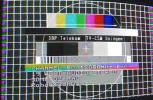
During my time off I've been going through some of my tape archives of satellite recordings. Lot's of MAC stuff which I'll be digitising. Video files to follow soon.......
 

Attachments

  • D2MAC Screen Shot from 1993.webp
    D2MAC Screen Shot from 1993.webp
    104.6 KB · Views: 31
I just got my hackrf but I cannot get the mac mode working correctly. My receiver locks to the mac signal only for a about second then it drops and it loops like this. When it locks I don't get audio while there is also a little noise on the picture like when the signal level is a little bit low on pal fm signals. Picture should be grainy at mac systems if the signal level was low. What am I doing wrong?
 
What is your sampling rate?

D-MAC requires 20MHz, D2-MAC needs half of this. Generally speaking I have trouble getting my hackrf running above 13 MHz on my USB2 PC, else it glitches all over the place, which translates to transient sync loss on MAC signals. Also, as a reminder, default hacktv sampling rate is 16MHz.

Thus I can just only confirm that D2-MAC works well with a Nokia receiver.
 
I tried to increase the sample rate to 20MHz as well but nothing has changed.
 
Sample rate should be 20.25Mhz for MAC. Also please try it with filter mode (--filter).

What command line are you running?
 
I am running bash. It seems much better with the filter option thank you. Now it is ok on d2mac but only at 16MHz. Also the noise has gone. If I go higher with the sample rate randomly I get dropouts again and I can see many U letters on the console while there is no sync. No mac lock at all at 20MHz with filter option so I have no chance with dmac. I also get this error above 12MHz of sample rate on mac.
[swscaler @ 0x561b5c973d00] Warning: data is not aligned! This can lead to a speedloss.
I still have problem with the audio. It is not recognized by default. Everytime I have to go to the menu and select audio to get it.
I can't see the eurocrypt option. It seems like it is not in the public version yet.
 
Sounds like your PC isn't quite up to speed - it does require a fairly beefy processor.

When I asked for command line, I meant what options are you using?

For Eurocrypt - only free-access is supported. You need to edit this line:


Change it to mac->vsam = MAC_VSAM_FREE_ACCESS_SINGLE_CUT;

Odd about having to select the audion - what receiver/decoder are you using?
 
It's safe to ignore the swscaler warning. Agreed on the audio issue, it's an odd one.
D-MAC may still work at 16MHz, I've seen it working but it may take some time to lock on.
 
I have a laptop with a 4 core i3 processor with 8G RAM. But of course it could be the problem. I'll try it with an other one.
I uploaded a video about the audio issue (sorry for the quality). It is a Nokia 8003S IRD.
I found the eurocrypt option I tried also the single and double cut version. Strange but the cutpoints are visible on the picture after decrypting you can see it on my video as well.
 
D-MAC may still work at 16MHz
Yes you are right it works at 16MHz and it takes longer time to lock but in this case I cannot get audio at all. The audio reselection doesn't solve the problem. I have to increase sample rate to 17.5MHz to get audio working again.

Anyway it is a good project to play with. It is good to see these old receivers/decoders working again. A big thanks to all the developers of this project.
Happy New Year to everyone!
 
Eurocrypt works best at 20.25MHz. Anything else will cause jitter.

It might be worth playing with d2mac_fm deviation value and see if it helps lock faster. I will try it on my Echostar receiver over the next few days in FM mode and see how it behaves.
 
I did some tests. These are my results:
dmac - unscrambled - test signal @19.5MHz
-locked, ok

dmac - unscrambled - test signal @20.25MHz
-locked, bit noisy

dmac - unscrambled - test signal @19.5MHz
-locked, ok

dmac - single cut - test signal @20.25MHz
-no lock

d2mac - single cut - test signal @20.25MHz
-locked, bit noisy, cutpoints are visible

d, or d2mac - single cut - video file input @20.25MHz
-no lock

d, or d2mac - single cut - video file input @17.50MHz
-locked, cutpoints are visible

So sample rate of 20.25 MHz doesn't solve the noise and the visible cutpoints problem at me. Maybe it's an issue of my decoder. Also my Thomson SVA1 decoder was not perfect as I remember. A picture was always a bit noisy after decrypting. Later on I didn't have this problem on my Thomson TSR610 VC2 decoder.

Even so a performance problem about my computer is really is there. If I start the webrowser while I am transmitting with hackRF my decoder drops lock (d, or d2mac - single cut - video file input @17.50MHz). CPU usage is about 112% and the load is only about 1.2 (I have 4 cores).

 
The "noise"/sparklies you see at 20.25MHz is actually you hitting the limits of HackRF. It officially only supports up to 20MHz sample rate, so it's just over that limit. It's the USB2 limitation that HackRF uses rather than HackRF itself. I am tempted to get LimeSDR Mini, which supports up to 30MHz but they are rather more expensive.

When you say you see cut-points, is it the small black dots running around? I also see it but It's very difficult to see on my TV to the point that they are not visible. For double-cut, it's much worse. You'll see black dots on white and vise versa. I believe it's to do with transitions between components in the time-compressed signal that's causing it.
 
Back
Top