neumoDVB

Not sure what you mean satesco. Just git cloned the media and neumo_media_build on deeptho's github.
I should have addressed this question to @deeptho, but such questions may well raise eyebrows, at best, especially since I have been working with his application for a long time.

The drivers and neumoDVB are installed using the commands you mentioned. But I am interested in checking the version after installing them.

At the risk of being the target of further irony, I will ask once again why, after the latest update of neumoDVB, version 1.7 appears instead of 1.9 when I check.
On your computer, neumoDVB appears as version 1.8 (#1493). I don't know why, but I imagine you update the drivers and neumoDVB every time @deeptho releases them.

I would like to know the same thing about the drivers I installed.

I hope I have made myself clear this time. :)
 
Last edited:
I've updated to the most recent neumodvb commits in Fedora and Manjaro as well as Ubuntu, and each OS dumps neumodvb when I scan a mux channel in DVB-S or T. I thought it might have been a problem with the current Manjaro I'm testing (each OS uses different kernel versions, possibly not relevant)


@deeptho

My neumo log throws an error around the point where I attempt a channel scan. The Console shows the same lines.
It does not work for me either.

If someone can answer the following questions then it can help
  1. does the card work with the most recent tbs drivers?
  2. What was the last version of neumodvb and of the kernel with which it worked. neumodvb version is shown in /tmp/neumo.log (the line with BUILD) and kernel version can be found in the kernel log, if you have one (look for what is written below "you are running an experimental version of the media..."
 
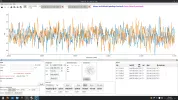
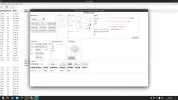
Although there are 2 tuners, it only shows 1 and does not scan channels.
 

Attachments

  • Ekran Görüntüsü_20250623_030211.webp
    Ekran Görüntüsü_20250623_030211.webp
    178.4 KB · Views: 19
  • Ekran Görüntüsü_20250623_030512.webp
    Ekran Görüntüsü_20250623_030512.webp
    56.6 KB · Views: 14
  • Ekran Görüntüsü_20250623_030614.webp
    Ekran Görüntüsü_20250623_030614.webp
    48.7 KB · Views: 8
  • Ekran Görüntüsü_20250623_030725.webp
    Ekran Görüntüsü_20250623_030725.webp
    103.3 KB · Views: 18
I should have addressed this question to @deeptho, but such questions may well raise eyebrows, at best, especially since I have been working with his application for a long time.

The drivers and neumoDVB are installed using the commands you mentioned. But I am interested in checking the version after installing them.

At the risk of being the target of further irony, I will ask once again why, after the latest update of neumoDVB, version 1.7 appears instead of 1.9 when I check.
On your computer, neumoDVB appears as version 1.8 (#1493). I don't know why, but I imagine you update the drivers and neumoDVB every time @deeptho releases them.

I would like to know the same thing about the drivers I installed.

I hope I have made myself clear this time. :)
I'm checking my distros as per deeptho's suggestions. Fedora has the neumodvb v.1.7 which is the version I installed before the latest. I can compare that with the latest version. That works OK without crashing.
The current version which crashes is showing v.1.7 in neumo.log :rolleyes: This is in Fedora.
 
In the mean time I found the DRIVER bug that prevents tbs5927 and cards based on stv6120 from working.
So you have to update drivers to fix it.

@Lew: your neumodvb version is very outdated. Version 1.8 dates from March (unless you confuse with the driver version).
 
It does not work for me either.

If someone can answer the following questions then it can help
  1. does the card work with the most recent tbs drivers?
  2. What was the last version of neumodvb and of the kernel with which it worked. neumodvb version is shown in /tmp/neumo.log (the line with BUILD) and kernel version can be found in the kernel log, if you have one (look for what is written below "you are running an experimental version of the media..."
1. Tried TBSDTV media_build. neumodvb crashes with that similarly.

2. neumodvb v.1.7. kernel.log shows kernel 6.11.9-100 fc39.

So, version still showing v.1.7 in latest neumodvb's neumo.log.

These are in Fedora.
 
In the mean time I found the DRIVER bug that prevents tbs5927 and cards based on stv6120 from working.
So you have to update drivers to fix it.

@Lew: your neumodvb version is very outdated. Version 1.8 dates from March (unless you confuse with the driver version).
OK, I'll check to see if I have a more recent neumodvb somewhere. Probably in a Ubuntu.
 
Hi

On my Fedora 42, the latest driver version builds nicely with 6.14.11-300.fc42.x86_64 kernel, but when upgrading to 6.15.3-200.fc42.x86_64 I get this error early during compilation:

Code:
blindscan_kernel/neumo_media_build/v4l/../linux/include/uapi/linux/videodev2.h:2539:41: error: field 'timestamp' has incomplete type
 2539 |         struct __kernel_timespec        timestamp;


On neumodvb side, compilation goes OK with 6.14.11-300.fc42.x86_64 kernel, I can launch the program, do a basic LNB setup, get a spectrum of a satellite, but when I try to blindscan a frequency or all the previouscly scanned spectrum, I get this error and the program crashes:

Code:
/usr/bin/../lib/gcc/x86_64-redhat-linux/15/../../../../include/c++/15/optional:1172: _Tp *std::optional<devdb::fe_t>::operator->() [_Tp = devdb::fe_t]: Assertion 'this->_M_is_engaged()' failed.

Before this error, I also get a ton of this one:
Code:
TypeError: 'PyGridBlocksIterator' object is not iterable
Traceback (most recent call last):
  File "/home/ryle/neumodvb/gui/neumodvb/neumolist.py", line 1336, in OnGridCellSelect
    has_selection = any(True for _ in self.GetSelectedBlocks())
  File "/home/ryle/neumodvb/gui/neumodvb/neumolist.py", line 1336, in <genexpr>
    has_selection = any(True for _ in self.GetSelectedBlocks())
                                      ~~~~~~~~~~~~~~~~~~~~~~^^

I removed every trace of older neumodvb files I could find on my system and I think that I installed all the required dependencies.

Am I missing something ?
 
Hi

On my Fedora 42, the latest driver version builds nicely with 6.14.11-300.fc42.x86_64 kernel, but when upgrading to 6.15.3-200.fc42.x86_64 I get this error early during compilation:

Code:
blindscan_kernel/neumo_media_build/v4l/../linux/include/uapi/linux/videodev2.h:2539:41: error: field 'timestamp' has incomplete type
 2539 |         struct __kernel_timespec        timestamp;


On neumodvb side, compilation goes OK with 6.14.11-300.fc42.x86_64 kernel, I can launch the program, do a basic LNB setup, get a spectrum of a satellite, but when I try to blindscan a frequency or all the previouscly scanned spectrum, I get this error and the program crashes:

Code:
/usr/bin/../lib/gcc/x86_64-redhat-linux/15/../../../../include/c++/15/optional:1172: _Tp *std::optional<devdb::fe_t>::operator->() [_Tp = devdb::fe_t]: Assertion 'this->_M_is_engaged()' failed.

Before this error, I also get a ton of this one:
Code:
TypeError: 'PyGridBlocksIterator' object is not iterable
Traceback (most recent call last):
  File "/home/ryle/neumodvb/gui/neumodvb/neumolist.py", line 1336, in OnGridCellSelect
    has_selection = any(True for _ in self.GetSelectedBlocks())
  File "/home/ryle/neumodvb/gui/neumodvb/neumolist.py", line 1336, in <genexpr>
    has_selection = any(True for _ in self.GetSelectedBlocks())
                                      ~~~~~~~~~~~~~~~~~~~~~~^^

I removed every trace of older neumodvb files I could find on my system and I think that I installed all the required dependencies.

Am I missing something ?
I tried recently on fedora42 and had no compilation problems with 6.14, but did not try to run it.
6.15 is not supported yet by tbs either.
 
I can confirm that neumo compile fine on debian13, kernel 6.12.30.
Spectrum and blindscan works but it freezes when trying to tune on any service. Also, same thing happens as @RyLe mention in previous post. This appears repeatedly in the console until termination:

Traceback (most recent call last):
File "/home/nh77/neumodvb/gui/neumodvb/neumolist.py", line 1336, in OnGridCellSelect
has_selection = any(True for _ in self.GetSelectedBlocks())
File "/home/nh77/neumodvb/gui/neumodvb/neumolist.py", line 1336, in <genexpr>
has_selection = any(True for _ in self.GetSelectedBlocks())
~~~~~~~~~~~~~~~~~~~~~~^^
TypeError: 'PyGridBlocksIterator' object is not iterable
Killed
nh77@deb13test:~$

Big gratitude to @deeptho who make linux usable with dvb cards.
 
Last edited:
I can confirm that neumo compile fine on debian13, kernel 6.12.30.
Spectrum and blindscan works but it freezes when trying to tune on any service. Also, same thing happens as @RyLe mention in previous post. This appears repeatedly in the console until termination:

Traceback (most recent call last):
File "/home/nh77/neumodvb/gui/neumodvb/neumolist.py", line 1336, in OnGridCellSelect
has_selection = any(True for _ in self.GetSelectedBlocks())
File "/home/nh77/neumodvb/gui/neumodvb/neumolist.py", line 1336, in <genexpr>
has_selection = any(True for _ in self.GetSelectedBlocks())
~~~~~~~~~~~~~~~~~~~~~~^^
TypeError: 'PyGridBlocksIterator' object is not iterable
Killed
nh77@deb13test:~$

Big gratitude to @deeptho who make linux usable with dvb cards.
You too have faced the same problem like me.
 
I fixed a few problems. It should run now on fedora42. Just make sure that the directory "pybind11" is removed,
as it is no longer used and can create problems.
 
I can confirm that latest changes and manual remove pybind11 directory did the trick. I am able to blind scan and tune on debian13 with kernel 6.12.30. Now starts fun time playing with it. Thanks for all involved making this
 
I can confirm that latest changes and manual remove pybind11 directory did the trick. I am able to blind scan and tune on debian13 with kernel 6.12.30. Now starts fun time playing with it. Thanks for all involved making this
It's great that the problem was solved after the changes were made.

I've been waiting a long time for those working with neumoDVB to “time play around” with it.
While on Windows we have many reception and spectrum reports with Crazyscan, on Linux we don't have many reports/users with neumoDVB.

I opened the topic " With neumoDVB (and Crazyscan) on satellites" for this very purpose: to compare the results obtained by those who use neumoDVB.
From the posts, it seems that @deeptho's application is of more interest to those who know Linux, as a technical challenge and out of curiosity(?), than to reception enthusiasts.
I hope I'm wrong, and you'll be the first to prove me wrong. :Y


...., it seems that @deeptho's application is of more interest to those who know Linux, as a technical challenge and out of curiosity(?), than to reception enthusiasts.
....


@satesco

I assume the majority of satellite DX enthusiasts are familiar with Windows and the two main Windows scanning apps of EBS Pro and CrazyScan. With these apps and a suitable TBS card most people can scan for feeds.

The change over to Linux is not a huge task for a person without Linux skills, it is fairly easy to install ubuntu onto a PC and use that PC for stuff like internet, email, streaming, office productivity etc.

Moving on to installing and using a custom app like neumoDVB is a different skill level. For a non Linux person it is a difficult task, made no easier by the issues that pop up during the install process. The error messages that occur are meaningless to non Linux people and they probably just give up.

For an app to get good uptake and for there to be a community of contributors in using it the app needs to be easier to install and have better support for Linux novices. There are posts from experienced Linux users who have allocated weeks to try and get neumoDVB to install and run correctly. What chance has a Linux novice, almost none !

When I asked for help in the topic a few months ago I was told by the developer to go and read up on Linux and get some experience/knowledge.
Until things change, this neumoDVB will remain as a low use app with very limited uptake by non Linux experts.
 
When I asked for help in the topic a few months ago I was told by the developer to go and read up on Linux and get some experience/knowledge.
Until things change, this neumoDVB will remain as a low use app with very limited uptake by non Linux experts.
I gave up on it (installing drivers). If the developer made it compatible with Windows (unlikely), I'd use it again.

My current apps are: Altdvb v2.5 (recently released), EBSpro, and Crazyscan with Ttransedit, and I also occasionally use TSreader.

I also tend to use DVB viewer and dvbdream among other software applications that I have tested and left installed.
 
I fixed a few problems. It should run now on fedora42. Just make sure that the directory "pybind11" is removed,
as it is no longer used and can create problems.
Crashes on spectrum -> blindscan with Fedora 42 (fc42 kernel 6.14.0-43). Also when tuning a chosen channel.

OK with Fedora 39 (on a different PC - I don't have 39 on the same PC).

May be a clue in the log or console, but I think I posted a similar console output earlier.
 

Attachments

@satesco

I assume the majority of satellite DX enthusiasts are familiar with Windows and the two main Windows scanning apps of EBS Pro and CrazyScan. With these apps and a suitable TBS card most people can scan for feeds.

The change over to Linux is not a huge task for a person without Linux skills, it is fairly easy to install ubuntu onto a PC and use that PC for stuff like internet, email, streaming, office productivity etc.

Moving on to installing and using a custom app like neumoDVB is a different skill level. For a non Linux person it is a difficult task, made no easier by the issues that pop up during the install process. The error messages that occur are meaningless to non Linux people and they probably just give up.

For an app to get good uptake and for there to be a community of contributors in using it the app needs to be easier to install and have better support for Linux novices. There are posts from experienced Linux users who have allocated weeks to try and get neumoDVB to install and run correctly. What chance has a Linux novice, almost none !

When I asked for help in the topic a few months ago I was told by the developer to go and read up on Linux and get some experience/knowledge.
Until things change, this neumoDVB will remain as a low use app with very limited uptake by non Linux experts.
I may be wrong, but I don't think we would have had neumoDVB if the STID135 chip cards had not intellectually challenged @deeptho.

When, a few years ago, our developer advised us to be patient and view his endeavor as a "hobby," we understood that it was best to follow his advice, especially since those of us who came from a Windows environment found it difficult to keep up. At that time, his passion/hobby for his application overlapped with our hobby as DX.

However, our patience, as DX hobbyists coming from a different background, largely depends on how quickly learn we can to install and use the application.

Time was not on his side, as he moved on to another phase of development and, I would say, of interest. Now that we've strayed too far from shore, we're forced to learn on our own what we need to do to get out of this situation.
That's the (un)intended lesson that @deepthgo is teaching us, and we have to learn it without complaining or blaming him.

Of course, my opinion above is psychological speculation, which @deeptho can certainly refute. I don't care if I'm right.

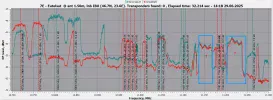
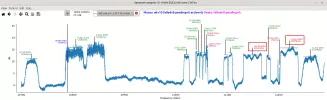
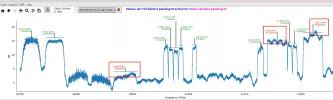
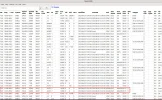
I hope, @moonbase, that you managed to install and work with neumoDVB. That's why I suggest you check at 7.0E with the 6903x card and the Novelsat device, the transponders highlighted in my neumoDVB screenshot.

It is surprising that neumoDVB found a symbol rate of 11260 on both polarities at 7.0E, which is not possible with Crazyscan. It doesn't even "smell" like this mux. You could definitely check this with Novelsat and the 6909x card.
There are other transponders that cannot be identified with our DVB applications, Crazyscan, and/or neumoDVB.

In short, I would like to know what results you get at 7.0E with the 6903s card and Novelsat using the Crazyscan and neumoDVB applications.
 

Attachments

  • 7.0E_10700-11300 HV_2025-06-29_14-11-45.webp
    7.0E_10700-11300 HV_2025-06-29_14-11-45.webp
    138.9 KB · Views: 14
  • 10700-11300 H_2025-06-29_13-42.webp
    10700-11300 H_2025-06-29_13-42.webp
    68.1 KB · Views: 16
  • 10700-11300 V_2025-06-29_13-36.webp
    10700-11300 V_2025-06-29_13-36.webp
    62.2 KB · Views: 14
  • 2uxes-11220 H & V_025-06-29_13-49.webp
    2uxes-11220 H & V_025-06-29_13-49.webp
    290 KB · Views: 12
Last edited:
Back
Top