Blindscan on linux with tbs cards

@deeptho In general is 6903x faster in blind scanning compared to 6903 ?
I am using two different computers with 6903x and i get (430 , 420) seconds(mean values) for full blind scanning.
Using a 6903 i get 212 seconds(mean value again).
Is it normal? The satellite is 16 East.
Thanks.

ps: Just for statistical reasons 6909x completes in 136 seconds(mean value).
 
@deeptho In general is 6903x faster in blind scanning compared to 6903 ?
I am using two different computers with 6903x and i get (430 , 420) seconds(mean values) for full blind scanning.
Using a 6903 i get 212 seconds(mean value again).
Is it normal? The satellite is 16 East.
Thanks.

ps: Just for statistical reasons 6909x completes in 136 seconds(mean value).
I have no 6903 card (I would like to have one for testing but I don't. It is old), so I cannot comment. Faster is not necessarily better.

PS. It also depends on how you scan and with which program.
For example, if you do not use the features for faster scanning on 6903x (stid135-blindscan with all available adapters is fastest)
then it will be slower.

How many adapters does 6903x show in /dev/dvb and how many do you actually use? And how many for 6903?
 
@deeptho Thanks for replying.
I am using the 6903 card on a windows machine with crazycat's blind scanning software like that:

BLScan2.exe config.ini

config.ini contents

[Options]
Device = 0
Loop = 1
ReportDir = Reports_00-22-AB-F1-34-09
TPDir = Transponders_00-22-AB-F1-34-09
IniFormat = 5
InfoFormat = 0

[SatInfo]
SatName = 16E
LOF1 = 9750
LOF2 = 10600
LOFSW = 11700

[Scan0]
Pol = 0
Start = 10700
Stop = 11700
Step = 2

[Scan1]
Pol = 0
Start = 11700
Stop = 12750
Step = 2

[Scan2]
Pol = 1
Start = 10700
Stop = 11700
Step = 2

[Scan3]
Pol = 1
Start = 11700
Stop = 12750
Step = 2

Which means that i use one adapter and checking(in serial mode) V/H 10700-11700/11700-12750 ranges with step value 2.

I the case of 6903x i am using
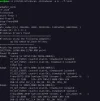
stid135-blindscan -cblindscan -a 0 1 -U8 --rf-in=0
I am using two adapters and /dev/dvb displays two adapters.

I am asking you this question because i want to be sure that i am doing it the correct way or if there is any chance of making scanning faster.

Thanks again
 
Faster than now? You are kidding.

Remember the first TBS cards, which took around one hour for a complete blindscan per satellite.
 
@deeptho Thanks for replying.
I am using the 6903 card on a windows machine with crazycat's blind scanning software like that:


Which means that i use one adapter and checking(in serial mode) V/H 10700-11700/11700-12750 ranges with step value 2.

I the case of 6903x i am using

I am using two adapters and /dev/dvb displays two adapters.

I am asking you this question because i want to be sure that i am doing it the correct way or if there is any chance of making scanning faster.

Thanks again
You are comparing apples to pears. How long a blindscan takes depends on what the blindscan does (like wait for NIT and SDT or not, whgich makes a significant difference, or deciding which frequencies to scan or not,). It is all a matter of choices and compromises. If some things can be improved, then report them in detail and perhaps then the code can be improved. I suspect it is a matter of different choices made (e.g.,
scanning or not scanning SDT, or scanning at lower/finer resolution).

I am unfamiliar with the windows software. I tested it in the past, but too often I had insurmontable problems like diseqc not working except on one input or some versions of software (e.g., ebspro) not being compatible with some drivers. That varied over the years. Some cards worked sometimes (but especially tbs6909x rarely worked untile recently) and not at other times. In general things improved over time.

I do know that the windows drivers tend to be based on example code from the manufacturer which is similar or the same between windows/linux. So I do not expect a fundamental difference in general. If i change something it is meant to be an improvement (in some sense), but there can be hangs or delays on some muxes, especially on satellites which report incorrect information. So then there is additional choices on what information to believe and how long to wait for information that may never come.

All the windows stuff (drivers, programs) is unfortunately closed source - so nothing can be learned from any windows-software improvements made. Also, such software becomes 100% useless when/if the creator abondons it. Sometimes the software even dies along with its developer as was recently made clear for one program. At least open source drivers can be picked up by someone else (the actual driver writing is hard, but the maintenance part is not that diffult. Many people have the required expertise).

That is why I stay away from windows (nothing to be learned, and it is a crappy OS anyway, that crashes for no reason, has trouble with touchpads, wants to reboot for no reason and focuses on telemetry, ads and changing/ignoring your settings).

For instance, what can I learn about how to implement something to extract the simin stream from AltDVB? Not much at all. That does not mean I do not appreciate the work that people have put into it! But it is not for me because it is closed source.

Only yesterday I had a discussion with someone who was late in a telco, blaming it on "I need to replace my windows". So I
gave hime the following advice: the weather is nice today, so just remove your windows and put in a mosquitto net and
enjoy the rest of your day.
 
@deeptho In general is 6903x faster in blind scanning compared to 6903 ?
I am using two different computers with 6903x and i get (430 , 420) seconds(mean values) for full blind scanning.
Using a 6903 i get 212 seconds(mean value again).
Is it normal? The satellite is 16 East.
Thanks.

ps: Just for statistical reasons 6909x completes in 136 seconds(mean value).
@deeptho responded with knowledge of the difference and what you can expect from the 6903x/6909x cards with his application, neumoDVB. This is his area of expertise, and I believe any further comment would be superfluous.

As a user of this application on Linux, as well as Crazyscan on Windows, I can say that what he has done for the cards with stid135 is beyond my expectations with the same cards on Windows. Especially for the 6909x card (and probably for the 6916), it's just fantastic.

In my opinion, the way the 6909x works with its application on Linux is that it's on the same level, proportionally speaking, as what @CrazyCat did for the 6983/6903 cards on Windows.

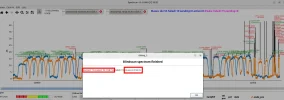
I am not sure if the tests posted now, using neumoDVB and Crazyscan, for the 6903x/6909x and 6983 cards, are conclusive, but at least they show differences in how these cards work on Linux, as well as on Windows.

I can confirm that the 6983/6903 cards have not really been on @deeptho's radar, for the reasons he explained, which means they are at a disadvantage compared to the 6903x/6909x cards from the outset. So they are not suitable for comparison, but we should not expect too much from them when scanning with neumoDVB.

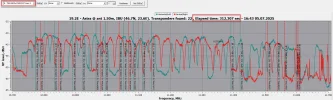
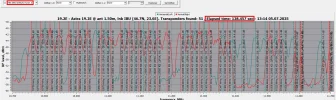
The search steps with the 6903x/6909x and 6983 cards yielded 3.8 on Crazyscan; however, the results and the time taken are different, with 6983 performing better on Windows, but 6903x/6909x performing worse. On the other hand, with neumoDVB, both cards with STID135 are significantly better than the 6983.

I don't claim that my results are the best with both applications and both cards, but I hope that the conclusions are valid for other users who work with these cards on both operating systems(!?).
 

Attachments

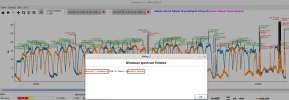
  • 6903x_neumoDVB_19.2E_10700-11700 HV_3.7step_2025-07-05_13-49.webp
    6903x_neumoDVB_19.2E_10700-11700 HV_3.7step_2025-07-05_13-49.webp
    116.3 KB · Views: 48
  • tbs6983_neumoDVB_19.2E_10700-11700 hV_2025-07-05_16-00.webp
    tbs6983_neumoDVB_19.2E_10700-11700 hV_2025-07-05_16-00.webp
    57.6 KB · Views: 18
  • 6903x_Crazyscan_19.2E_10700-11700 HV_3.8step_2025-07-05_16-43-47.webp
    6903x_Crazyscan_19.2E_10700-11700 HV_3.8step_2025-07-05_16-43-47.webp
    157.1 KB · Views: 20
  • 6983_Crazyscan_19.2E_10700-11700 HV_3.7step_2025-07-05_13-14-57.webp
    6983_Crazyscan_19.2E_10700-11700 HV_3.7step_2025-07-05_13-14-57.webp
    244.6 KB · Views: 15
  • 6909x_neumoDVB_19.3E_BS_10700-11700 HV_2025-07-05_16-10.webp
    6909x_neumoDVB_19.3E_BS_10700-11700 HV_2025-07-05_16-10.webp
    92.4 KB · Views: 17
  • 6909x_Crazyscan_19.2E_3.7step_10700-11700 HV_2025-07-05_13-36-14.webp
    6909x_Crazyscan_19.2E_3.7step_10700-11700 HV_2025-07-05_13-36-14.webp
    178.9 KB · Views: 29
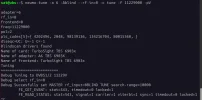
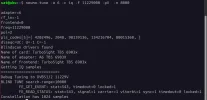
I scanned with stid135-blindscan, but I don't know how to view the blindscan_rf0.dat, spectrum_rf0_V.dat, etc, files in the tmp folder.
Perhaps that's why I am unsure if the scan with this command is correct.
Any suggestions are welcome.
 

Attachments

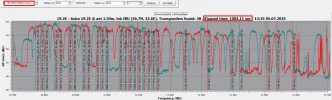
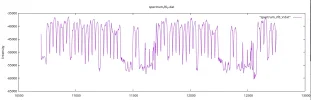
Until AI can provide a definitive answer to all our questions about our problems as a neumodvb app fan, I turn to Linux enthusiasts to tell me how I can obtain a graphical representation of a spectrum_rf.dat and blindscan_rf.dat file(see my sample files).

In the Neumo-BlindScan documentation, we are recommended a script, plotiq.py, to visualize such a file. However, the script for this sample takes me into "unknown" territory for a beginner, requiring advanced knowledge of several apps and files to succeed.

Who knows, I may have moved on to another phase of using neumodvb, not as a DXer, but as a Linux "expert" so as to benefit from the potential of @deeptho's applications. But to reach that stage, it's a long, long way to...Tipperary. :)

However, until then, I am waiting for guidance to view the .dat files. Thanks.
 

Attachments

  • neumo-tune_2025-07-06_20-17.webp
    neumo-tune_2025-07-06_20-17.webp
    38.7 KB · Views: 22
  • Constallation samples_2025-07-06_20-19.webp
    Constallation samples_2025-07-06_20-19.webp
    37.1 KB · Views: 36
  • sample.zip
    sample.zip
    89.6 KB · Views: 1
Until AI can provide a definitive answer to all our questions about our problems as a neumodvb app fan, I turn to Linux enthusiasts to tell me how I can obtain a graphical representation of a spectrum_rf.dat and blindscan_rf.dat file(see my sample files).

In the Neumo-BlindScan documentation, we are recommended a script, plotiq.py, to visualize such a file. However, the script for this sample takes me into "unknown" territory for a beginner, requiring advanced knowledge of several apps and files to succeed.

Who knows, I may have moved on to another phase of using neumodvb, not as a DXer, but as a Linux "expert" so as to benefit from the potential of @deeptho's applications. But to reach that stage, it's a long, long way to...Tipperary. :)

However, until then, I am waiting for guidance to view the .dat files. Thanks.
I used Gnuplot satesco. An example in this thread, post #94. I didn't continue using it as neumodvb arrived shortly afterwards, and its spectrum charts looked much better than anything I could draw with Gnuplot. ^_^

Search online for the youtube "gnuplot Tutorial". Very helpful.
 
I used Gnuplot satesco. An example in this thread, post #94. I didn't continue using it as neumodvb arrived shortly afterwards, and its spectrum charts looked much better than anything I could draw with Gnuplot. ^_^

Search online for the youtube "gnuplot Tutorial". Very helpful.
Thanks, @Llew, for your help. Apart from @deeptho, you're the only one who jumps to the aid of a non-linux user who wants to solve a problem with the neumo app.
As in life, how easy or how hard it is to be of help to the helpless. I'm glad it's in your nature to be on their side. :-respekt
 

Attachments

  • spectrum 19.2E_V_2025-07-07_10-35.webp
    spectrum 19.2E_V_2025-07-07_10-35.webp
    35.1 KB · Views: 31
Thanks, @Llew, for your help. Apart from @deeptho, you're the only one who jumps to the aid of a non-linux user who wants to solve a problem with the neumo app.
As in life, how easy or how hard it is to be of help to the helpless. I'm glad it's in your nature to be on their side. :-respekt
Excellent spectrum satesco. It took me a good couple of days to make something presentable with Gnuplot :rolleyes:
 
When I said in the previous post that I'm in the next phase, I mean I need to learn not only how to manipulate @deeptho's application, but also how to work effectively in Linux.
That said, the neumo application forces us to know more about the environment (Linux) in which it works; that means getting deep into the intricacies of the system so that I can be independent and thus not have to rely on the help and goodwill of another user, even as generous as you are.
And with a classic saying, knowledge gives you the freedom we all want. So, out of any lack, in this case, ignorance, comes an opportunity to gain something. And what a wonderful opportunity to learn if we give this Forum the meaning it deserves: everyone learns from one another!:Y
 
Thanks, @Llew, for your help. Apart from @deeptho, you're the only one who jumps to the aid of a non-linux user who wants to solve a problem with the neumo app.
As in life, how easy or how hard it is to be of help to the helpless. I'm glad it's in your nature to be on their side. :-respekt
If only the blindscan giothub repository would included a script to view the data.....
Oh wait, it does....
 
Yes, indeed, that's a good question how to view the dat files in /tmp


This only shows a result, but what are the code lines for gnuplot ?


This page also does not mention a solution ... Or did you mean another Readme?
 
If only the blindscan giothub repository would included a script to view the data.....
Oh wait, it does....
Indeed, the "plotiq.py" script on GitHub is there, but it seems to be, sorry for the pretentious comparison, for Linux esoterics...
 
I have just uploaded new drivers. Not many changes, but several bug fixes.
 
Does this work with a 6982 card?
 
I am using the command line tool 'stid135-blindscan' with TBS6909X V2 stid135 card a lot and it works great. It identifies even DVB-S2 parameters for transponders with CNR below threshold but can not always show CNR. CNR is often shown as "CNR:-10.00dB" for weak transponders. I assume the reason may be that it would slow down the blindscan to wait for stable CNR estimation?

When I tune manually to the same DVB-S2 transponder and monitor with dvb-fe-tool I can see a low CNR, not -10.00dB :
>>Lock (0x213) Signal= -40.33dBm C/N= 4.70dB preBER= 0 Layer A: Signal= 60.06% C/N= 23.52%

I assume Lock (0x213) means:
FE_HAS_SIGNAL = 0x01
FE_HAS_CARRIER = 0x02
FE_HAS_LOCK = 0x10
FE_HAS_TIMING_LOCK = 0x200

The transponder I tested with is on 28.2East 11023H SR23000 DVB-S2 8PSK 3/4 and my antenna is to small. I think the C/N displayed with dvb-fe-tool is sensible as I have tested with an antenna with 3dB more gain and then the C/N is close to 7.7dB.

I think I had similar issues with dvb-fe-tool and my TBS6908 ( STV091X/stv6120) several years ago and then there was no CNR shown in dvb-fe-tool but CrazyScan did show CNR. I think the difference was that CrazyScan did show CNR as soon as CARRIER was detected or locked. If I remember correctly I did some modification in the orginal TBS linux drivers in order to display CNR as soon as FE_HAS_CARRIER was detected.
 
I am using the command line tool 'stid135-blindscan' with TBS6909X V2 stid135 card a lot and it works great. It identifies even DVB-S2 parameters for transponders with CNR below threshold but can not always show CNR. CNR is often shown as "CNR:-10.00dB" for weak transponders. I assume the reason may be that it would slow down the blindscan to wait for stable CNR estimation?
CNR is only properly estimated if the signal locks. So most likely, you are comparing apples to pears: signals with and without lock.

When I tune manually to the same DVB-S2 transponder and monitor with dvb-fe-tool I can see a low CNR, not -10.00dB :
>>Lock (0x213) Signal= -40.33dBm C/N= 4.70dB preBER= 0 Layer A: Signal= 60.06% C/N= 23.52%
Well, yes. Manual tuning with the correct parameters will lock easier.

I assume Lock (0x213) means:
FE_HAS_SIGNAL = 0x01
FE_HAS_CARRIER = 0x02
FE_HAS_LOCK = 0x10
FE_HAS_TIMING_LOCK = 0x200

The transponder I tested with is on 28.2East 11023H SR23000 DVB-S2 8PSK 3/4 and my antenna is to small. I think the C/N displayed with dvb-fe-tool is sensible as I have tested with an antenna with 3dB more gain and then the C/N is close to 7.7dB.

I think I had similar issues with dvb-fe-tool and my TBS6908 ( STV091X/stv6120) several years ago and then there was no CNR shown in dvb-fe-tool but CrazyScan did show CNR. I think the difference was that CrazyScan did show CNR as soon as CARRIER was detected or locked. If I remember correctly I did some modification in the orginal TBS linux drivers in order to display CNR as soon as FE_HAS_CARRIER was detected.
You claim using different results with different tools, but with the same driver?

Do the tools show the same CNR when you do have a lock?
 
It is not a big deal that CNR is set to -10.00dB. I was just curious as dvb-fe-tool show CNR with blindscan driver.

I am not using the blindscan drivers of 21'st of October but the previous blindscan drivers.

Her is what 'stid135-blindscan' outputs for the transponder:

Code:
Adap3    Tuning to 11023.400H 24300.000kS/s    
FE_GET_EVENT: count=0 stat=0, timedout=0 locked=0
FE_GET_EVENT: count=1 stat=531, timedout=0 locked=1
freq=11023.265H Symrate=22998 Stream=-1    pls_mode= 0:    1
SIG=-41.00dB     SIG= 59% CNR=-10.00dB CNR=100%

status 531 (0x213)
0x213:
FE_HAS_SIGNAL = 0x01
FE_HAS_CARRIER = 0x02
FE_HAS_LOCK = 0x10
FE_HAS_TIMING_LOCK = 0x200

Tuning to 11023H in tsduck gives this output from dvb-fe-tool:
Lock (0x213) Signal= -41.26dBm C/N= 3.30dB
I set all parameters incorrect except frequency and pol just to test that the blindscan
driver still finds SR and all parameters and it does so quite fast.

Another similar transponder with far better signal gives different status 543 (0x21f).

Code:
Adap7    Tuning to 11552.000H 21600.000kS/s    
FE_GET_EVENT: count=0 stat=0, timedout=0 locked=0
FE_GET_EVENT: count=1 stat=543, timedout=0 locked=1
freq=11552.749H Symrate=22999 Stream=-1    pls_mode= 0:    1
SIG=-29.68dB     SIG= 71% CNR=13.50dB CNR= 67%

0x21f:
FE_HAS_SIGNAL = 0x01
FE_HAS_CARRIER = 0x02
FE_HAS_VITERBI = 0x04
FE_HAS_SYNC = 0x08
FE_HAS_LOCK = 0x10
FE_HAS_TIMING_LOCK = 0x200


I assume CNR estimation then require FE_HAS_VITERBI and FE_HAS_SYNC.
Perhaps stid135 only uses errors corrected to estimate CNR?

Forget the part I wrote about TBS6908 ( STV091X/stv6120) as it was not tested with your blindscan drivers.
 
Back
Top