- Forums
- Satellite TV receivers & systems support forums
- Satellite PC Card Receivers, Internet by Satellite
You are using an out of date browser. It may not display this or other websites correctly.
You should upgrade or use an alternative browser.
You should upgrade or use an alternative browser.
Top Tip T2-MI reception on E2 STB with SDG image - A complete step by step guide
- Thread starter MCelliotG
- Start date

satesco
Specialist Contributor
- My Satellite Setup
- seven antennas,one toroidal with 16 lnbs,
6 satellite receivers,2 Meters,9 PC cards(tbs6983,6903,6590,6504,6522,6209,2603,6909X,6903X,6902se,skystar hd2),2 tuners usb-tbs5927, TBS5927SE USB & tbs5925,Skystar HD.
Satellite reception between 100.5E-50.0W
- My Location
- Romania
A fellow forum member asked me in private how to extract a T2-MI file and what applications could do it.
Because I think the question is of general interest, I would publicly answer how to see such a stream directly and how to extract a t2-mi stream from a recorded file.
The only one I can mention now is that to view and extract a t2-mi stream, you need a dvb card, Crazyscan, TSReader, and 4T2 Content Analyser applications.
I hope the T2-MI video tutorial will be more helpful than if I explain in writing what to do with such streams.
Because I think the question is of general interest, I would publicly answer how to see such a stream directly and how to extract a t2-mi stream from a recorded file.
The only one I can mention now is that to view and extract a t2-mi stream, you need a dvb card, Crazyscan, TSReader, and 4T2 Content Analyser applications.
I hope the T2-MI video tutorial will be more helpful than if I explain in writing what to do with such streams.
Satspot
Member
- My Satellite Setup
- Technomate TM5402 M4
1.2m Triax dish
Technomate H to H motor
- My Location
- Ireland
Thanks for the heads up. When discussions of a technical nature like this go PM the members here loose out in the long run. Valuable piece of information too.A fellow forum member asked me in private how to extract a T2-MI file and what applications could do it.
Because I think the question is of general interest, I would publicly answer how to see such a stream directly and how to extract a t2-mi stream from a recorded file.
The only one I can mention now is that to view and extract a t2-mi stream, you need a dvb card, Crazyscan, TSReader, and 4T2 Content Analyser applications.
I hope the T2-MI video tutorial will be more helpful than if I explain in writing what to do with such streams.
satesco
Specialist Contributor
- My Satellite Setup
- seven antennas,one toroidal with 16 lnbs,
6 satellite receivers,2 Meters,9 PC cards(tbs6983,6903,6590,6504,6522,6209,2603,6909X,6903X,6902se,skystar hd2),2 tuners usb-tbs5927, TBS5927SE USB & tbs5925,Skystar HD.
Satellite reception between 100.5E-50.0W
- My Location
- Romania
You are right, many, or some, private discussions are of general interest. At least, I often get questions about one technical problem or another, and I realize answers might interest other users. But of course, we cannot demand that others do the same. It's everyone's right to do what they want.Thanks for the heads up. When discussions of a technical nature like this go PM the members here loose out in the long run. Valuable piece of information too.
Satspot
Member
- My Satellite Setup
- Technomate TM5402 M4
1.2m Triax dish
Technomate H to H motor
- My Location
- Ireland
Absolutely but it’s amazing what comes out of collaborative discussion. Different slant, different perspective on a particular subject. Nobody should ever feel embarrassed asking a question publicly no matter how trivial it may appear or feel they have to go PM to ask it. We’ve all been there at some stage. Of course there are those who go the PM route for one particular reason but that’s for another days discussion. Nice work though.You are right, many, or some, private discussions are of general interest. At least, I often get questions about one technical problem or another, and I realize answers might interest other users. But of course, we cannot demand that others do the same. It's everyone's right to do what they want.
evans
Member
- My Satellite Setup
- 1.8M solid pan motorized
strong srt 4669x
- My Location
- somanya,Ghana
Thumbs up, mate, this has been helpful.A fellow forum member asked me in private how to extract a T2-MI file and what applications could do it.
Because I think the question is of general interest, I would publicly answer how to see such a stream directly and how to extract a t2-mi stream from a recorded file.
The only one I can mention now is that to view and extract a t2-mi stream, you need a dvb card, Crazyscan, TSReader, and 4T2 Content Analyser applications.
I hope the T2-MI video tutorial will be more helpful than if I explain in writing what to do with such streams.

EnoSat
Specialist Contributor
- My Satellite Setup
- TBS-5927/5925/5220 , Dreambox , Edision , Mutant , Octagon , Uclan
- My Location
- Slovakia
Microsoft Windows [Version 10.0.22543.1000]
(c) Microsoft Corporation. Všetky práva vyhradené.
e:\TV\TSDuckBeta\bin>T2MItoFILE
e:\TV\TSDuckBeta\bin>tsp --verbose -I file T2MI.ts -P t2mi -P analyze -o analyze.txt -O file extract.ts
* file: unknown initial input bitrate
* t2mi: using PID 0x0040 (64) to extract T2-MI stream
* t2mi: extracting PLP 0x66 (102)
* t2mi: extracted 139,794 TS packets from 5,463 T2-MI packets
e:\TV\TSDuckBeta\bin>
if problem detect PID from PMT insert manual
e:\TV\TSDuckBeta\bin>T2MItoFILEbadPMT
e:\TV\TSDuckBeta\bin>tsp --verbose -I file T2MI.ts -P t2mi --pid 0x1000 -P analyze -o analyze.txt -O file extract.t2mi.ts
* file: unknown initial input bitrate
* t2mi: extracting PLP 0x00 (0)
* t2mi: extracted 1,270,801 TS packets from 37,860 T2-MI packets
e:\TV\TSDuckBeta\bin>
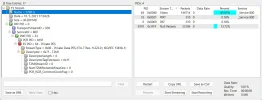
source file
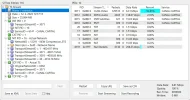
output file
===============================================================================
| TRANSPORT STREAM ANALYSIS REPORT |
|=============================================================================|
| Transport Stream Id: ....... 3071 (0x0BFF) | Services: .............. 1 |
| Bytes: ........................ 26,281,272 | PID's: Total: ......... 10 |
| TS packets: ...................... 139,794 | Clear: ......... 10 |
| With invalid sync: .................. 0 | Scrambled: ...... 0 |
| With transport error: ............... 0 | With PCR's: ..... 1 |
| Suspect and ignored: ................ 0 | Unreferenced: ... 0 |
|-----------------------------------------------------------------------------|
| Transport stream bitrate, based on ....... 188 bytes/pkt 204 bytes/pkt |
| User-specified: ................................... None None |
| Estimated based on PCR's: ................ 6,799,979 b/s 7,378,700 b/s |
| Selected reference bitrate: .............. 6,799,979 b/s 7,378,700 b/s |
|-----------------------------------------------------------------------------|
| Broadcast time: ................................... 30 sec (0 min 30 sec) |
| First TDT UTC time stamp: ........................... 2017/09/07 11:24:56 |
| Last TDT UTC time stamp: ............................ 2017/09/07 11:25:26 |
| First TOT local time stamp: ..................................... Unknown |
| Last TOT local time stamp: ...................................... Unknown |
| TOT country code: .............................................. Unknown |
|-----------------------------------------------------------------------------|
| Srv Id Service Name Access Bitrate |
| 0x17FD CANAL CAPITAL ................................ C 6,468,526 b/s |
| |
| Note 1: C=Clear, S=Scrambled |
| Note 2: Unless specified otherwise, bitrates are based on 188 bytes/pkt |
===============================================================================
===============================================================================
| SERVICES ANALYSIS REPORT |
|=============================================================================|
| Global PID's |
| TS packets: 6,814, PID's: 6 (clear: 6, scrambled: 0) |
|-----------------------------------------------------------------------------|
| PID Usage Access Bitrate |
| Total Global PID's ................................. C 331,452 b/s |
| Subt. Global PSI/SI PID's (0x00-0x1F) .............. C 33,272 b/s |
| 0x0000 PAT .......................................... C 15,031 b/s |
| 0x0001 CAT .......................................... C 15,031 b/s |
| 0x0010 NIT .......................................... C 195 b/s |
| 0x0011 SDT/BAT ...................................... C 1,508 b/s |
| 0x0014 TDT/TOT ...................................... C 1,508 b/s |
| 0x1FFF Stuffing ..................................... C 298,181 b/s |
|=============================================================================|
| Service: 0x17FD (6141), TS: 0x0BFF (3071), Original Netw: 0x20AA (8362) |
| Service name: CANAL CAPITAL, provider: CANAL CAPITAL |
| Service type: 0x01 (Digital television service) |
| TS packets: 132,980, PID's: 4 (clear: 4, scrambled: 0) |
| PMT PID: 0x0BC2 (3010), PCR PID: 0x0BC3 (3011) |
|-----------------------------------------------------------------------------|
| PID Usage Access Bitrate |
| Total Digital television service ................... C 6,468,526 b/s |
| 0x0BC2 PMT .......................................... C 15,031 b/s |
| 0x0BC3 AVC video (1920x1080, high profile, level 4.0 C 6,299,979 b/s |
| 0x0BC4 MPEG-1 Audio (Audio layer II, 128 kb/s, @48,0 C 137,902 b/s |
| 0x0BC7 Subtitles (spa, DVB subtitles, no aspect rati C 15,614 b/s |
| (C=Clear, S=Scrambled, +=Shared) |
===============================================================================
(c) Microsoft Corporation. Všetky práva vyhradené.
e:\TV\TSDuckBeta\bin>T2MItoFILE
e:\TV\TSDuckBeta\bin>tsp --verbose -I file T2MI.ts -P t2mi -P analyze -o analyze.txt -O file extract.ts
* file: unknown initial input bitrate
* t2mi: using PID 0x0040 (64) to extract T2-MI stream
* t2mi: extracting PLP 0x66 (102)
* t2mi: extracted 139,794 TS packets from 5,463 T2-MI packets
e:\TV\TSDuckBeta\bin>
if problem detect PID from PMT insert manual
e:\TV\TSDuckBeta\bin>T2MItoFILEbadPMT
e:\TV\TSDuckBeta\bin>tsp --verbose -I file T2MI.ts -P t2mi --pid 0x1000 -P analyze -o analyze.txt -O file extract.t2mi.ts
* file: unknown initial input bitrate
* t2mi: extracting PLP 0x00 (0)
* t2mi: extracted 1,270,801 TS packets from 37,860 T2-MI packets
e:\TV\TSDuckBeta\bin>
source file
output file
===============================================================================
| TRANSPORT STREAM ANALYSIS REPORT |
|=============================================================================|
| Transport Stream Id: ....... 3071 (0x0BFF) | Services: .............. 1 |
| Bytes: ........................ 26,281,272 | PID's: Total: ......... 10 |
| TS packets: ...................... 139,794 | Clear: ......... 10 |
| With invalid sync: .................. 0 | Scrambled: ...... 0 |
| With transport error: ............... 0 | With PCR's: ..... 1 |
| Suspect and ignored: ................ 0 | Unreferenced: ... 0 |
|-----------------------------------------------------------------------------|
| Transport stream bitrate, based on ....... 188 bytes/pkt 204 bytes/pkt |
| User-specified: ................................... None None |
| Estimated based on PCR's: ................ 6,799,979 b/s 7,378,700 b/s |
| Selected reference bitrate: .............. 6,799,979 b/s 7,378,700 b/s |
|-----------------------------------------------------------------------------|
| Broadcast time: ................................... 30 sec (0 min 30 sec) |
| First TDT UTC time stamp: ........................... 2017/09/07 11:24:56 |
| Last TDT UTC time stamp: ............................ 2017/09/07 11:25:26 |
| First TOT local time stamp: ..................................... Unknown |
| Last TOT local time stamp: ...................................... Unknown |
| TOT country code: .............................................. Unknown |
|-----------------------------------------------------------------------------|
| Srv Id Service Name Access Bitrate |
| 0x17FD CANAL CAPITAL ................................ C 6,468,526 b/s |
| |
| Note 1: C=Clear, S=Scrambled |
| Note 2: Unless specified otherwise, bitrates are based on 188 bytes/pkt |
===============================================================================
===============================================================================
| SERVICES ANALYSIS REPORT |
|=============================================================================|
| Global PID's |
| TS packets: 6,814, PID's: 6 (clear: 6, scrambled: 0) |
|-----------------------------------------------------------------------------|
| PID Usage Access Bitrate |
| Total Global PID's ................................. C 331,452 b/s |
| Subt. Global PSI/SI PID's (0x00-0x1F) .............. C 33,272 b/s |
| 0x0000 PAT .......................................... C 15,031 b/s |
| 0x0001 CAT .......................................... C 15,031 b/s |
| 0x0010 NIT .......................................... C 195 b/s |
| 0x0011 SDT/BAT ...................................... C 1,508 b/s |
| 0x0014 TDT/TOT ...................................... C 1,508 b/s |
| 0x1FFF Stuffing ..................................... C 298,181 b/s |
|=============================================================================|
| Service: 0x17FD (6141), TS: 0x0BFF (3071), Original Netw: 0x20AA (8362) |
| Service name: CANAL CAPITAL, provider: CANAL CAPITAL |
| Service type: 0x01 (Digital television service) |
| TS packets: 132,980, PID's: 4 (clear: 4, scrambled: 0) |
| PMT PID: 0x0BC2 (3010), PCR PID: 0x0BC3 (3011) |
|-----------------------------------------------------------------------------|
| PID Usage Access Bitrate |
| Total Digital television service ................... C 6,468,526 b/s |
| 0x0BC2 PMT .......................................... C 15,031 b/s |
| 0x0BC3 AVC video (1920x1080, high profile, level 4.0 C 6,299,979 b/s |
| 0x0BC4 MPEG-1 Audio (Audio layer II, 128 kb/s, @48,0 C 137,902 b/s |
| 0x0BC7 Subtitles (spa, DVB subtitles, no aspect rati C 15,614 b/s |
| (C=Clear, S=Scrambled, +=Shared) |
===============================================================================
Last edited:
evans
Member
- My Satellite Setup
- 1.8M solid pan motorized
strong srt 4669x
- My Location
- somanya,Ghana
Hello Satesco,
I am giving your tutorial a shot
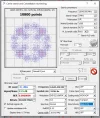
the channel I was trying to analyze may not be T2-MI, the input stream displays multi 171, 172, 173
not like single in your case.
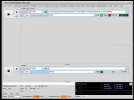
then also am unable to analyze the TS file I created, my 4T2 content analyzer doesn't get synched, what could be the problem
could you kindly attach your executable files as well?
you have TSReader 2.8.55 and crazyscan 1.0.2.171( I have that)
I don't know about your version of the 4T2 content analyzer
Thanks for your fast reply as always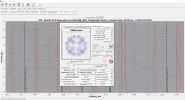
I am giving your tutorial a shot
the channel I was trying to analyze may not be T2-MI, the input stream displays multi 171, 172, 173
not like single in your case.
then also am unable to analyze the TS file I created, my 4T2 content analyzer doesn't get synched, what could be the problem
could you kindly attach your executable files as well?
you have TSReader 2.8.55 and crazyscan 1.0.2.171( I have that)
I don't know about your version of the 4T2 content analyzer
Thanks for your fast reply as always
satesco
Specialist Contributor
- My Satellite Setup
- seven antennas,one toroidal with 16 lnbs,
6 satellite receivers,2 Meters,9 PC cards(tbs6983,6903,6590,6504,6522,6209,2603,6909X,6903X,6902se,skystar hd2),2 tuners usb-tbs5927, TBS5927SE USB & tbs5925,Skystar HD.
Satellite reception between 100.5E-50.0W
- My Location
- Romania
Unfortunately, I cannot receive the Africa beam on Astra 2F to check the TV packages of the operator K-Net Ghana. According to FlySat reports, the parameters of this transponder (qpsk2 and fec 5/6) are accessible with any dvb application.
It seems something is wrong with this transponder listed on FlySat. Because the parameters on 12645 V, 32702, are in ACM mode, RollOff is 0.10 and are for Data transmissions. RollOff of 0.10 tells me it's also with S2X extension.
But first, I would try what EnoSat recommended, to try using the TransEdit app to see what this transponder contains.
I use sw 0.10.2.3 for 4T2 Content Analyser. But I should add that this is irrelevant, because there is no difference between the 4T2 versions. And, although it doesn't matter when you use recorded files, I notice you have an unlicensed version of 4T2 Content. To view live streams, you must have the licensed version, as exemplified in my T2-MI tutorial.
And there is something else. If the recorded file has errors, the application often freezes and has to be restarted.
added: Maybe it would be good to record these streams and post it on a host site to see what it contains.
It seems something is wrong with this transponder listed on FlySat. Because the parameters on 12645 V, 32702, are in ACM mode, RollOff is 0.10 and are for Data transmissions. RollOff of 0.10 tells me it's also with S2X extension.
But first, I would try what EnoSat recommended, to try using the TransEdit app to see what this transponder contains.
I use sw 0.10.2.3 for 4T2 Content Analyser. But I should add that this is irrelevant, because there is no difference between the 4T2 versions. And, although it doesn't matter when you use recorded files, I notice you have an unlicensed version of 4T2 Content. To view live streams, you must have the licensed version, as exemplified in my T2-MI tutorial.
And there is something else. If the recorded file has errors, the application often freezes and has to be restarted.
added: Maybe it would be good to record these streams and post it on a host site to see what it contains.
Last edited:
satesco
Specialist Contributor
- My Satellite Setup
- seven antennas,one toroidal with 16 lnbs,
6 satellite receivers,2 Meters,9 PC cards(tbs6983,6903,6590,6504,6522,6209,2603,6909X,6903X,6902se,skystar hd2),2 tuners usb-tbs5927, TBS5927SE USB & tbs5925,Skystar HD.
Satellite reception between 100.5E-50.0W
- My Location
- Romania
A fellow forum member asked me in private how to extract a T2-MI file and what applications could do it.
Because I think the question is of general interest, I would publicly answer how to see such a stream directly and how to extract a t2-mi stream from a recorded file.
The only one I can mention now is that to view and extract a t2-mi stream, you need a dvb card, Crazyscan, TSReader, and 4T2 Content Analyser applications.
I hope the T2-MI video tutorial will be more helpful than if I explain in writing what to do with such streams.
Thanks to our good colleague, EnoSat, who posted my two tutorial videos on youtube (whom I thank on this occasion), I thought it would be better to view them on the forum with no additional operations.
I hope to be excused for the redundancy of my message.
evans
Member
- My Satellite Setup
- 1.8M solid pan motorized
strong srt 4669x
- My Location
- somanya,Ghana
Hello
anyone can also download and have a look
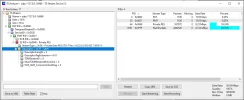
interestingly, after scanning with crazyScan and analyzing with transedit, I found something
I will try and pay for the 0.10.2.3 for 4T2 Content Analyser and see how it goes.
Thanks
Thanks so much, bud, I really appreciate all your efforts, I have a recorded TS file for your scrutinyUnfortunately, I cannot receive the Africa beam on Astra 2F to check the TV packages of the operator K-Net Ghana. According to FlySat reports, the parameters of this transponder (qpsk2 and fec 5/6) are accessible with any dvb application.
It seems something is wrong with this transponder listed on FlySat. Because the parameters on 12645 V, 32702, are in ACM mode, RollOff is 0.10 and are for Data transmissions. RollOff of 0.10 tells me it's also with S2X extension.
But first, I would try what EnoSat recommended, to try using the TransEdit app to see what this transponder contains.
I use sw 0.10.2.3 for 4T2 Content Analyser. But I should add that this is irrelevant, because there is no difference between the 4T2 versions. And, although it doesn't matter when you use recorded files, I notice you have an unlicensed version of 4T2 Content. To view live streams, you must have the licensed version, as exemplified in my T2-MI tutorial.
And there is something else. If the recorded file has errors, the application often freezes and has to be restarted.
added: Maybe it would be good to record these streams and post it on a host site to see what it contains.
anyone can also download and have a look
interestingly, after scanning with crazyScan and analyzing with transedit, I found something
I will try and pay for the 0.10.2.3 for 4T2 Content Analyser and see how it goes.
Thanks
satesco
Specialist Contributor
- My Satellite Setup
- seven antennas,one toroidal with 16 lnbs,
6 satellite receivers,2 Meters,9 PC cards(tbs6983,6903,6590,6504,6522,6209,2603,6909X,6903X,6902se,skystar hd2),2 tuners usb-tbs5927, TBS5927SE USB & tbs5925,Skystar HD.
Satellite reception between 100.5E-50.0W
- My Location
- Romania
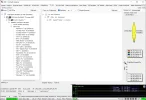
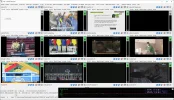
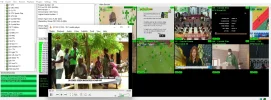
I have good news:12645 V is T2-MI and uses PLP 0 and can watch with 4T2 Content Analyser but also with TSReader!
Attachments
evans
Member
- My Satellite Setup
- 1.8M solid pan motorized
strong srt 4669x
- My Location
- somanya,Ghana
I see where the problem is with TSReader
under settings >> special TS modes, there is no option like QPSK-R Mode/T2-MI- Mode like you have in your video
so am unable to watch the stream with TSReader
I have 2.8.53a, but you have 2.8.56. Could that be the problem?
under settings >> special TS modes, there is no option like QPSK-R Mode/T2-MI- Mode like you have in your video
so am unable to watch the stream with TSReader
I have 2.8.53a, but you have 2.8.56. Could that be the problem?
suedschwede
Member
- My Satellite Setup
- 2.7m Laminas+Polarmount+JPC-Posi+SF8008
- My Location
- DE
@ evans
please check this, copy this line to satellites.xml by 28.2E
please check this, copy this line to satellites.xml by 28.2E
Code:
<transponder frequency="12645000" symbol_rate="32700000" polarization="1" fec_inner="4" system="1" modulation="4" t2mi_plp_id="0" t2mi_pid="64" />satesco
Specialist Contributor
- My Satellite Setup
- seven antennas,one toroidal with 16 lnbs,
6 satellite receivers,2 Meters,9 PC cards(tbs6983,6903,6590,6504,6522,6209,2603,6909X,6903X,6902se,skystar hd2),2 tuners usb-tbs5927, TBS5927SE USB & tbs5925,Skystar HD.
Satellite reception between 100.5E-50.0W
- My Location
- Romania
Although I have receivers with Enigma2, I don't use them much. That's why I don't know which image can process t2 stream. Even if I don't use receivers, if, say, the OpenATV image supports this type of stream, then besides parameters (12645 V, 327023/4, 16APSK), enter PID 64 and PLP 0. I don't know what OpenATV's menu is like for T2-MI. You need to see what and how.
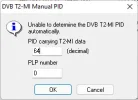
It's no problem if you don't have this function, because you can't see the live stream. That's all. Instead, you can view the file with TSReader by choosing from source, i.e. File. To do this, click Ctrl and TSreader. It opens right under Sources and from there chooses File. And then, enter pid and plp as in the image below.
It's no problem if you don't have this function, because you can't see the live stream. That's all. Instead, you can view the file with TSReader by choosing from source, i.e. File. To do this, click Ctrl and TSreader. It opens right under Sources and from there chooses File. And then, enter pid and plp as in the image below.