TBS 6925 PCi Card with hardware blind scan in DVB-S2 and DVB-S

Okay mate, not seeing what's so special about that, not being funny?
 
Would anyone please be able to help me to get the blind scan working in Crazy Scan with a TBS6925 card.

The card is installed and working OK and I can get CrazyScan to do a "Scan" OK but when I try to get Crazy Scan to do a "Blind Scan" I get a blind scan failed message.
Do I need to install another program or copy some more files to the root folder for Crazy Scan on my PC? I have copied streamreader.ini and streamreader.dll files to the CrazyScan root folder, plus I copied 8 x "requiredlibs" files to the Crazy Scan root folder.

Rgds

Check you streamreader.log file - it will probably have some error message in there. You could try a different version of streamreader as I found the latest one didn't work with my card at all.
 
Blindscan can also fail with small step sizes including 1MHz (at least on the Prof cards), if yours is set to that increase it to 2MHz and try again. It's not everytime on the Prof cards but very occasionally it will do this, I've found no pattern as to why.
 
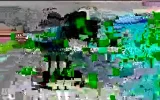
I have been getting a transponder from 45East.Broken picture.
Fox news.It is listed on flysat.
12524 V 30000 3/4 32 APSK.
TBS 6925 100cm Dish.
 

Attachments

  • Nameless 12524_1_0450 12524_V_30000_20140603_145652.webp
    Nameless 12524_1_0450 12524_V_30000_20140603_145652.webp
    85 KB · Views: 87
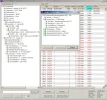
It'S ACM. The modulation is constantly changing and it's not a transport stream but a continuous stream. The content is also changing. The fragments you can see are from webstreaming services. You'll need a professional modem to get something useful. Here's screen shot from transedit. Transedit does recognize some TS fragment but in fact this is due to a bug like with your player ;) TSReader with a better sync algo doesn't show anything from these streams. The nominal bit rate is around 60Mbps (depending on the changing modulation). From this transedit leaks a couple of 100 kbps. That's why you can get some artefacts :D
 

Attachments

  • Snap197.webp
    Snap197.webp
    173.3 KB · Views: 110
Been reading about NS3 which in some circles is dubbed DVB-S3 and seeing the Skybox M3 is compatible with it.

From what I understand NS3 is an improvement on DVB-S2 you could say its DVB-S2.5, maybe someone here with more understanding could shed some light on it.

Cheers
 
A very interesting dialogue on the subject , can be read HERE
 
Yes that was one of things that came up for me on Google too, thanks for the link.
 
Hi,

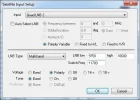
Would anyone please be able to assist with the LNB input settings for TSReader Standard ($99) version?

I have installed TSReader Standard, downloaded the BDA TBS6925.dll file, placed it in the sources folder and TSReader will capture and analyse a satellite signal. However, I am not sure if I have got the LNB input settings correct within TSReader, or, if I even need to set anything for the LNB.

It might be the case that the LNB is totally controlled by the TBS6925 card and that the card just passes over the satellite signal to TSReader without any LNB configuration required at all in TSReader? I do not use Diseqc as I have a 36v motor that moves the dish powered by an EchoStar AD3600IP. The LNB is an Invacom Quad band LNB

I have attached a screen capture of the settings I entered for my setup so would be grateful if anyone could review the settings and let me know if they are OK?


Rgds
 

Attachments

  • TSReader Input.webp
    TSReader Input.webp
    16.1 KB · Views: 81
I can't test with those settings using TSReader, as I now use a TBS5925, and the TSReader source file for the TBS5925 isn't recognised with my TSReader (2.7.45 version). It was OK with those settings when I had the TBS6925 on a WinXP OS, but when I changed to Win 7, it wouldn't tune any TP's on any satellites.

I now use Crazyscan for tuning, and then invoke TSReader from Crazyscan using TCP streaming.
 
Windows driver for TBS6925 is updated to version V1.0.1.23, which add eumesat VCM signal support,solved mass packets loss issue
 
Eumetsat's a weather data service, so there won't be not much there to look at with our equipment.
 
Hi,

I am trying to integrate EBS Pro with VLC so that the scans from my TBS6925 card can be viewed in a VLC Player window on my local PC.
In the EBS Pro options menu for player integration do I select the VLC (TCP) option in the Auto Config list or the VLC (UDP) option in the Auto Config list?

Also, is there a preferred version of VLC Player to use with EBS Pro, for example can I use a Windows 64 bit version of VLC or is a Windows 32 bit version of VLC more stable and are there any particular version releases that are know to be better?

I have installed the latest Windows 64 bit version of VLC and got it linked to EBS Pro using the VLC (TCP) option but every time I close VLC it gives an error message that it has stopped working, is this normal?

Rgds
 
Last edited:
Update:

I removed the Windows 64 bit version of VLC and installed the Windows 32 bit version of VLC to see if it resolved the error message when closing down.

It is all OK now, the EBS Pro linked to VLC is running like a bitch in heat, that Windows 64 bit version of VLC was the culprit, keep clear of it and use the 32 bit version.

Rgds
 
Harness races from Italy (Teleippica feed)

Intelsat 905 (24.5W) - 11532 Vertical 2100 16APSK 2/3 DVB-S2
 

Attachments

  • vlcsnap-2014-09-02-22h16m44s227.webp
    vlcsnap-2014-09-02-22h16m44s227.webp
    68.5 KB · Views: 39
Astra 3B (23.5E) - 11528 Horizontal 7200 16APSK 2/3 DVB-S2 MPEG-4
 

Attachments

  • vlcsnap-2014-09-04-20h02m44s233.webp
    vlcsnap-2014-09-04-20h02m44s233.webp
    95.7 KB · Views: 58
Astra 3B (23.5E) - 12603 Vertical 3600 16APSK 3/4 DVB-S2 4:2:2 MPEG-4
 

Attachments

  • vlcsnap-2014-09-05-18h14m02s85.webp
    vlcsnap-2014-09-05-18h14m02s85.webp
    54.9 KB · Views: 45
Back
Top