2 receivers to one TV set up

Dale Butler

New Member
My Satellite Setup
Humax Foxsat-HD
My Location
South Yorkshire
I have a single LNB going to a satellite receiver
I want to add another receiver
I know this wont work with a splitter because one would interfere with the other
I don't want to have to change the LNB and run another cable
I asked in Maplin if they had a switch instead of a splitter rather than pull out the cable and replace it each time and they couldn't help
Does such a switch exist? If so where could I buy one?
Thanks
 
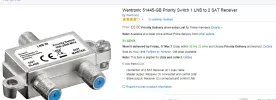
An alternative is a Smart Priority Switch (SPS) like this Wentronic one -
upload_2017-3-14_11-43-45.webp
Whichever receiver (provided that the other one is switched to Standby) is switched from Standby to On takes control of the LNB - no manual intervention required, and electrically better than those cheap manual switches which can also become unreliable over time. You connect the "most used" receiver to the "OUT MASTER" socket and the "least used" one to the "OUT SLAVE" socket

I have several of them to allow me to use either the receivers in our office/bedroom or those in the living room as and when required, and they work very well.
 
If your receiver is a clever one with an active loopthrough you can use it by 'daisy-chaining', one receiver powers on, whilst the other is off. Whichever one is providing the channel also controls the LNB and /or the dish motor
 
Does any of the two receivers have a LNB loop through?
You can connect the LNB cable to the one having the loop through and the loop through output to the second receiver.
The HDMI outputs go to two HDMI inputs on your TV, assuming you have more than one.
But you must have only one receiver on.

Edit: I am not as fast as CH.
 
An alternative is a Smart Priority Switch (SPS) like this Wentronic one -

Whichever receiver (provided that the other one is switched to Standby) is switched from Standby to On takes control of the LNB

However some receivers do supply LNB-power while in stand-by. (Don't SKYboxes do that also?)

In that case that receiver needs to be cut-off from power completely, or should be connected to the slave-port, if the other receiver is to have control.

greetz,
A33
 
If your receiver is a clever one with an active loopthrough you can use it by 'daisy-chaining', one receiver powers on, whilst the other is off. Whichever one is providing the channel also controls the LNB and /or the dish motor
@ the OP
Very cheap (just a length of coax & 2x F-plugs) but obviously does require at least one of the receivers to have a 2nd "loop-through" F-connector socket.
 
Does any of the two receivers have a LNB loop through?
You can connect the LNB cable to the one having the loop through and the loop through output to the second receiver.
The HDMI outputs go to two HDMI inputs on your TV, assuming you have more than one.
But you must have only one receiver on.

Edit: I am not as fast as CH.
Is this what you mean?a__--9822-foxsathdrrear.webp
 
I am currently running 2 motorised system with 6 receivers using 2 x A/B switches + a loop through for receivers 5 & 6.
 
+1 for these.

I have a few and they are very robust and very effective. Even the wife can drive them!
I'm not so sure about this. The description says "For switching manually between 2 LNBs (A & B) and a single receiver "
What I need is a single LNB switching manually between 2 receivers
Or am I wrong?
 
I'm not so sure about this. The description says "For switching manually between 2 LNBs (A & :cool: and a single receiver "
What I need is a single LNB switching manually between 2 receivers
Or am I wrong?
A manual A/B switch can be used ..either for switching the lnb source between 2 receivers ..OR ..the reverse ..
switching 2 lnbs between one receiver input
 
+1 for these.

I have a few and they are very robust and very effective. Even the wife can drive them!
With SPS, wives would not even need to drive - they are virtually "invisible" to users (unless you forget to switch off the receiver connected to the Master socket when you want to use the one connected to the Slave socket).

PS: and you don't have to get out of your armchair to do it - just use the receiver remote controls.

PPS to the OP - what is the second receiver that you want to use?
 
Last edited:
I'm not so sure about this. The description says "For switching manually between 2 LNBs (A & :cool: and a single receiver "
What I need is a single LNB switching manually between 2 receivers
Or am I wrong?


I refer the Honourable Gentleman to @Vipersan's reply ... reversible!

Great solution ..... Bulletproof.

And no need to worry about remembering to power up only one box.
 
Back
Top