Top Tip T2-MI reception on E2 STB with SDG image - A complete step by step guide

Why haven't you tried 4T2 Content Analyser? No license is required for recorded files, as I have shown in the tutorial.
But the most convenient for you is to use the AltDVB v2.4 player. It can scan T2-MI transponders with no problems.
I attach a video clip of this player at 54.0E, where there are some t2-mi transponders. Instead of pid 4069, you use pid 64 and plp 0 for 12645 V.

Can't watch video it says "This Video Is Peivate".
 

Attachments

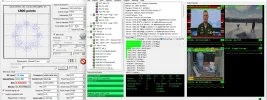
  • capture_002_19022022_124632.webp
    capture_002_19022022_124632.webp
    67.7 KB · Views: 43
Would the solution described in this thread work also with other images (for example openpli) on receivers with multi-stream satellite tuners (for instance vu duo 4k) ?
 
T2MI is an encapsulation, not a DVB standard, so any DVB-S2 tuner can do streaming. OpenPLI, SDG (at the time of the article it was the only one patched) and OpenATV can be used for this tutorial with no problem.
Certain receivers have implemented this solution into their tuner drivers, so they scan T2MI directly (SF8008, Osmio etc).
 
T2-MI on SatDreamGr images detailed guide/tutorial

1. Introduction

T2-MI is a special transmission method where a whole DVB-T2 stream is capped inside a data pid of a satellite transponder that is used to feed a terrestrial DVB-T2 transmitter. Until now, only some selected software was able to decapsulate these streams, notably for PC.

The SatDreamGr team made possible to implement this decapsulation to its supported Enigma2 receivers. So far this is done via the astra-sm project which works parallel to Enigma2 as a process, with the difference that it can now be done completely by the receiver without the need of an external device like a PC. The channels are being decapsulated internally as a stream favourites bouquet and can be viewed as regular channels with everything that there is inside the transponder stream such as EPG, teletext, audio streams etc.

The philosophy includes the data channel, which can be tuned with the receiver’s tuner (unless it’s also a multistream transmission, which requires a USB tuner like TBS) and acts as a feed for the T2-MI stream. This stream becomes an input for the astra-sm process, and with the help of a special script and a configuration file can be output as a stream package via internal stream relay. Note that this is the same way Powervu works for E2 STBs that don’t support direct emulation. The stream relay can then be stripped to separate channels that will compile a favourites bouquet which will work as a regular ready-to-view channel bouquet in the E2 receiver.

In this tutorial, I will show a complete step-by-step guide that will help you tune to these T2-MI streams and configure them to use on your E2 STB using the SatDreamGr image.


2. What you will need

a) your E2 STB :)

b) the SatDreamGr experimental image which can be downloaded here

c) Dreamboxedit on your PC for editing the streams and bouquets as required

d) a UNIX editor (like Notepad++ or UltraEdit).

e) an FTP client to connect to your STB (like Filezilla or FlashFXP)

f) a telnet client for certain commands (like Putty)


3. Getting the feed channel

Every Enigma2 receiver when it gets tuned to a T2-MI transponder will not download the channels directly (although this automation has to be implemented in the near future). Instead the tuner will lock and download a data channel. In the following example we used a T2-MI transponder on the C band of Express AM7 satellite on 40E.

In this image you can see that this frequency (3685L) is tuned normally with the internal tuner.
screenshot1.jpg


Now, scanning the frequency downloads the data service (it might take a while).
screenshot_(1).jpg


This data channel will act as our feed, as it contains the T2-MI stream. In 99% of these transmissions, this stream is contained in pid 4096. In order for the E2 STB to have it directly visible to the user in their channel list, it must be edited in the lamedb. There are two options; either direct lamedb editing (hard way) or editing via Dreamboxedit (easier).

With Dreamboxedit, the data service will be edited to look as a “fake” TV service (visible in the list). The pid 4096 has to be added manually too, as a cached pid.

After downloading the data service, FTP the channels to Dreamboxedit on your PC and locate the data service you just downloaded.

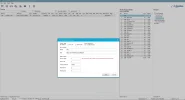
Click on the service and you will see a screen like this one:
Screenshot_2016_11_12_14_19_51.png

Now change these parameters:

Name: input a descriptive name for the fake service. This is important as it will affect the configuration later on. In this example I give the name 3685L T2-MI.

Service Type: 1 (TV)

Check the K (Keep). This is also very important, so that the service will not be reverted to data on a future satellite scanning.

Extra parameters: add c:151000, where 15 is the cached index and 1000 is the hex value for 4096. This will cache this pid in the lamedb, and will provide all T2-MI data.

Click Save.

After this editing, the data service reference will change to 1:0:1:320:32A:0:1910E65:0:0:0:

Keep this service ref in mind, as it will be used in the configuration too.

After editing you can send the entries back to your STB. Make sure to completely reboot the STB after sending, and not just reload the commands, in order for lamedb changes to stick.

Now we are ready for Part 2 of this guide.

Goodday bud,
This thread is gradually becoming a one-stop thread for T2MI, DVB for PC, TS downloading, and analyzing.
Am I commend the starters and contributors
The first page, which is one of the essential pages, has lost the links for pictures
I will humbly ask the admins or @MCelliotG to kindly fix it because it's a critical sticky thread for those who cannot directly scan T2MI with their E2 tuners
cheers!
 
The thread is 6 years old. I could never find those pictures even if I tried. But the instructions are all the same.
 
@MCelliotG : Thanks for the excellent T2-MI tutorial. One question : where is the value 8001 for the relay/stream port configured (in which receiver menu, if any) and how can this value be changed? Or is this value always 8001 for all enigma 2 images?
 
Hello friends,
I have tried to set up T2MI on Zero 4K without success.

Extra parameters: c:1540 >> converting 64 to hex =40


before adding parameters SR = 1:0:64:320:3A2:0:11AB164:0:0:0

After adding parameters SR = 1:0:1:320:3A2:0:11AB164:0:0:0


astra --analyze "t2mi://#t2mi_pid=64&t2mi_input=http://127.0.0.1:8001/1:0:1:320:3A2:0:11AB164:0:0:0:"


/etc/astra/astra.conf


Code:
root@vuzero4k:~# astra --analyze "t2mi://#t2mi_pid=64&t2mi_input=http://127.0.0.1:8001/1:0:1:320:3A2:0:11AB164:0:0:0:"
Feb 20 01:25:52: INFO: Starting Astra SM 0.2
Feb 20 01:25:53: INFO: Bitrate: 0 Kbit/s
Feb 20 01:25:53: INFO: [t2mi/analyze] L1-current: PLP 0 (Data Type 1), group 0 (*)
Feb 20 01:25:53: INFO: [t2mi/analyze] selected data PLP 0 (auto)
Feb 20 01:25:53: INFO: PAT: tsid: 8480
Feb 20 01:25:53: INFO: PAT: pid: 16 NIT
Feb 20 01:25:53: INFO: PAT: pid: 1011 PMT pnr: 1
Feb 20 01:25:53: INFO: PAT: pid: 1021 PMT pnr: 2
Feb 20 01:25:53: INFO: PAT: pid: 1031 PMT pnr: 3
Feb 20 01:25:53: INFO: PAT: pid: 1041 PMT pnr: 4
Feb 20 01:25:53: INFO: PAT: pid: 1051 PMT pnr: 5
Feb 20 01:25:53: INFO: PAT: pid: 1071 PMT pnr: 7
Feb 20 01:25:53: INFO: PAT: pid: 1081 PMT pnr: 8
Feb 20 01:25:53: INFO: PAT: pid: 1091 PMT pnr: 9
Feb 20 01:25:53: INFO: PAT: pid: 1101 PMT pnr: 10

Code:
Feb 20 01:25:54: ERROR: CC: PID:0=2 PID:1=2 PID:17=1 PID:18=2 PID:1011=2 PID:1012=2 PID:1013=1 PID:1021=1 PID:1022=1 PID:1023=1 PID:1031=2 PID:1032=2 PID:1033=2 PID:1041=2 PID:1042=2 PID:1043=1 PID:1051=2 PID:1052=2 PID:1053=2 PID:1071=2 PID:1072=2 PID:1073=1 PID:1081=2 PID:1082=2 PID:1083=1 PID:1091=2 PID:1092=2 PID:1093=1 PID:1101=1 PID:1102=1 PID:1103=1 PID:1111=2 PID:1112=2 PID:1113=2 PID:1121=2 PID:1122=2 PID:1123=1 PID:1131=2 PID:1132=2 PID:1133=1 PID:1141=2 PID:1142=2 PID:1143=1 PID:1151=2 PID:1160=
Feb 20 01:25:55: INFO: SDT: tsid: 8480
Feb 20 01:25:55: INFO: SDT: sid: 1
Feb 20 01:25:55: INFO: SDT:    Service: GTV
Feb 20 01:25:55: INFO: SDT:    Provider: GoG DTT
Feb 20 01:25:55: INFO: SDT: sid: 2
Feb 20 01:25:55: INFO: SDT:    Service: GBC News
Feb 20 01:25:55: INFO: SDT:    Provider: GoG DTT
Feb 20 01:25:55: INFO: SDT: sid: 3
Feb 20 01:25:55: INFO: SDT:    Service: GL-TV
Feb 20 01:25:55: INFO: SDT:    Provider: GoG DTT
Feb 20 01:25:55: INFO: SDT: sid: 4
Feb 20 01:25:55: INFO: SDT:    Service: GTV Sports Plus
Feb 20 01:25:55: INFO: SDT:    Provider: GoG DTT
Feb 20 01:25:55: INFO: SDT: sid: 5
Feb 20 01:25:55: INFO: SDT:    Service: GTV Life
Feb 20 01:25:55: INFO: SDT:    Provider: GoG DTT
Feb 20 01:25:55: INFO: SDT: sid: 7
Feb 20 01:25:55: INFO: SDT:    Service: Crystal Prime
Feb 20 01:25:55: INFO: SDT:    Provider: GoG DTT
Feb 20 01:25:55: INFO: SDT: sid: 8
Feb 20 01:25:55: INFO: SDT:    Service: Crystal Xtra
Feb 20 01:25:55: INFO: SDT:    Provider: GoG DTT
Feb 20 01:25:55: INFO: SDT: sid: 9
Feb 20 01:25:55: INFO: SDT:    Service: Crystal Plus
Feb 20 01:25:55: INFO: SDT:    Provider: GoG DTT
Feb 20 01:25:55: INFO: SDT: sid: 10
Feb 20 01:25:55: INFO: SDT:    Service: TV Africa
Feb 20 01:25:55: INFO: SDT:    Provider: GoG DTT
Feb 20 01:25:55: INFO: SDT: sid: 11
Feb 20 01:25:55: INFO: SDT:    Service: TV3
Feb 20 01:25:55: INFO: SDT:    Provider: GoG DTT
Feb 20 01:25:55: INFO: SDT: sid: 12
Feb 20 01:25:55: INFO: SDT:    Service: Metro TV
Feb 20 01:25:55: INFO: SDT:    Provider: GoG DTT
Feb 20 01:25:55: INFO: SDT: sid: 13
Feb 20 01:25:55: INFO: SDT:    Service: Net2
Feb 20 01:25:55: INFO: SDT:    Provider: GoG DTT
Feb 20 01:25:55: INFO: SDT: sid: 14
Feb 20 01:25:55: INFO: SDT:    Service: ETV
Feb 20 01:25:55: INFO: SDT:    Provider: GoG DTT
Feb 20 01:25:55: INFO: SDT: sid: 15
Feb 20 01:25:55: INFO: SDT:    Service: KFS
Feb 20 01:25:55: INFO: SDT:    Provider: GoG DTT
Feb 20 01:25:55: INFO: SDT: sid: 16
Feb 20 01:25:55: INFO: SDT:    Service: New TV
Feb 20 01:25:55: INFO: SDT:    Provider: GoG DTT
Feb 20 01:25:55: INFO: SDT: sid: 20
Feb 20 01:25:55: INFO: SDT:    Service: Kantanka TV
Feb 20 01:25:55: INFO: SDT:    Provider: GoG DTT
Feb 20 01:25:55: INFO: SDT: sid: 21
Feb 20 01:25:55: INFO: SDT:    Service: CTV
Feb 20 01:25:55: INFO: SDT:    Provider: GoG DTT
Feb 20 01:25:55: INFO: SDT: sid: 23
Feb 20 01:25:55: INFO: SDT:    Service: Light TV
Feb 20 01:25:55: INFO: SDT:    Provider: GoG DTT
Feb 20 01:25:55: INFO: SDT: sid: 24
Feb 20 01:25:55: INFO: SDT:    Service: GH-One TV
Feb 20 01:25:55: INFO: SDT:    Provider: GoG DTT
Feb 20 01:25:55: INFO: SDT: sid: 25
Feb 20 01:25:55: INFO: SDT:    Service: Atinka TV
Feb 20 01:25:55: INFO: SDT:    Provider: GoG DTT
Feb 20 01:25:55: INFO: SDT: sid: 26
Feb 20 01:25:55: INFO: SDT:    Service: UTV
Feb 20 01:25:55: INFO: SDT:    Provider: GoG DTT
Feb 20 01:25:55: INFO: SDT: sid: 32
Feb 20 01:25:55: INFO: SDT:    Service: Soul TV
Feb 20 01:25:55: INFO: SDT:    Provider: GoG DTT
Feb 20 01:25:55: INFO: SDT: sid: 46
Feb 20 01:25:55: INFO: SDT:    Service: Wontumi TV
Feb 20 01:25:55: INFO: SDT:    Provider: GoG DTT
Feb 20 01:25:55: INFO: SDT: sid: 700
Feb 20 01:25:55: INFO: SDT:    Service: Uniq FM
Feb 20 01:25:55: INFO: SDT:    Provider: GoG DTT
Feb 20 01:25:55: INFO: SDT: crc32: 0xB6B97F03
Feb 20 01:25:55: INFO: Bitrate: 30303 Kbit/s
Feb 20 01:25:56: INFO: Bitrate: 28814 Kbit/s
Feb 20 01:25:57: INFO: Bitrate: 30342 Kbit/s

t2mi222.PNG


astra conf

-- Astra Slonik Mod

log.set({ stdout = false, debug = false, syslog = "astra", })
f12644gog0 = make_t2mi_decap({
name = "12644V T2-MI",
input = "http://127.0.0.1:8001/1:0:1:320:3A2:0:11AB164:0:0:0:",
plp = 0,
pnr = 0,
pid = 64,
})
make_channel({
name = "12644plp0", input = { "t2mi://f12644gog0", },
output = { "http://0.0.0.0:9999/gog/12644plp0", },
})

but still not working....what could be wrong

BR
 
working now >>> changing extra parameters to this c:150040 solved the problem
 
next T2-MI start test on 14W - 11633V and 11650V, actual now only 11647V
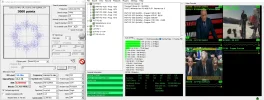
capture_001_26022022_132100.webp
 
next T2-MI start test on 14W - 11633V and 11650V, actual now only 11647V
...
Two more T2-Mi transponders activated:
11544 V,14181,3/4,8PSK,PLP 0-RTRS,
11563 V,14585,3/4,8PSK,PLP 0-RTRS,
11646 V,14182,3/4,8PSK,PLP 0-RTRS.
 

Attachments

  • 11544 V,14181,34,8psk-PLP 0_2022-02-26_22-17-16.webp
    11544 V,14181,34,8psk-PLP 0_2022-02-26_22-17-16.webp
    212.7 KB · Views: 36
  • 11563 V,14585,34,8psk-PLP 0_2022-02-26_21-29-10.webp
    11563 V,14585,34,8psk-PLP 0_2022-02-26_21-29-10.webp
    230.5 KB · Views: 27
  • 11646 H,14181,34,8psk-PLP 0__2022-02-26_20-58-10.webp
    11646 H,14181,34,8psk-PLP 0__2022-02-26_20-58-10.webp
    169.3 KB · Views: 20
4096 for the TV channels, there are three radios on 64. Both PLPs are 0.
 
Yamal 402 @ 54.9E

12615 V,5119,3/4,8PSK,T2-MI PLP 1-Rossia 1,Rossiya-24,ORT(new),
12622 V,5119,3/4,8PSK-T2-MI Rostov(Rossiya-1,Rossiya-24,ORT),new
 

Attachments

  • 12615 V,5119,34,8psk,plp-1_2022-02-24_23-12-12.webp
    12615 V,5119,34,8psk,plp-1_2022-02-24_23-12-12.webp
    189.3 KB · Views: 32
  • 12622 V.5119,34,8psk-T2-MI Rostov_2022-02-24_23-15-44.webp
    12622 V.5119,34,8psk-T2-MI Rostov_2022-02-24_23-15-44.webp
    175.6 KB · Views: 22
  • 12615 V_2022-02-25_00-04-14.webp
    12615 V_2022-02-25_00-04-14.webp
    148.8 KB · Views: 24
I am trying for the first time the tutorial for t2-mi, for 11647 V, 14 W. I edited the astra.conf file, but the "astra --analyze "t2mi://...." command does not find anything (continously writing Bitrate : 0 Kbit/s). Is there a minimal signal strength required to get the streaming working?
Do I have to add the t2_mi pid also in the satellites.xml file, before scanning the channel? I scanned the frequency without it and it found a "dummy" channel, which I edited with dreamboxedit as described in the tutorial.
 
One more question: does anyone got the t2-mi stream 125 on 9E, 12380 V running with the tutorial? I got the channel list with astra analyze, then I added the channels with the sids in a bouquet with the help of dreamboxedit, but nothing happens.
 
I'll give them a try myself next weekend...
 
Back
Top